
Opt Out Guides
Truecaller Opt Out Guide
Privacy Writer
A. J. MercerAva J. Mercer
Updated
Read
5 min
Truecaller can expose your name, address, and phone, reducing personal data security. The site typically shows caller ID details sourced from public and commercial feeds and user contributions. In this walkthrough, you’ll get quick steps, screenshots, official links, and timelines to act quickly. We cover how to find your entry, confirm the change, and what to do if unwanted tags persist. This is simple, practical, and security-focused.
How to opt out of Truecaller
Visit the official website opt-out page. Submit your email and phone. Verify via code or link, then confirm. The change may take up to 24 hours to show everywhere.
Checklist:
- Open the official opt-out form
- Enter identifiers (phone/email)
- Complete CAPTCHA/verification
- Confirm via code/link
- Save the confirmation email
- Set a reminder to re-opt-out
Find out if your private details were exposed

2,865,794 have already used our service
Truecaller – Quick Facts
| Parameter | Value |
| Domain | truecaller.com |
| Data Types | contacts, addresses, possible social identifiers, and reported unwanted tags |
| Opt-out Methods | web form (privacy portal) |
| Identity Verification | code via email/SMS or confirmation email |
| Typical Response Time | 1–3 days |
| Re-listing Risk | medium |
About Truecaller
Truecaller is a caller ID service that aggregates contact information from public sources, commercial partners, and active user submissions. It lets people find a name for a number and submit a request to hide a listing.
Common data you may find:
- Names and known aliases
- Phone numbers and tags
- Email addresses (if available)
- Current and past addresses
- Country and city details
- Age range or year of birth (if available)
- Social or professional profile links (if available)
- Reported spam labels and comments
- Related numbers or duplicates
- True caller ID metadata
Step-by-Step Guide
Open the official opt-out form
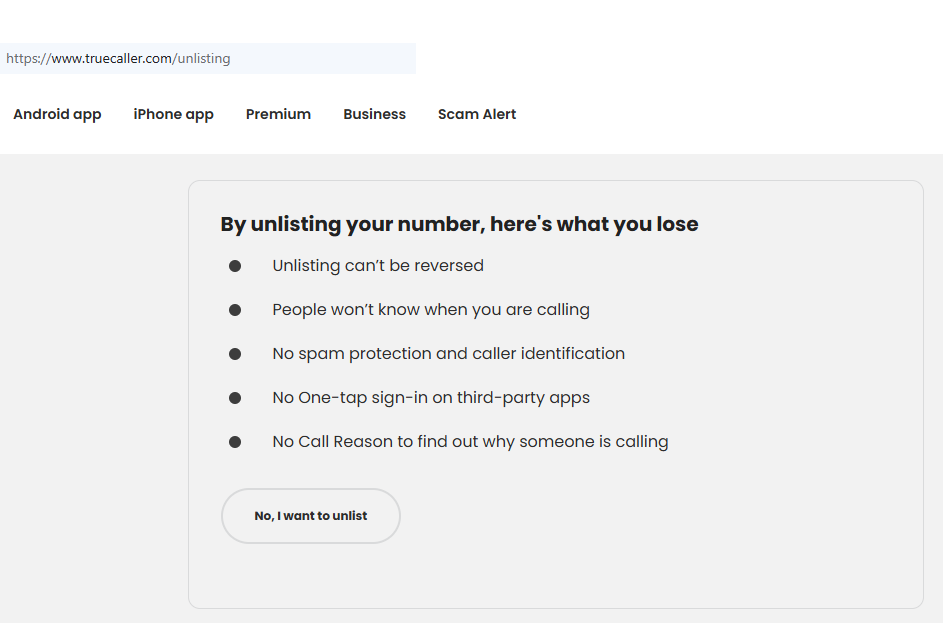
On the Truecaller website, open the unlisting page. Select your country, then confirm you’re on the official domain. Keep your phone ready. Avoid third-party pages to protect your information. Tip: Before proceeding, bookmark the page so you can return if the session expires.
Submit your identifiers (email/phone + CAPTCHA)
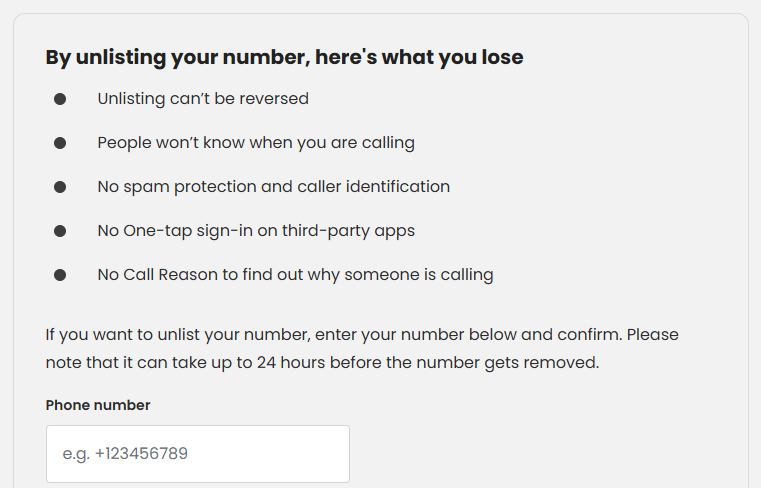
Enter your phone in international format. Complete the CAPTCHA to prevent automated spam. Double-check digits to avoid delays. Tip: If formatting fails, try E.164 (+code) to help the system find your record.
Verify via code or link (email/SMS)
Truecaller sends a verification code or link. Retrieve it and finish verification on the same page. If nothing arrives in a minute, check Spam and resend once. Tip: Keep the tab open to prevent a session timeout during the process.
Confirm deletion / Do-Not-Sell request
Review the summary and submit the request to hide your profile. If offered, choose options that stop future display. Tip: Capture a screenshot of the confirmation (blur sensitive fields) so you can reference it with support if needed.
Track confirmation & timeline
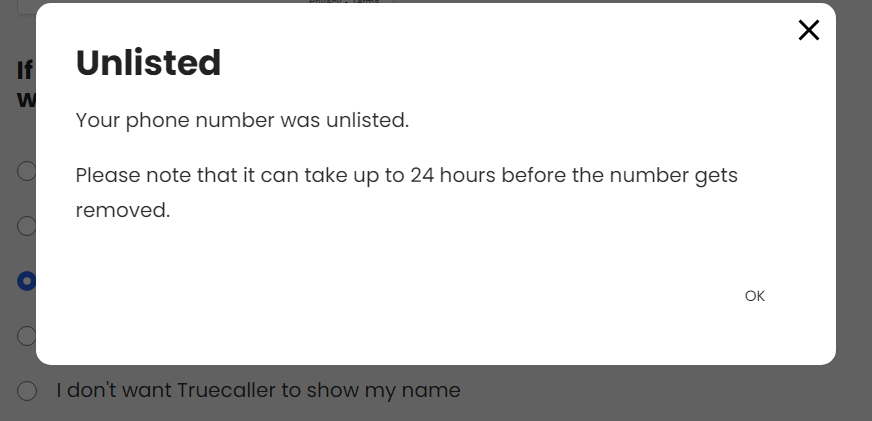
You’ll see an on-page status and a follow-up email. Changes can take 24 hours to propagate. Search again later to verify the number no longer appears. Tip: Set a calendar reminder to recheck and keep the email for any follow-up.
Timelines, Verification & What to Expect
Most updates appear within 1–3 days. You typically get an on-page notice right after submitting and a confirmation email shortly after. If nothing changes by day three, search the site again, then resubmit once with the same details and your screenshot. For stubborn cases, contact support and include your phone number, date, and any reference ID. This helps staff locate your case. One request per number is usually enough; if you corrected formatting, wait a short time before retrying.
Edge Cases & Troubleshooting
- No access to the original email/phone: verify with the channel you still control and state the loss.
- “Record not found”: try alternate formats and search the site for variants.
- CAPTCHA or submission errors: clear cache, switch browsers, or wait and retry.
- Verification code not arriving: check Spam, resend once, confirm international format.
- Region blocks (EU/UK/CA): pick the correct region; if blocked, contact support.
- Account deletion vs listing removal: deleting a Truecaller account affects in-app features; unlisting hides the public entry.
- Re-submitting: wait briefly, then send one clean query with consistent details.
Will my data reappear?
Listings can reappear as aggregators refresh, partner feeds sync, or new uploads add the same number. This is normal for directories. Reduce recurrence by keeping confirmations, searching the site every few months, and resubmitting quickly if your profile returns. Set a reminder every 3–6 months. Remember: the procedure does not prevent future third-party mentions. However, routine checks keep pages clear. If you change carriers or numbers, repeat the steps for each number.
Related removals
- Whitepages
- Spokeo
- BeenVerified
- Intelius
- AnyWho
- TruePeopleSearch
- Radaris
- FastPeopleSearch
Manual vs Assisted Removal
Manual:
- Pros: No cost, full control, you learn the steps for repeat monitoring.
- Cons: Requires your time, you must track confirmations.
Assisted:
- Pros: Faster execution, verification handled, tracking dashboard, recurring checks.
- Cons: Not free; ownership checks still apply; results depend on refresh cycles.
“Excellent”
We remove your data for you - faster, verified, trackable.
Discover Which Sites Share Your Private Details—Instantly and Free.
2,865,794 have already used our service
FAQ
Receive expert privacy advice by email - 1-2 times per month, no fluff.
Share Article

Posted by Ava J. Mercer
Ava J. Mercer is a privacy writer at ClearNym focused on data privacy, data broker exposure, and practical privacy tips. Her opt-out guides are built on manual verification: Ava re-tests broker opt-out processes on live sites, confirms requirements and confirmation outcomes, and updates guidance when something changes. She writes with a simple goal - help readers take the next right step to reduce unwanted exposure and feel more in control of their personal data.
76 Articles

