
Opt Out Guides
Sync.ME Opt Out Guide
Privacy Writer
A. J. MercerAva J. Mercer
Updated
Read
5 min
Sync.ME can expose your name, place of residence, and phone, which affects online privacy for any user of the app. It’s a platform that helps identify callers and may display information on Sync.ME from public records, a database, and information from data sources. Review a step-by-step guide with quick actions, one official link, and a timeline so you can remove your information and protect your digital ID. You’ll see an in-depth but simple overview, a short checklist, FAQs, and a note on why records might return. We also mention how to cancel an entry, what personal information removal is, and how to remove your personal data if needed. This guide helps manage users’ data with an extensive approach, using a simple tool to gather the necessary steps.
How to opt out of Sync.ME
Open the official opt-out form on the website, submit your email and phone number, then verify via code or email link. Processing usually finishes within 1–3 days. Keep confirmations and verify once after completion.
Checklist:
- Open the official opt-out page
- Enter identifiers (email/phone)
- Finish CAPTCHA/verification
- Confirm via code/link
- Save the confirmation email
- Set a reminder to re-opt-out
Find out if your private details were exposed

2,865,794 have already used our service
Sync.ME – Quick Facts
| Parameter | Value |
| Domain | sync.me |
| Data Types | contacts, addresses, phone/email, social identifiers |
| Opt-out Methods | web form |
| Identity Verification | code via email/SMS |
| Typical Response Time | 1–3 days |
| Re-listing Risk | medium |
Sync.ME is a caller ID service that aggregates publicly available information and user-contributed details to identify calls. It may collect and display contact fields and limited profile signals; some partners may also sell or share user data to improve caller labeling, which raises privacy concerns.
Common data you may search for:
- Names (and known aliases)
- Phone numbers
- Emails
- Current and past addresses
- Age range/year of birth (if available)
- Relatives/household information
- Social media profile references
- Caller category tags (e.g., marketing)
- Basic location (city/state)
Step-by-Step Guide
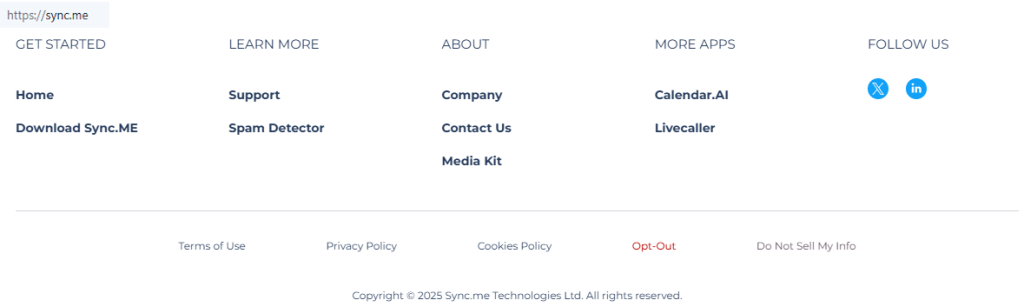
Open the official opt-out form
Go to the website’s opt-out area and confirm you’re on Sync.ME (secure HTTPS). Locate the opt-out table and review any brief notices. Use a private window if you prefer fewer cookies. Tip: Take notes of the time you start to track follow-up timing.
Submit your identifiers (email/phone + CAPTCHA)
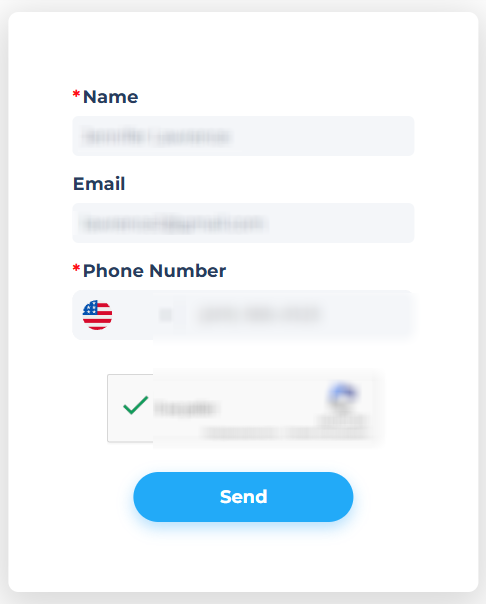
Enter your first and last name, email, and phone number. If a country selector appears, choose the correct code before typing the number. Verify that digits are correct and that formatting matches the prompt. Complete the CAPTCHA only once to avoid rate limits. Tip: Keep a local note with the exact number you used.
Verify via code or link (email/SMS)
After submission, the site may send a code by SMS or email. Open the message and enter the code carefully to ensure the correct verification. If nothing arrives after a few minutes, review Spam and ask for a single resend. Tip: Do not forward the code to others to protect identity.
Confirm deletion / Do-Not-Sell request
When verified, confirm the single request. You should see an on-screen acknowledgement. Save it as a PDF. Tip: Keep this with your emails so you can show proof of order to remove if re-listed.
Track confirmation & timeline
Watch for a confirmation email within 1–3 days. Then check your card once in a fresh browser session. If it persists beyond the window, use the site’s support channel and include your submission time and number. Tip: Keep one concise file of timestamps and screenshots for future reference.
Timelines, Verification & What to Expect
Most procedures finish in 1–3 days after verification. You’ll usually get an on-page notice and a single email. If nothing arrives, check Spam and ask for a resend. If the information is unchanged after three days, reach out via the site’s support route with your number and submission time, then wait one business day. If needed, submit again once with corrected formatting. This process helps you maintain control without over-submitting.
Edge Cases & Troubleshooting
- No access to the original email/phone: Use the site’s support route with proof you control the number now.
- “Record not found”: Try the number with and without the country code; try later.
- CAPTCHA/submission errors: Refresh or switch browsers; reduce autofill.
- Verification not arriving: Wait a few minutes, check Spam, ask for a resend.
- Regional limits (EU/UK/CA): Use the privacy option shown for your region.
- Account deletion vs listing removal: Subscription deletion is separate; finish the opt-out.
- Re-submitting after failure: Fix formatting and perform one clean submission.
Will my data reappear?
Reappearing happens when aggregators refresh feeds or partners update inputs. Sources may pull from public records and the broader internet, so entries can return after a change upstream. Reduce risk by setting a 3–6 month reminder, keeping confirmations, and re-submitting promptly if needed. Consider related removals at data brokers like Sync.ME and similar services to regain broader control of your online presence.
Related removals
- Spokeo
- Truecaller
- BeenVerified
- Whitepages
- PeopleFinders
- Radaris
- Intelius
- USPhoneBook.
Manual vs Assisted Removal
Manual:
- Pros: No cost; precise control; you learn the flow for future analyses.
- Cons: Time needed; ongoing monitoring; sites may alter steps.
Assisted:
- Pros: Faster batching; verification guidance; tracking dashboard; recurring scans.
- Cons: Paid; you still verify; coverage varies.
“Excellent”
We remove your data for you - faster, verified, trackable.
Discover Which Sites Share Your Private Details—Instantly and Free.
2,865,794 have already used our service
Frequently Asked Questions (FAQs)
Receive expert privacy advice by email - 1-2 times per month, no fluff.
Share Article

Posted by Ava J. Mercer
Ava J. Mercer is a privacy writer at ClearNym focused on data privacy, data broker exposure, and practical privacy tips. Her opt-out guides are built on manual verification: Ava re-tests broker opt-out processes on live sites, confirms requirements and confirmation outcomes, and updates guidance when something changes. She writes with a simple goal - help readers take the next right step to reduce unwanted exposure and feel more in control of their personal data.
76 Articles

