
Opt Out Guides
Statara Opt Out Guide
Privacy Writer
A. J. MercerAva J. Mercer
Updated
Read
5 min
Removing your personal information from Statara lowers the exposure of your name, address, and phone number that can appear online and helps protect your privacy as an individual. Statara Solutions is a data broker and marketing company that gathers information from various sources, often commercial. This opt-out guide gives quick steps, screenshots, official links, and a simple timeline. You’ll see where to submit a request and how to confirm it, plus additional tips to keep your personal information off the website. We stay neutral and practical – no legal guarantees, just clear directions to remove key records and limit selling where available.
How to opt out of Statara
Visit the official privacy choices page, open the opt-out form, and submit a request with your email. If prompted, verify via a code or link. Most submissions acknowledge receipt promptly; completion usually follows after verification checks within a standard window.
Checklist
- Open the official opt-out page
- Enter identifiers (email/phone/address)
- Complete CAPTCHA/verification
- Confirm via code/link
- Save the confirmation email
- Set a reminder to re-opt-out
Find out if your private details were exposed

2,865,794 have already used our service
Statara – Quick Facts
| Parameter | Value |
| Domain | statara.com |
| Data Types | contacts, addresses, possible social identifiers, marketing attributes |
| Opt-out Methods | web form |
| Identity Verification | code or confirmation email/SMS |
| Typical Response Time | 10–30 days |
| Re-listing Risk | medium |
The service is a data broker that aggregates consumer information so organizations can reach audiences. This data generally comes from publicly available records and commercial sources, and the service offers a portal for privacy choices, including requests to delete.
Common data you may find:
- Names (and known aliases)
- Phone numbers
- Email addresses
- Current and past addresses
- Age range or year of birth (if available)
- Relatives or household links
- Property and real-estate references (where available)
- Social/profile links (if provided)
- Marketing segments or audience tags
- Opt preferences and contact history (if available)
Step-by-Step Guide
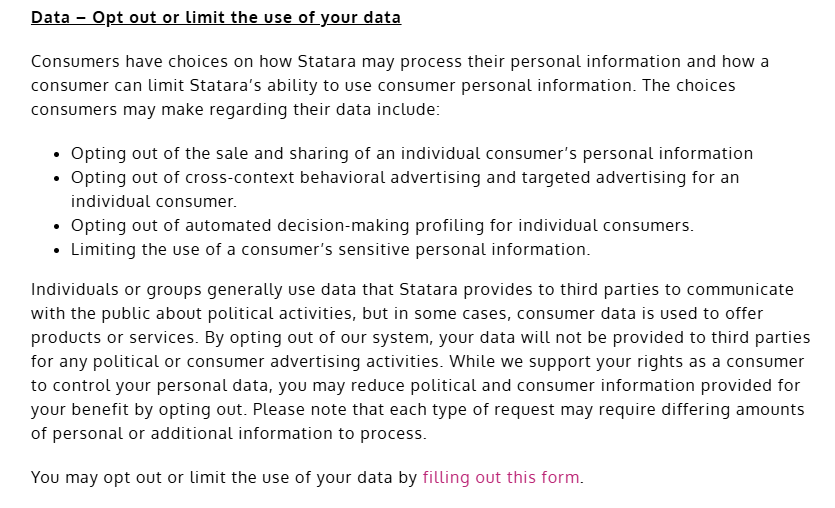
Open the official opt-out form
Go to the platform’s privacy page and find the consumer choices link in the footer or menu. Open the portal, choose delete or limit selling, and review the brief instructions. Choose the corresponding link. Avoid capturing sensitive info in screenshots; blur addresses or IDs. Tip: Keep your acknowledgment message for tracking later.

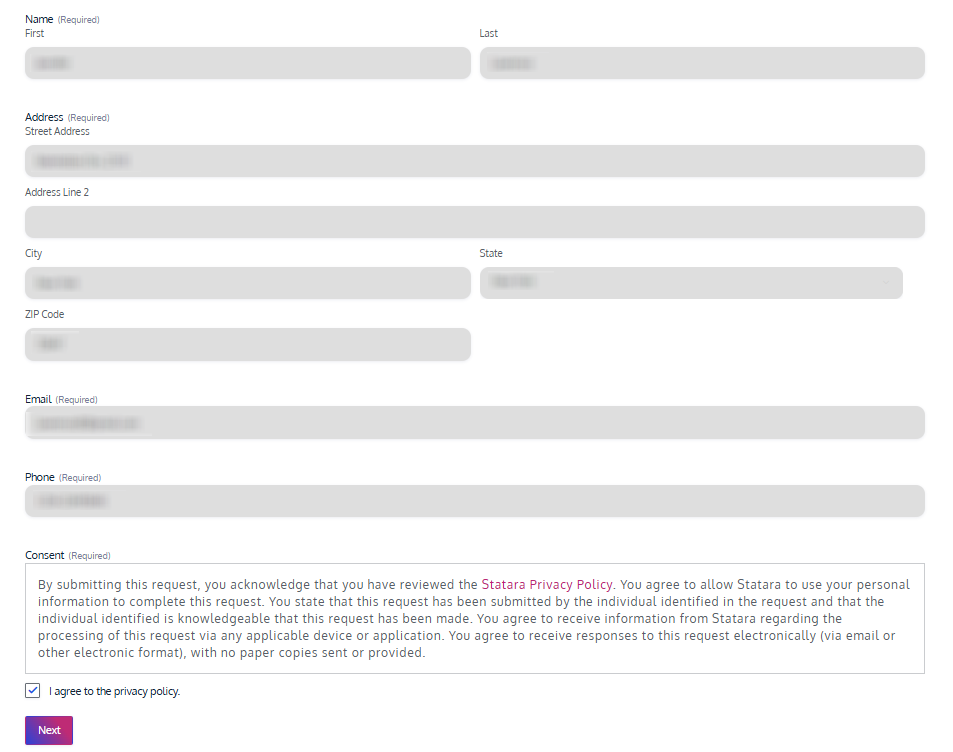
Submit your identifiers (email/phone/address + CAPTCHA)
Enter your email in the main field and complete the CAPTCHA. If the page asks for an additional identifier, supply only what’s necessary. Keep a simple note with the date of submission. Tip: Try another browser if the page stalls during the process.
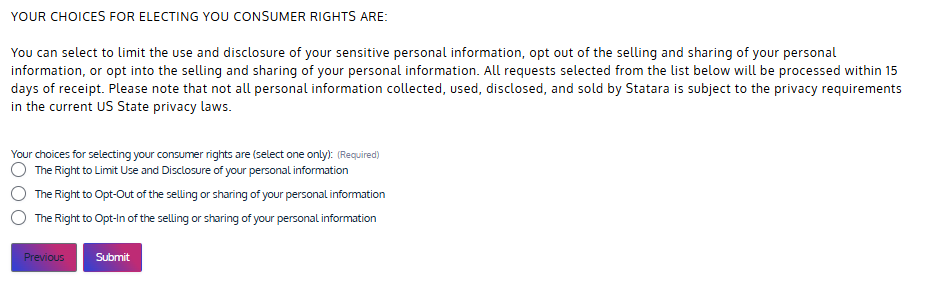
Confirm deletion / Do-Not-Sell request
Return to the portal and select the option to delete records or to limit selling. If you need corrections, choose those paths accordingly. Keep confirmations for your records. If you manage a minor’s information, you may submit on their behalf when the portal presents that route.
Track confirmation & timeline
Save the confirmation email and note the submission date. Most queries move forward after verification checks; timelines vary. Set a reminder to review results and resubmit if needed. Tip: Store any reference number in your password manager or secure notes.
Timelines, Verification & What to Expect
Expect an acknowledgment shortly after submitting, then a verification step. A practical window is 10–30 days for completion once identity is confirmed. Confirmation usually appears on the page and by email. If you do not see progress after about 30 days, reply to the acknowledgment or resubmit once with clearer matching facts. Keep copies of your messages and any portal receipts. If the portal provides a contact path, use it for a status check. Stay methodical: one follow-up, then a fresh submission if required.
Edge Cases & Troubleshooting
- No access to the original email/phone: Submit with a current address and explain the change; provide past address or other match points.
- “Record not found”: Try prior addresses or a middle initial; small variations can improve matching.
- CAPTCHA or submission errors: Refresh, clear cache, or switch browsers; try desktop if mobile fails.
- Verification code not arriving: Check Spam, wait briefly, then resend once.
- Region-limited application (EU/UK/CA): Use region options if shown, or the listed contact channel.
- Account deletion vs. public listing removal: Choose deletion or limit selling; cancellation of an account isn’t required for privacy choices.
- Re-submitting after a failed attempt: Wait a day, gather better matching facts, then submit again.
Will my data reappear?
Re-listing can happen because partner feeds and aggregators refresh imports. A downstream source may re-sync records, and a new crawl can rebuild a post or profile. To reduce recurrence, keep confirmations, set a reminder every 3–6 months, and re-submit quickly if you notice changes. Consider tackling related removals next to shrink back-feeds. This routine keeps expectations realistic and improves outcomes over time without absolute promises.
Related removals
- BeenVerified
- Spokeo
- Whitepages
- PeopleFinders
- Intelius
- TruthFinder
- US Search
- Radaris
Manual vs Assisted Removal
Manual:
- Pros: No cost; full control over steps; you learn the system for repeat monitoring.
- Cons: Time investment; recurring checks; results depend on matching quality.
Assisted:
- Pros: Faster execution; verification guidance; tracking dashboard; recurring checks across brokers.
- Cons: Not free; you still verify identity; scope is limited by each company.
“Excellent”
We remove your data for you - faster, verified, trackable.
Discover Which Sites Share Your Private Details—Instantly and Free.
2,865,794 have already used our service
FAQ
Receive expert privacy advice by email - 1-2 times per month, no fluff.
Share Article

Posted by Ava J. Mercer
Ava J. Mercer is a privacy writer at ClearNym focused on data privacy, data broker exposure, and practical privacy tips. Her opt-out guides are built on manual verification: Ava re-tests broker opt-out processes on live sites, confirms requirements and confirmation outcomes, and updates guidance when something changes. She writes with a simple goal - help readers take the next right step to reduce unwanted exposure and feel more in control of their personal data.
76 Articles

