
Opt Out Guides
Site Impact Opt Out Guide
Privacy Writer
A. J. MercerAva J. Mercer
Updated
Read
5 min

Removing your personal information helps reduce the risk of exposure of your name, address, and phone number. Site Impact is a company that provides data-driven email marketing services and may process details from public and commercial sources to deliver campaigns to the audience. This guide helps you suppress your information quickly, showing the official links, submission steps, and confirmation. You’ll find detailed instructions that include clear steps and verified methods designed to provide inbox placement, deliverability, and improved analytics. Following these best practices supports higher reach, security, and increased conversion rates while protecting your privacy.
How to opt out of Site Impact
Visit the official privacy or Your Privacy Choices page. Submit your details. Verify via code/link. The procedure usually completes within a few business days, and you’ll receive a confirmation email. Save the message and check again later.
Checklist:
- Open the official form
- Enter identifiers (name/email/phone)
- Complete CAPTCHA/verification
- Confirm via code/link
- Save the confirmation email
- Set a reminder to re-opt out
Find out if your private details were exposed

2,865,794 have already used our service
Site Impact – Quick Facts
| Parameter | Value |
| Domain | siteimpact.com |
| Data Types | Contacts, addresses, and campaign-related details |
| Opt-out Methods | Web form/email |
| Identity Verification | Code via email/SMS or confirmation email |
| Typical Response Time | 3–10 days |
| Re-listing Risk | Medium |
The website is a service provider that is well-recognized in its industry. The platform aggregates online consumer data to deliver email campaigns and measure performance. Information may come from public sources, partners, or commercial databases. The service supports validation and unsubscribe management to ensure compliance with the CAN-SPAM Act.
Common data you may find:
- Names and known aliases
- Email addresses
- Phone numbers
- Current and past addresses
- Relatives or household details
- Property or business details
- Social or professional profile details
- Campaign interaction data
- Customer validation details
- Marketing preferences
Step-by-Step Guide
Open the official opt-out form
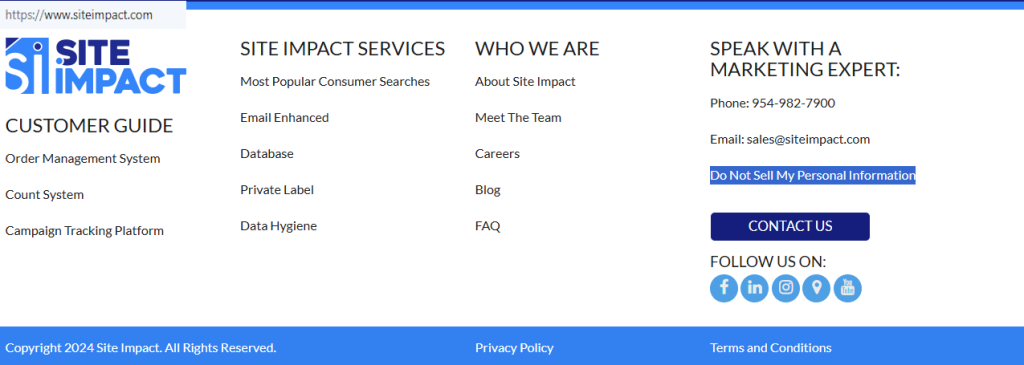
Go to the Your Privacy Choices or Privacy Policy page on the website and locate the “Do Not Sell” option close to the “Follow Us” heading. Check that you’re on the official domain before entering any data. Review the information on the page to ensure accuracy. Using the correct form is essential for security and customer verification.
Submit your identifiers (email/phone/address + CAPTCHA)
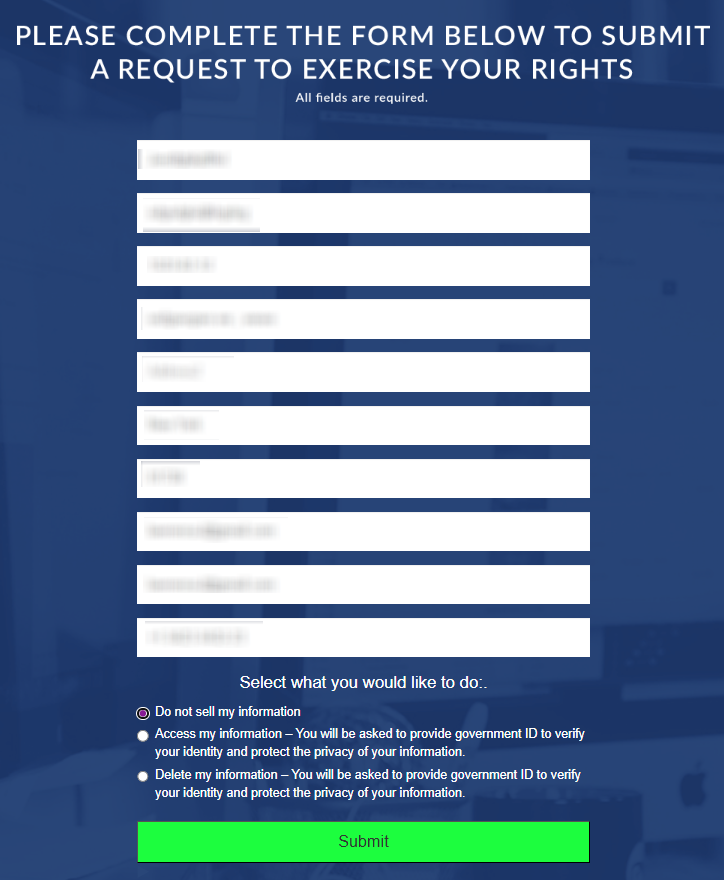
Enter all the required details. Complete the CAPTCHA to verify that you’re not a bot. Provide only the necessary details and review the form before submission. Save your confirmation for tracking.
Verify via code or link (email/SMS)
You’ll find a verification code by email or SMS. Follow the instructions in the message and complete verification promptly. If the message doesn’t arrive, check your Spam folder. Keep this confirmation as proof.
Confirm deletion / Do-Not-Sell request
Select whether you want to delete or suppress your details. Review all fields before final submission. The website ensures reliable removal while maintaining accurate lists to prevent future marketing sends to the same email.
Track confirmation & timeline
You’ll get an on-page message and a confirmation email. Most removals are completed in a few business days. Set a reminder to check your inbox for final confirmation. Keeping a copy helps ensure your data is no longer in active campaigns.
Timelines, Verification & What to Expect
Processing typically takes 3–10 days. You’ll find an on-page receipt followed by an email confirmation. If no message arrives within 10 days, address the privacy team or resubmit your query. Retain all confirmation details. Customers may still find pending deliveries for a short period. Re-check your inbox placement after completion to confirm that no marketing content is sent. This algorithm provides reliable data handling and provides clients with verified deliverability results.
Edge Cases & Troubleshooting
- No access to the original email/phone: Use the support email to verify identity manually.
- “Record not found”: Try a different email or alias; details can vary.
- CAPTCHA or submission errors: Refresh or change browsers and repeat the procedure.
- Verification code not arriving: Check Spam or Promotions folders.
- Form rejects by region: Use alternate route or privacy email for EU/UK/CA.
- Account deletion vs. listing removal: Removing details differs from canceling an account.
- Re-submitting after a failed attempt: Wait 24 hours and try again with consistent identifiers.
Will my data reappear?
Data can reappear if the partner feeds or external resellers re-import old records. To minimize this, set a 3–6 month reminder to repeat the opt-out procedure and confirm suppression. Keep every confirmation email as proof. Re-check public databases to ensure no new records appear. Following these best practices helps achieve deliverability, analytics, and protection. Regular reviews improve reach quality.
Related Removals
- Experian Health
- Lookify
- 411.com
- BeenVerified
- Spokeo
- Intelius
- PeopleFinders
- Whitepages
Manual vs Assisted Removal
Manual:
- Pros: Full control, no cost, manage your own information accuracy.
- Cons: Time investment, repeat monitoring, multiple submissions.
Assisted:
- Pros: Faster, verified assistance, tracking dashboard, and recurring checks.
- Cons: Fee-based and requires sharing some details.
“Excellent”
We remove your data for you - faster, verified, trackable.
Discover Which Sites Share Your Private Details—Instantly and Free.
2,865,794 have already used our service
FAQ
Receive expert privacy advice by email - 1-2 times per month, no fluff.
Share Article

Posted by Ava J. Mercer
Ava J. Mercer is a privacy writer at ClearNym focused on data privacy, data broker exposure, and practical privacy tips. Her opt-out guides are built on manual verification: Ava re-tests broker opt-out processes on live sites, confirms requirements and confirmation outcomes, and updates guidance when something changes. She writes with a simple goal - help readers take the next right step to reduce unwanted exposure and feel more in control of their personal data.
76 Articles

