
Opt Out Guides
Seamless AI Opt Out Guide
Privacy Writer
A. J. MercerAva J. Mercer
Updated
Read
5 min
Seamless AI can show business details that include your name, place of residence, and phone. As a data broker focused on B2B data, the website may display work identifiers sourced from public records and information from various commercial sources that are useful for any entrepreneur and CEO. This opt-out guide gives you a step-by-step guide with official resources and realistic timelines. You’ll learn where to search for the opt-out form, what to provide, and when to expect an update. We keep it simple and neutral so you can remove your information efficiently while maintaining ongoing data management.
How to opt out of Seamless
Visit the Do not Sell or Share My Information page, open the corresponding table, add your identifiers, then verify once. Most actions finish within several business days after you click confirm. Keep the confirmation letter for your record.
Checklist:
- Open the official opt-out page
- Enter identifiers (email/phone/name)
- Complete CAPTCHA/verification
- Confirm via code/link
- Save the confirmation letter
- Set a reminder to re-opt-out
Find out if your private details were exposed

2,865,794 have already used our service
Seamless AI – Quick Facts
| Parameter | Value |
| Domain | seamless.ai |
| Data Types | addresses, employment details, emails, and possible social/profile information |
| Opt-out Methods | web form/email |
| Identity Verification | code or confirmation letter |
| Typical Response Time | several business days |
| Re-listing Risk | medium |
The platform is a B2B data service that aggregates business information from public data and commercial sources. The company offers privacy options to review, delete, or suppress personal information through an online workflow.
Common data you may find:
- Names and known aliases
- Phone numbers
- Email addresses
- Current and past addresses (city, state, country)
- Job titles and employers
- Social/profile information (if available)
- Industry and role markers
- Company domain associations
- Profile URL visibility
- Last update date (if shown)
Seamless AI – Quick Facts Table
Step-by-Step Guide
Open the official opt-out form
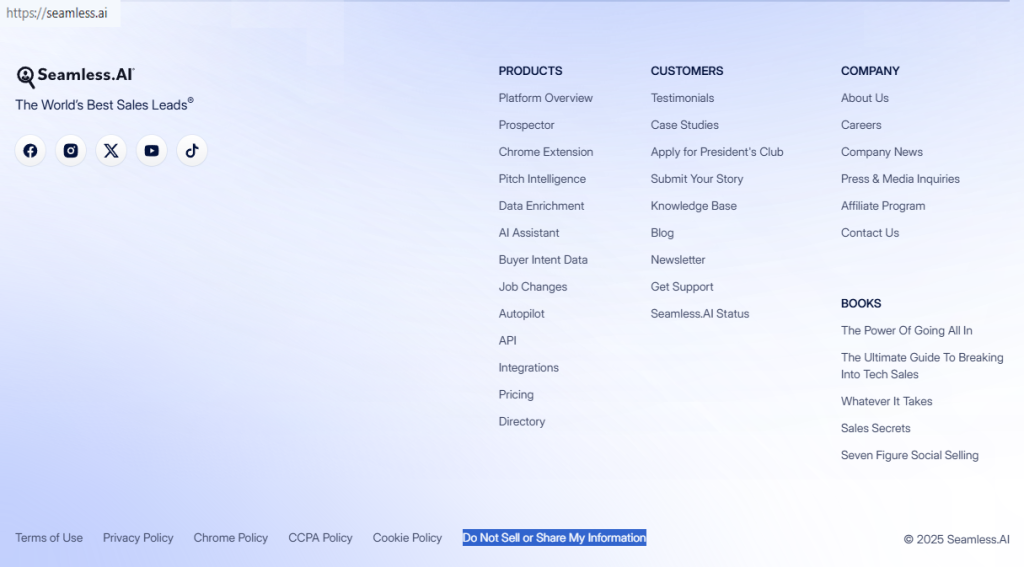
From the site footer, open the Do not Sell or Share My Information page and follow the lone request path. Confirm the website domain is correct, then proceed. If signed in, review any prefilled fields once. Tip: Bookmark this area for future information management checks.
Submit your identifiers (+ CAPTCHA)
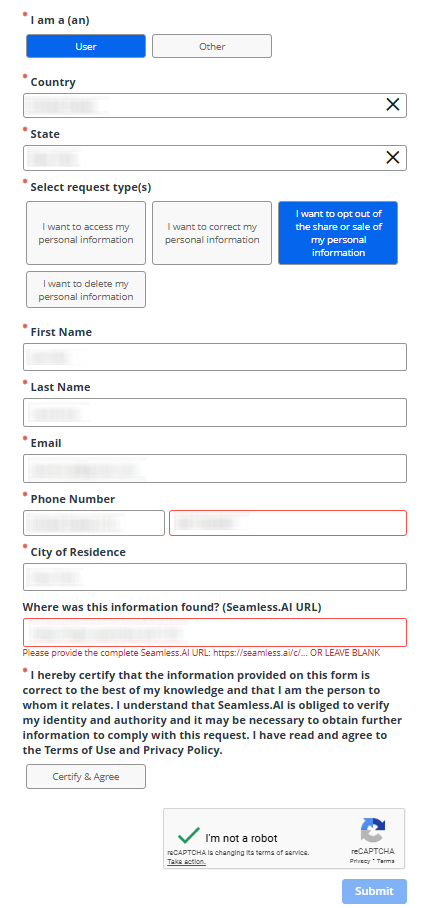
Enter first name, last name, a single email, and one phone, then complete any CAPTCHA. Use the notes field briefly and avoid extra files. Provide only the essentials and blur sensitive items if you save screenshots for your information.
Verify via code or link
Watch for one message and verify. Check Spam/Junk if nothing appears within a few minutes. Verify once to prevent delays. Keep this message so you can reference the update window later.
Confirm deletion / Do-Not-Sell request
Choose the privacy path that fits your goal (delete or do-not-sell/share) and finalize with a single submit action. Note the time of completion and store the confirmation for your files.
Track confirmation & timeline
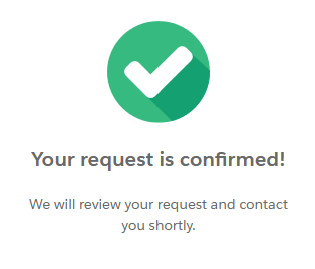
Most cases finish within several business days. If nothing changes after a week, reach the team at [email protected] or call 855-953-3265, then try one careful follow-up. Keep your confirmation for future reference and set a reminder.
Timelines, Verification & What to Expect
Expect a practical window of several business days after verification. Confirmation usually appears in a message and may also show on-screen. If nothing arrives after one week, use the published privacy channel once, referencing your prior action, then make a single careful follow-up later. Store confirmations in a dedicated folder so you can audit changes. This calm approach helps you stay organized while respecting privacy controls.
Edge Cases & Troubleshooting
- No access to the original email/phone: use current identifiers and note the change.
- “Record not found”: paste the profile URL and try alternate spellings.
- CAPTCHA or submission errors: refresh, try another browser, or disable extensions temporarily.
- Verification code not arriving: wait a few minutes, check Spam, request one more code.
- Region-limited flow (EU/UK/CA): select delete or do-not-sell/share and proceed.
- Account cancellation vs. listing: use billing pages for cancellation; use privacy flow for listing.
- Re-submitting after failure: wait 24–48 hours, then act once with consistent identifiers.
Will my data reappear?
Re-listing can occur because networks draw from a shared database and partner feeds. Aggregators and resellers may refresh profiles from external sources, including Seamless contacts found on public sites. To lower the chance, keep confirmations, set a 3–6 month reminder, and act quickly if you notice a new entry. Maintain good data management by limiting exposure of work identifiers. Re-check periodically, especially for entrepreneurs and CEOs whose visibility is higher. Treat this as ongoing upkeep rather than a one-time action.
Related removals
- BeenVerified
- Spokeo
- ZoomInfo
- Whitepages
- Intelius
- PeopleFinder
- Radaris
- Experian.
Manual vs Assisted Removal
Manual:
- Pros: Control, clear steps, no fees, flexible timing.
- Cons: Time investment, repeated monitoring, dispersed confirmations.
Assisted:
- Pros: Faster execution, verification guidance, tracking dashboard, recurring checks.
- Cons: Paid service, occasional confirmations still needed, coverage varies.
“Excellent”
We remove your data for you - faster, verified, trackable.
Discover Which Sites Share Your Private Details—Instantly and Free.
2,865,794 have already used our service
FAQ
Receive expert privacy advice by email - 1-2 times per month, no fluff.
Share Article

Posted by Ava J. Mercer
Ava J. Mercer is a privacy writer at ClearNym focused on data privacy, data broker exposure, and practical privacy tips. Her opt-out guides are built on manual verification: Ava re-tests broker opt-out processes on live sites, confirms requirements and confirmation outcomes, and updates guidance when something changes. She writes with a simple goal - help readers take the next right step to reduce unwanted exposure and feel more in control of their personal data.
76 Articles

