
Opt Out Guides
Quick People Trace Opt Out Guide
Privacy Writer
A. J. MercerAva J. Mercer
Updated
Read
5 min
Removing your personal data helps protect your privacy because exposure of your name, address, and phone can invite spam or risks. Quick People Trace is a people-search site with a data broker directory that aggregates records and displays details from public records and commercial sources.
How to opt out of Quick People Trace
Go to the official opt-out/privacy page, submit your data, then confirm. Processing usually takes 5–10 days. Keep the confirmation email and set a reminder to re-check later.
Checklist:
- Open the official opt-out form
- Enter identifiers (email/phone)
- Complete CAPTCHA/verification
- Confirm via code/link
- Save the confirmation email
- Set a reminder to re-opt-out
Find out if your private details were exposed

2,865,794 have already used our service
Quick People Trace – Quick Facts
| Parameter | Value |
| Domain | quickpeopletrace.com |
| Data Types | contacts details, possible social/profile identifiers |
| Opt-out Methods | web form/email/mail |
| Identity Check | confirmation email or code |
| Typical Response Time | 5–10 days |
| Re-listing Risk | medium |
The website is a people-search data broker that aggregates consumer records from public records and commercial sources and displays them in searchable results for users.
Common data you may find:
- Names (and known aliases)
- Phone numbers
- Emails
- Current and past addresses
- Age range/year of birth (if available)
- Relatives/household links
- Property & real-estate records
- Court or public filings (if available)
- Professional licenses/social media accounts (if available)
- Basic background pointers
Step-by-Step Guide
Open the official opt-out form
Visit the site’s opt-out page. If a direct “Do Not Sell/Share” option isn’t visible, open the contact page and request suppression of your record, plus a reachable email. If needed, sign in to any related account first. Blur any private details if taking screenshots. Tip: Look for a button or footer privacy link.
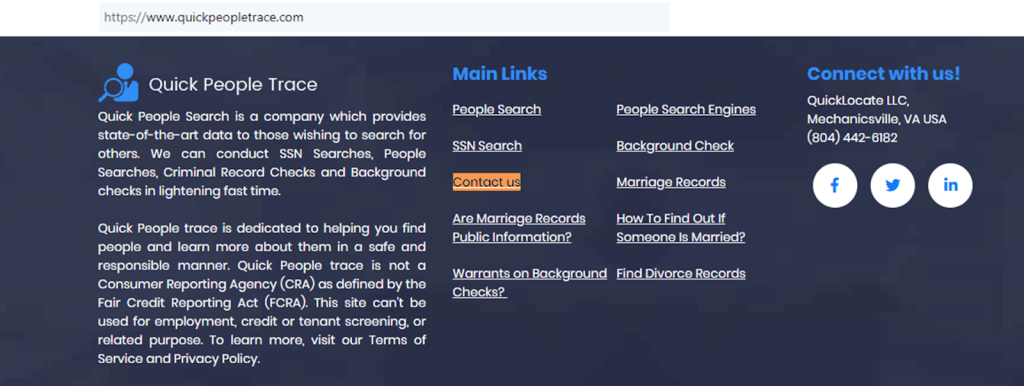
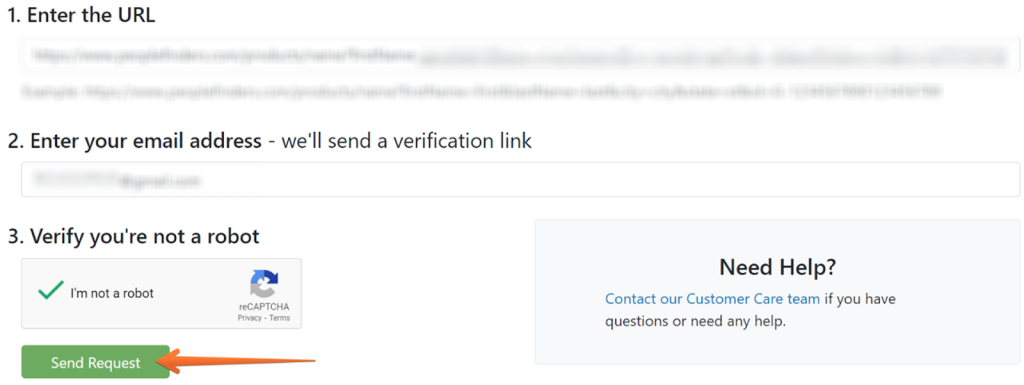
Submit your identifiers (email/phone + CAPTCHA)
Provide your email address so they can respond, and add your phone only if requested. Enter your name variants and the city/state found on the listing. Complete any CAPTCHA before you click submit. Tip: Select a dedicated inbox for privacy requests to keep confirmations organized.
Verify via code or link (email/SMS)
Watch for a message containing a single-use code. Click the link to confirm identity and authorize suppression. Check Spam/Promotions if nothing arrives within 15–30 minutes. Save the message for your records. Tip: Resend once if no response.
Confirm deletion/Do-Not-Sell request
The request is queued for processing. If the site requests more details, provide only the necessary personal info. Keep a short log noting the request date and any ticket number. If a dashboard is available, review the status later.
Track confirmation & timeline
Most requests resolve in 5–10 days. Keep the confirmation email and calendar a follow-up in two weeks to search for your name on the site again. If the record remains, write to support and reference your date. Tip: Capture redacted screenshots for your files.
Timelines, Verification & What to Expect
Typical turnaround is 5–10 days. You’ll usually receive confirmation via email after entering a code, or you may see an on-page acknowledgment. If nothing arrives within one business day, re-check Spam and filters. If there’s still no response after 10 days, send a concise follow-up to the published email, referencing your earlier request, or resubmit once. Keep copies of emails and any ticket numbers. Because workflows vary, some pages may ask for city/state or a brief explanation. Maintain a simple log so you can repeat the request later if needed.
Edge Cases & Troubleshooting
- No access to the original email/phone: submit from a current address and explain briefly.
- “Record not found”: try alternate spellings and prior addresses; include the profile URL if available.
- CAPTCHA or submission errors: retry another browser; clear cache.
- Code not arriving: check Spam; wait 30 minutes; request a new link.
- Region rejection (EU/UK/CA): cite local rights and ask for manual handling.
- Account deletion vs public listing: specify suppression of the public record.
- Re-submitting after failure: wait 48 hours, then resend with concise identifiers.
Will my data reappear?
Re-listing can happen when aggregators refresh feeds or resellers republish. A suppressed record today may return if upstream sources re-add it. Reduce recurrence by saving confirmations, setting a 3–6 month reminder, and re-submitting quickly if you see a new listing. Also, review related data brokers’ databases and keep a small notes file (date, URL, result). Monitoring doesn’t happen automatically everywhere, so periodic reviews help. Aim to review the top sources and repeat as needed—steady maintenance keeps exposure lower over time.
- Related removals
- Fast People Search
- PeopleFinders
- TruePeopleSearch
- Instant Checkmate
- Intelius
- Spokeo
- Whitepages
- Radaris
Manual vs Assisted Removal
Manual:
- Pros: No cost; full control; you decide what to provide; you keep confirmations; repeat monitoring on your schedule.
- Cons: Time-intensive; many site differences; periodic repeats; difficult to track.
Assisted:
- Pros: Speed; tracking dashboard; recurring checks; wider sites covered with one sign-up.
- Cons: Paid plans starting with $3.25; sharing details with a third-party; occasional actions still required.
“Excellent”
We remove your data for you - faster, verified, trackable.
Discover Which Sites Share Your Private Details—Instantly and Free.
2,865,794 have already used our service
FAQ
Receive expert privacy advice by email - 1-2 times per month, no fluff.
Share Article

Posted by Ava J. Mercer
Ava J. Mercer is a privacy writer at ClearNym focused on data privacy, data broker exposure, and practical privacy tips. Her opt-out guides are built on manual verification: Ava re-tests broker opt-out processes on live sites, confirms requirements and confirmation outcomes, and updates guidance when something changes. She writes with a simple goal - help readers take the next right step to reduce unwanted exposure and feel more in control of their personal data.
76 Articles

