
Opt Out Guides
PubMatic Opt Out Guide
Privacy Writer
A. J. MercerAva J. Mercer
Updated
Read
5 min

Removing your data helps protect consumer privacy by reducing exposure of your name, address, and phone number. PubMatic is a publisher-facing company that helps monetize inventory on behalf of partners and operates a platform that can use information from browser/device signals for online advertising. PubMatic uses cookies and similar tech to deliver ads. In this guide, you’ll get quick steps, where to click, what to submit, and timing expectations. We show how settings apply per browser on the device, how to ensure status persists, and where to find the privacy policy for more information.
How to opt out of PubMatic
Open the Your Privacy Choices page on the website, set a browser-level preference, or submit a limited data request if asked to verify personal information. Confirmation appears on-page for the current browser; email confirmation may follow. Processing for data actions can take a few days; please visit the official page for links.
Checklist:
- Open the official opt-out page
- Set the opt-out preference
- Set a reminder to repeat the opt-out process
Find out if your private details were exposed

2,865,794 have already used our service
PubMatic – Quick Facts
| Parameter | Value |
| Domain | pubmatic.com |
| Data Types | Contacts, addresses, technical/browser data, possible social identifiers |
| Opt-out Methods | Web form/in-browser opt-out |
| Identity Verification | Code via email/SMS or confirmation email |
| Typical Response Time | Same-day for cookie status; a few days for personal information actions |
| Re-listing Risk | Medium |
PubMatic runs advertising technology that helps a publisher manage placements on behalf of clients. Sources can include public records and commercial data. See PubMatic’s pages for information on how the service uses data, opt-out mechanisms that are linked, and regional options. Please note that settings may be scoped to a particular browser or device.
Common data you may find:
- Names and known aliases
- Email addresses
- Phone numbers
- Current and past addresses
- Age range or year of birth (where available)
- Relatives or household links
- Social/profile identifiers (if available)
- Property references and public filings (if available)
- Professional licenses (if available)
- Activity signals from mobile applications and cookies
Step-by-Step Guide
Set your choice
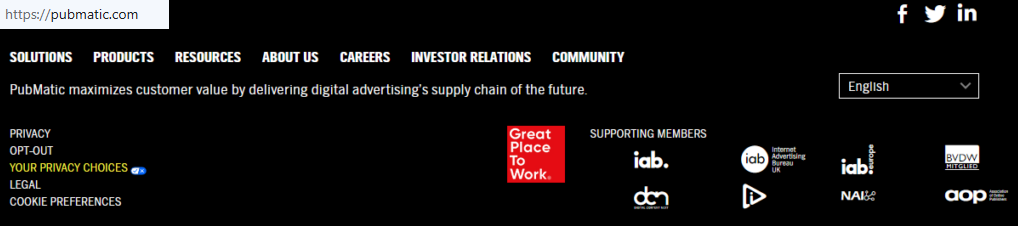
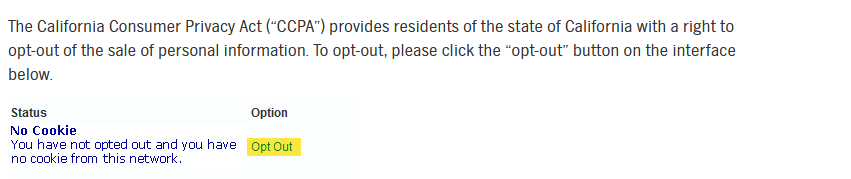
Open pubmatic.com, scroll to the footer, and click Your Privacy Choices → the Opt Out button. This sets a PubMatic opt-out cookie and updates the status for the current browser. The PubMatic opt-out cookie may need renewal after you delete storage. If a page does not function properly, try another browser, disable an extension temporarily, or refresh. These controls limit interest-based advertising, including retargeting, but ads can still display. For broader control, manage third-party cookies via industry tools linked from their sites.
Keep it active across sessions
Settings are local to the browser and device on which you set them. If you switch to another app or device, you need to repeat the opt-out. To ensure continuity, apply the choice on each browser and gadget you use and set a reminder every 3–6 months. If you no longer wish to receive targeted experiences, you can also adjust mobile advertising identifiers. For regional choices (for example, if you are a resident of California), please follow the instructions on the official page.
Track confirmation & timeline
Keep screenshots and emails. For cookie-level actions, status changes immediately in the web browser; personal information actions can take a few days. If nothing updates, please contact support via the form and try again later. When you change your browser’s settings or clear storage, re-check the status. For quick access in the future, download a calendar reminder and search for “PubMatic opt” if you forget the link.
Timelines, Verification & What to Expect
Most browser choices update at once; data actions involving personal information may take a few days. Confirmation appears on the page and sometimes by email. If your query isn’t resolved, wait a short window, then submit a follow-up. Controls often rely on a platform cookie and are scoped per browser on the device; changing settings, switching software, or moving across non-affiliated sites can affect persistence. If you want targeted advertising from a particular provider turned off, use the available forms for advertising from a particular company.
Edge Cases & Troubleshooting
- “Record not found”: verify the identifier and try again.
- Verification code missing: check Spam/Junk, then resend once.
- Regional limits: if you are a resident of certain regions, follow local links.
- Confusing account vs. listing: data deletion differs from cookie choices.
- Page won’t load: test another browser, or pause a blocker extension.
- After device/browser change: you need to repeat the opt-out and re-check the status.
Will my data reappear?
Feeds can refresh from partners and third-party sources based on your use patterns, so settings may require periodic upkeep. Set reminders to re-check every few months and keep confirmations to track effectiveness. Choices help reduce cross-device targeting for advertising purposes, but do not erase all signals. If you wish to receive targeted advertising changes later, simply revisit the page or target a setting specific to a provider.
Related removals
- Magnite (SSP)
- OpenX
- Index Exchange
- Criteo
- The Trade Desk
- LiveRamp
- Quantcast
- MediaMath
Manual vs Assisted Removal
Manual:
- Pros: control, learn each policy, and no fees.
- Cons: time, monitoring, and repeated work across browsers and devices.
Assisted:
- Pros: speed, verification, tracking dashboard, recurring checks.
- Cons: cost, reliance on a service.
“Excellent”
We remove your data for you - faster, verified, trackable.
Discover Which Sites Share Your Private Details—Instantly and Free.
2,865,794 have already used our service
FAQ
Receive expert privacy advice by email - 1-2 times per month, no fluff.
Share Article

Posted by Ava J. Mercer
Ava J. Mercer is a privacy writer at ClearNym focused on data privacy, data broker exposure, and practical privacy tips. Her opt-out guides are built on manual verification: Ava re-tests broker opt-out processes on live sites, confirms requirements and confirmation outcomes, and updates guidance when something changes. She writes with a simple goal - help readers take the next right step to reduce unwanted exposure and feel more in control of their personal data.
76 Articles

