
Opt Out Guides
Public Information Services Opt Out Guide
Privacy Writer
A. J. MercerAva J. Mercer
Updated
Read
5 min
If your name, home address, and phone number appear online, it can create privacy and security risks. These are identity theft, unwanted solicitations, and targeted marketing. Public Information Services is a people-search platform that may display personal details, such as addresses and relatives, based on information from publicly available sources and commercial databases. This 2025 step-by-step guide helps you remove your personal information and take control of your digital footprint for better online privacy and data privacy. You’ll get quick steps, screenshots, official links, and a simple timeline. Review valuable tips for handling email issues and repeat listings to strengthen your data privacy. It also explains why your details can show up in search results and how to limit future exposure.
How to opt out of Public Information Services
Go to the official Opt Out page, search the database for your listing, submit your email/phone, complete the CAPTCHA, then confirm using the link provided. It usually takes 7–14 days for removal.
Checklist:
- Open the official opt-out form and get started
- Enter identifiers (email/phone/name)
- Confirm via code/link and save the confirmation email
- Set a reminder to resubmit
Find out if your private details were exposed

2,865,794 have already used our service
Public Information Services – Quick Facts
| Parameter | Value |
| Domain | publicinfoservices.com |
| Data Types | contact information, addresses, and possible social identifiers |
| Opt-out Methods | web form (Privacy Requests) |
| Identity Check | verification email |
| Typical Response Time | 7–14 days |
| Re-listing Risk | medium |
Public Information Services is a people-search service that can show public record data. Some pages may also display information from data broker sites and data partners. If a detail is unclear, assume it comes from public records and commercial sources.
Common data you may find:
- Full name
- Current and past addresses
- Email address
- Phone
- Relatives or household links
- Consumer records
- Court records
- Criminal records
- Financial history
Step-by-Step Guide
Open the official opt-out form
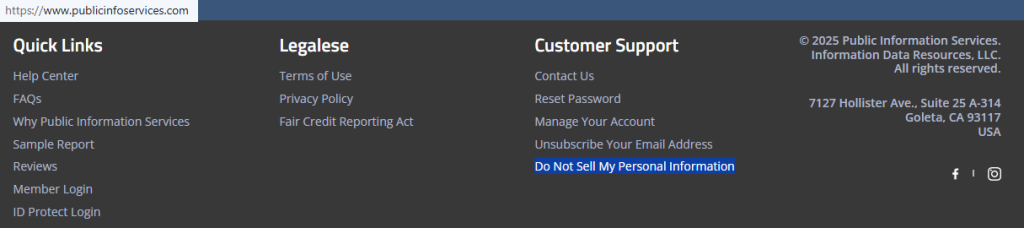
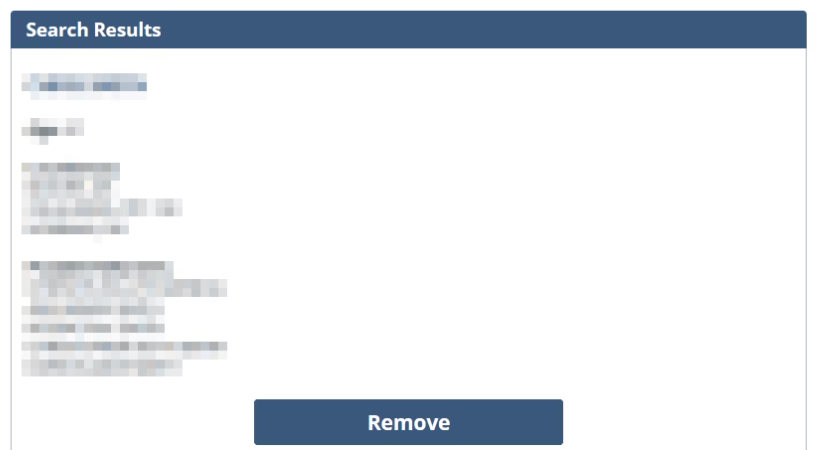
Open the homepage in your browser and scroll to the footer. Select the “Do Not Sell My Personal Information” link to reach the privacy portal (publicinfoservices opt-out). This opt-out process usually starts with a search box that pulls listings from the database. Choose the record that matches you. Then, proceed to the next screen. Before you capture any screenshots, blur or redact sensitive information. This is an online opt-out, and it’s helpful to write down the record URL or a short note for follow-up. Finish by opting out of publicinfoservices and keep the page open until you see the receipt.
Submit your identifiers (email/phone + CAPTCHA)
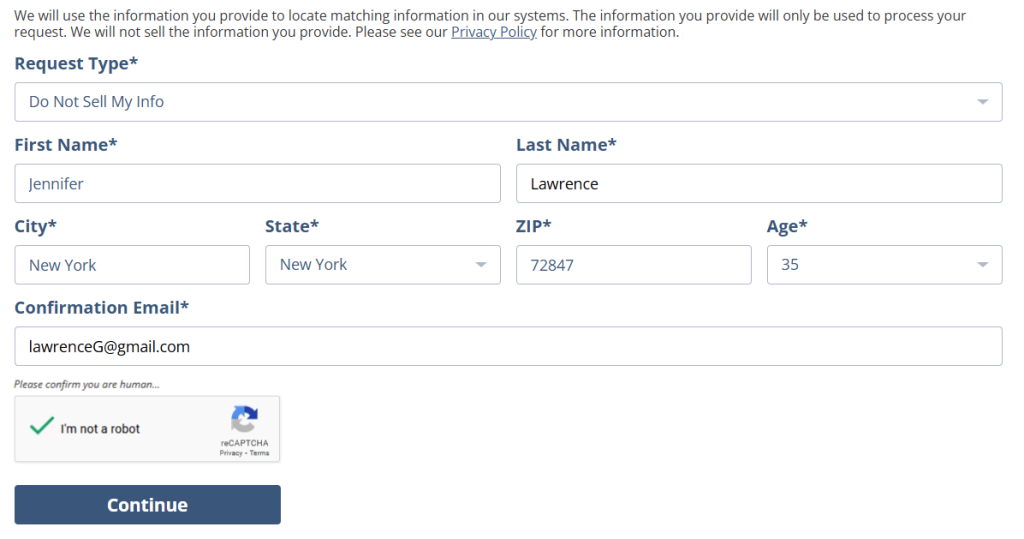
On the Privacy Requests form, locate the fields and enter your identifiers. To continue, enter your email address and add a phone if requested. Submit one removal request and wait for the page to finish loading. Double-check that the profile you selected matches your record before submitting. For any screenshots you keep, blur or redact personal information so your notes stay clean. If you need to repeat the request later, reuse the same steps and keep your notes minimal so you are not storing extra details.
Verify via code or link (email/SMS)
After submission, a verification message is sent to your email. Check your email inbox and look for the message. Open it and click the link to confirm the request. If it doesn’t arrive, look in Spam or Promotions before resending it once. Save the email you received. You can reference it later if support asks for proof, and redact any identifiers if you screenshot the message.
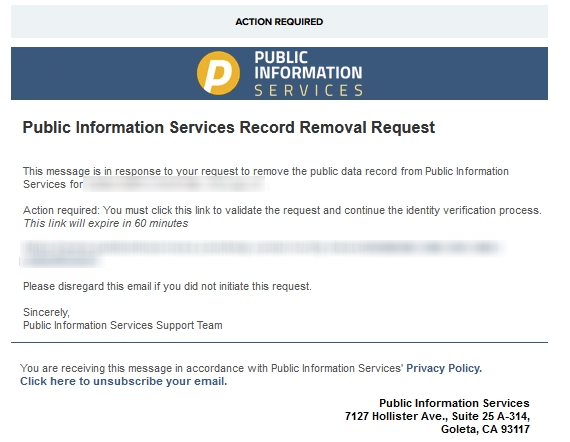
Confirm deletion / Do-Not-Sell request
Once your request is verified, you should see a status screen, and you may get a final email receipt. This supports a data broker opt-out and keeps a record of your opt-out request for follow-up. If you want to remove your data and submit deletion requests under the California Consumer Privacy Act (CCPA), use the same privacy flow and keep any reference details. If you act as an authorized agent for an individual’s request, be ready to show authorization if asked. Keep screenshots private and redact any identifiers before saving them.

Track Confirmation & timeline
File your receipt and note the date you submitted. Typical processing is 7–14 days, and sometimes listings take longer to disappear if matching needs extra time. If nothing changes after 14 days, submit one more removal request and then use the contact page for help. Keep this folder for privacy and security, and to validate later that the request was accepted. Information may be updated in future refreshes, so keep a 3–6 month reminder on your calendar and check again using the same search terms.
Alt text: “Save receipt in email folder
Timelines, Verification & What to Expect
The entire process is not time-consuming, and most requests are handled in 7–14 days, but timing varies by workload and how clearly your listing matches. You may see a status screen right away, and you should also receive a single receipt email after you verify. If you do not receive it, look in Spam, wait a bit, and resubmit a single time if needed. Keep your records so you can remove your info quickly if a listing returns, and so you can opt out of data again later without redoing everything from scratch. To reduce mistakes, write down the record link you selected, save your receipt, and avoid submitting duplicates on the same day. If nothing changes after 14 days, use the site’s support contact path and include the record link.
Edge Cases & Troubleshooting
- No access to the original email/phone: Use a current address you control, or contact support to update the email address.
- “Record not found”: Try variations of your name, initials, or a prior address; some entries are indexed differently.
- Submission errors: Clear cookies, switch networks, slow down, and try again once.
- Verification code not arriving: Wait a few minutes, check Spam, then resend one time.
- Form rejects the request by region (EU/UK/CA): Use the site’s privacy page for regional routes or contact support for the correct path.
- Account or subscription issue: If you need to cancel, do it in your member area; listing suppression is separate from paid plans.
- Re-submitting after a failed attempt: If the page times out, try later; don’t submit repeatedly in a loop.
Will my data reappear?
Listings can return when data brokers refresh feeds, a broker gets updated records, or matching changes (like a new address or spelling). The re-listing risk is medium, so be proactive: regularly monitor every 3–6 months, keep your receipts, and re-submit quickly if your profile returns. To reduce recurrence, opt out of PublicInfoServices and other data broker sites that show the same contact details, since brokers like these often share updates across platforms. It also helps to check close-name variations and old addresses, then request suppression for each match you find. Keep a short folder of receipts so you can show what you submitted if you need support later. If you move or change phone details, repeat the request soon after the change so older records are less likely to resurface.
Related removals
- 411.com
- Whitepages
- Spokeo
- TruePeopleSearch
- Intelius
- BeenVerified
Manual vs Assisted Removal
Manual:
- Pros: You do it manually and keep full control; you can document each request.
- Cons: You must monitor and repeat requests; more work across many sites.
Assisted:
- Pros: Faster turnaround with a tracking dashboard; support for follow-ups and tracking.
- Cons: Some services offer subscriptions.
“Excellent”
We remove your data for you - faster, verified, trackable.
Discover Which Sites Share Your Private Details—Instantly and Free.
2,865,794 have already used our service
FAQ
Receive expert privacy advice by email - 1-2 times per month, no fluff.
Share Article

Posted by Ava J. Mercer
Ava J. Mercer is a privacy writer at ClearNym focused on data privacy, data broker exposure, and practical privacy tips. Her opt-out guides are built on manual verification: Ava re-tests broker opt-out processes on live sites, confirms requirements and confirmation outcomes, and updates guidance when something changes. She writes with a simple goal - help readers take the next right step to reduce unwanted exposure and feel more in control of their personal data.
76 Articles

