
Opt Out Guides
PrivateNumberChecker Opt Out Guide
Privacy Writer
A. J. MercerAva J. Mercer
Updated
Read
5 min
Your privacy matters because exposed name, place of residence, and telephone can attract unwanted contact. The platform is a reverse phone lookup website that shows contact information in number reports. This guide explains how to opt out of privatenumberchecker.com using a simple form. Ready to remove your information from PrivateNumberChecker in 2025? You’ll get quick steps, screenshots, and official links, plus timing and troubleshooting. The process is free and designed to remove your information with minimal effort while you safeguard your presence across the internet. If you’re ready to remove your info, follow this step-by-step guide to take control without legal jargon or guarantees.
How to opt out of PrivateNumberChecker
Open the official form, enter basics, complete verification, then confirm by email. Save the confirmation. Processing usually takes a few days. If needed, Google the site to locate the page again and recheck your status later.
Checklist:
- Open the official form
- Enter identifiers (email/telephone)
- Complete CAPTCHA/verification
- Confirm via code/link
- Save the confirmation email
- Set a reminder to re-opt-out
Find out if your private details were exposed

2,865,794 have already used our service
PrivateNumberChecker – Quick Facts
| Parameter | Value |
| Domain | privatenumberchecker.com |
| Data Types | contacts, addresses, possible social identifiers |
| Opt-out Methods | web form |
| Identity Verification | code via email or confirmation email |
| Typical Response Time | several days |
| Re-listing Risk | medium |
The platform aggregates records from public sources and commercial partners to display consumer information tied to numbers. You can use the online form to remove your listing and limit visibility. The service focuses on number-based lookups and related info.
Common data you may find:
- Names (and known aliases)
- Telephones
- Emails
- Current and past places of residence
- Age range or year of birth (if available)
- Relatives or household links
- Property references (if available)
- Court filings (if available)
- Possible carrier and line type
- Links to social networks (if available)
PrivateNumberChecker – Quick Facts Table
Step-by-Step Guide
Open the official opt-out form
Go to the dedicated page and scroll to the bottom of the page to find the link. If starting at the homepage, look for “Removal Request.” Keep your inbox open for the follow-up. Avoid sharing screenshots that reveal sensitive fields. This opt-out helps reduce exposure of personal information.

Submit your identifiers (personal data + CAPTCHA)
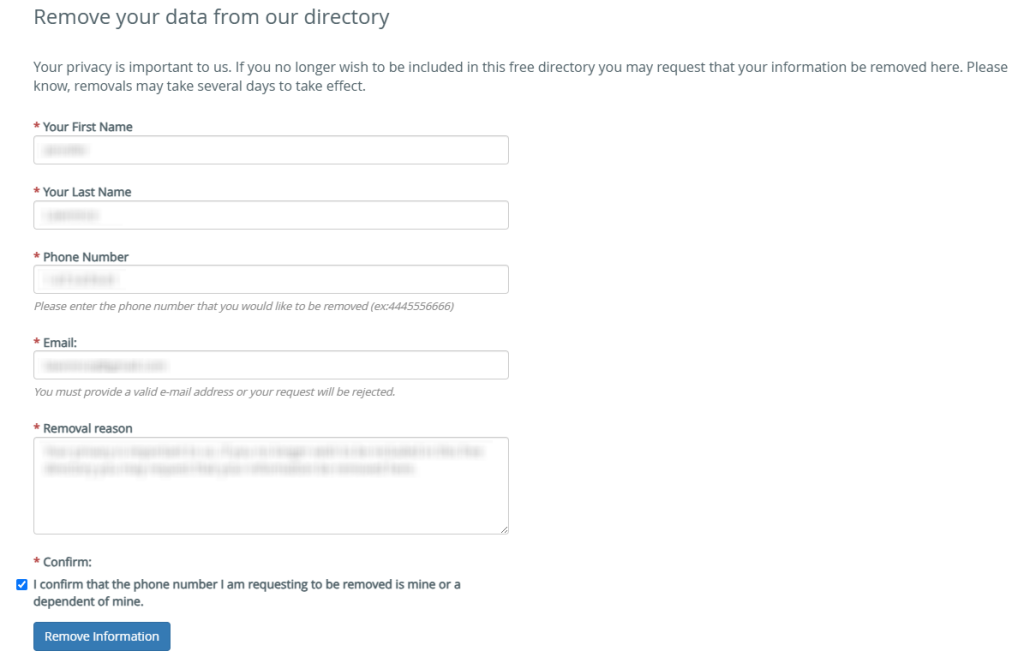
Enter first name, last name, phone number, a valid email, and a brief removal reason. Tick the checkbox acknowledging ownership of the number. Complete the CAPTCHA. Review your entries, then click the “remove information” button. Store a copy of what you entered for recordkeeping. Redact any sensitive details in saved images.
Verify via code or link (email/SMS)
Watch your inbox for a code or link to confirm. If nothing appears within a few minutes, review Spam/Promotions. Use the same inbox you provided. Do not forward codes. Confirm promptly so processing can start. Keep that message for future reference.
Confirm deletion / Do-Not-Sell request
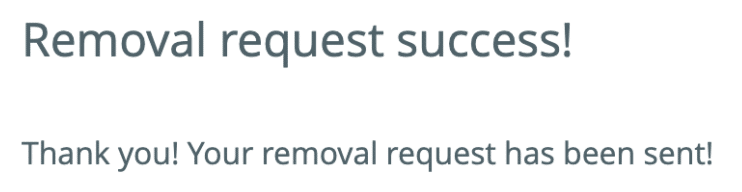
Follow the message instructions to finalize the procedure. Some pages show an on-screen success note; others rely on email only. Keep any case or reference number. This step helps remove your personal data from public view rather than change account credentials.
Track confirmation & timeline
Keep your confirmation email and note the date. Processing commonly completes within several days. Revisit the website to verify whether the listing is gone. If needed, resubmit once after a reasonable wait. Caches may take time to delete, so give it a short window.
Timelines, Verification & What to Expect
Expect a practical window of several days. Confirmation typically appears on-page during form submission and via email after verification. If no change is visible after that window, review Spam/Promotions, then resubmit once. If you still see the listing, contact support through the official page and include your timestamp and confirmation details. Listings may linger briefly in caches before disappearing. Keep your records organized so you can follow up efficiently, and set a reminder to review in a few weeks. If you change your mind, you can cancel by reaching out through the contact page.
Edge Cases & Troubleshooting
- No access to original inbox/number: Use a current email and explain briefly in the form.
- “Record not found”: Proceed with the precise number; recheck later.
- CAPTCHA/submission errors: Refresh, try another browser, and submit once more.
- Verification not arriving: Wait a few minutes, then check Spam/Promotions; ask for a new code once.
- Region limits (EU/UK/CA): Use the contact page and include your timestamp.
- Account vs listing: This flow suppresses a public listing; accounts are separate.
- Re-submitting: If the first try fails, wait a day and resubmit once with accurate details.
Tip: You can opt out of private listings on comparable platforms to reduce rediscovery.
Will my data reappear?
Re-listing can occur because a data broker or partner feed refreshes records. To reduce recurrence, set a reminder every 3–6 months, keep confirmation emails, and repeat the process quickly if needed. Check adjacent sites that reference number-based profiles. This approach helps protect your privacy over time without promising permanence. Organized records make re-requests faster and smoother.
Related removals
Manual vs Assisted Removal
Manual:
- Pros: Full control; free; you decide timing; direct oversight.
- Cons: Time investment; repeat monitoring; varied forms and flows.
Assisted:
- Pros: Speed; verified steps; tracking dashboard; recurring checks that can automate follow-ups.
- Cons: Requires a plan; limited coverage on some platforms.
“Excellent”
We remove your data for you - faster, verified, trackable.
Discover Which Sites Share Your Private Details—Instantly and Free.
2,865,794 have already used our service
FAQ
Receive expert privacy advice by email - 1-2 times per month, no fluff.
Share Article

Posted by Ava J. Mercer
Ava J. Mercer is a privacy writer at ClearNym focused on data privacy, data broker exposure, and practical privacy tips. Her opt-out guides are built on manual verification: Ava re-tests broker opt-out processes on live sites, confirms requirements and confirmation outcomes, and updates guidance when something changes. She writes with a simple goal - help readers take the next right step to reduce unwanted exposure and feel more in control of their personal data.
76 Articles

