
Opt Out Guides
PersonSearchers Opt Out Guide
Privacy Writer
A. J. MercerAva J. Mercer
Updated
Read
5 min
Removing your data from PersonSearchers matters because your personal information, including your full name, address, and phone, can appear in public records listings that reduce privacy, especially when personal data is reused across platforms. The website typically compiles information from public data and other commercial sources into a searchable database, which is why many users look for instructions on how to opt out efficiently. In this removal guide, you’ll learn how to opt out and remove your information quickly using official links and following the step-by-step instructions. If you’re concerned about your personal information, you’ll also find what to expect, how long processing takes, and how to improve your privacy by reducing what data broker sites like this display about you.
How to opt out of PersonSearchers
Use the official form, provide your email and phone, verify yourself, and confirm the request via email. Processing typically takes a few days. This will help you remove yourself from peoplesearchers.com and reduce exposure from public data, and is one of three ways to remove your personal information from data broker sources.
Checklist:
- Open the official form
- Enter identifiers (email/phone)
- Complete CAPTCHA/verification
- Confirm via link
- Save the email
- Set a reminder to re-opt out
Find out if your private details were exposed

2,865,794 have already used our service
PersonSearchers – Quick Facts
| Parameter | Value |
| Domain | personsearchers.com |
| Data Types | contacts, addresses, public data |
| Opt-out Methods | web form |
| Identity Check | confirmation email |
| Typical Response Time | a few days |
| Re-listing Risk | medium |
About PersonSearchers
The platform is a people-search service that aggregates consumer information from public records and various commercial sources. It displays contact details, address histories, basic public data, and links derived from public databases. The service helps users run a simple search for individuals, and you can find your name in listings to start a request through the personsearcher.com opt process if you want stronger privacy protection.
Common data you may find:
- Full name and known aliases
- Phones
- Emails
- Current and past addresses
- Age range or year of birth
- Relatives or household links
- Property records
- Directory or social media profiles
- Court or criminal records (when publicly available)
Step-by-Step Guide
Open the official opt-out form
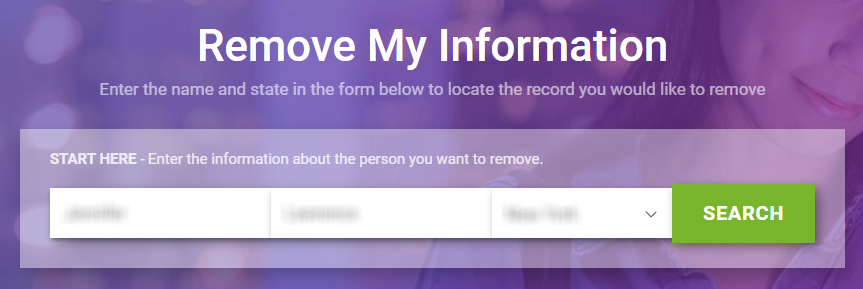
Begin by navigating to a specific form (Do Not Sell or Share My Personal Information page). Find your listing by entering your first and last name. Then, select the state where you live. This helps the system locate your name from the search results. In some cases, you may need to click the green button shown next to your record. If you plan to show any screenshots for your own use, blur personal info. This starts the removal process and prepares you to opt out of the data listing.

Submit your identifiers (email/phone + CAPTCHA)
Next, provide your primary email address and phone number, then complete the procedure. A short information form will appear asking for the identifiers needed for data removal. This helps them send an email. If the CAPTCHA fails, refresh the page and try again. Always double-check spelling to avoid delays.
Verify via code or link (email/SMS)
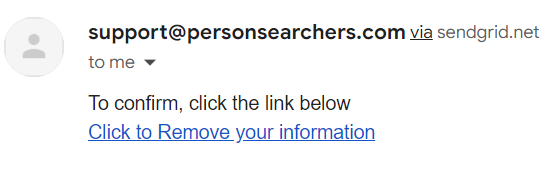
An email will be sent to your inbox. Open the email and click the confirmation link. If you don’t see it, check your spam folder. This link ensures your personal information will be removed and supports automated opt-out workflows. It’s particularly relevant if you prefer not to have sites sell your personal data.
Confirm deletion / Do-Not-Sell request
After verifying, you may be prompted to click the Do Not Sell or Share My Personal Info link. This signals your request to opt out and delete your listing. Some users also choose to manually opt out of the data display. Following the steps outlined on the page ensures full deletion.
Track confirmation & timeline
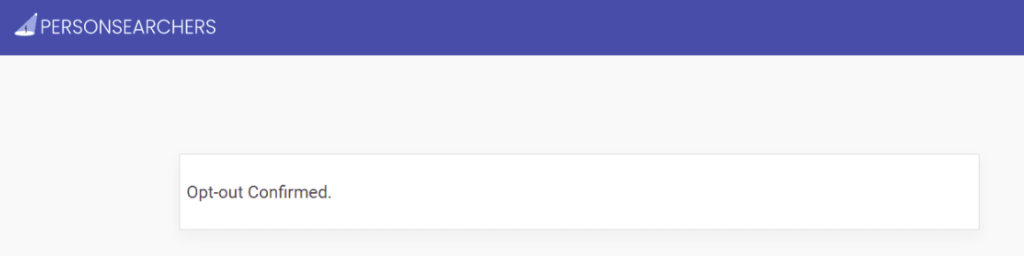
Once finished, the email will indicate that the request is complete. Check your email inbox for an email that states the procedure is in progress. Keep this email for future reference. If you want to improve your privacy further, consider reviewing information from data broker sites like other directories or using free tools to monitor changes.
Timelines, Verification & What to Expect
Most removals take a few days to process. However, timelines may vary. You will typically receive confirmation via email once the request is approved. If no response arrives within a week, check spam filters or resubmit once through the form. Keep your email in case your listing reappears. If you used an assisted data removal service, your dashboard may track the status for you. Results depend on public data. So, some elements may take longer to clear from partner sources.
Edge Cases & Troubleshooting
- No access to original email/phone: Use another address and note the issue in the form.
- Record not found: Try alternate spellings or past locations.
- CAPTCHA errors: Refresh or change browsers.
- Email not arriving: Check spam and retry once.
- Regional restrictions: Some regions may require alternative forms.
- Account vs listing removal: Removing a listing doesn’t cancel an account.
- Re-submitting: Wait 24 hours before a new attempt.
Will my data reappear?
Listings can reappear because aggregators, resellers, and public record partners refresh feeds periodically. This doesn’t mean your opt-out failed—only that sources repopulated the database. To stay ahead, set a reminder every 3–6 months to review your listing and resubmit if needed.
Related removals
- Whitepages
- Spokeo
- BeenVerified
- Intelius
- TruthFinder
- PeopleFinders
- Instant Checkmate
Manual vs Assisted Removal
Manual:
- Pros: Full control; no cost; you learn how each site works.
- Cons: Time-consuming; must repeat checks, listings may reappear.
Assisted:
- Pros: Faster; verification and tracking; automated checks.
- Cons: Paid plans start at different tiers; some sites require custom removals.
“Excellent”
We remove your data for you - faster, verified, trackable.
Discover Which Sites Share Your Private Details—Instantly and Free.
2,865,794 have already used our service
FAQ
Receive expert privacy advice by email - 1-2 times per month, no fluff.
Share Article

Posted by Ava J. Mercer
Ava J. Mercer is a privacy writer at ClearNym focused on data privacy, data broker exposure, and practical privacy tips. Her opt-out guides are built on manual verification: Ava re-tests broker opt-out processes on live sites, confirms requirements and confirmation outcomes, and updates guidance when something changes. She writes with a simple goal - help readers take the next right step to reduce unwanted exposure and feel more in control of their personal data.
76 Articles

