
Opt Out Guides
PeopleDataLabs Opt Out Guide
Privacy Writer
A. J. MercerAva J. Mercer
Updated
Read
5 min
If your name, address, or phone number appear online, your privacy can suffer, exposing you to unwanted contact and profiling. PeopleDataLabs is known for aggregating business-centric records into detailed profiles from publicly available and commercial sources across the public Internet. This guide shows you how to take down what’s listed about you with a quick, neutral process. You’ll get clear steps, official links, typical timelines, and troubleshooting tips. We reference the company’s privacy policy.
How to opt out of PeopleDataLabs
Go to the official privacy center, submit your identifiers (email), complete verification, and confirm by code/link to suppress your personal information. Processing typically completes within several business days; keep the on-page receipt for your records. If needed, you can also contact support.
Checklist:
- Open the official opt-out form
- Enter identifiers (email)
- Confirm via code/link
- Save the acknowledgement email
- Set a reminder to re-opt-out
Find out if your private details were exposed

2,865,794 have already used our service
PeopleDataLabs – Quick Facts
| Parameter | Value |
| Domain | peopledatalabs.com |
| Data Types | Contacts, addresses, professional/education fields, and possible social identifiers |
| Opt-out Methods | Web form/privacy portal; email option |
| Identity Verification | Code/link via email or SMS |
| Typical Response Time | A few business days to ~2 weeks |
| Re-listing Risk | Medium |
PeopleDataLabs provides data products and APIs that aggregate and normalize information from various public records and commercial sources. The service helps customers build or enrich datasets for products and services, subject to the terms of its privacy policy governing the use of the services. Requests can be submitted via the services to manage use and disclosure.
Common data you may find:
- Names (and known aliases)
- Phone numbers
- Email addresses
- Current and past addresses
- Age range or year of birth (if available)
- Employment/education fields and social profile links (if available)
- Company/role metadata and professional classifications
- Possible IP references and technical identifiers
- Household/associate links (if available)
- Publicly available property or court references (where available)
Step-by-Step Guide
Open the official opt-out form
Go to the Privacy Center and choose “Make a Privacy Request.” This official page is the starting point for opt-in and opt-out requests. Review the privacy policy links shown there before you proceed. Avoid third-party forms; stick to peopledatalabs.com. Tip: Open in a private window if you prefer.

Submit your identifiers (email/)
Select the request type (“delete”). Enter your email and submit. Provide only what’s requested for compliance; do not over-share screenshots. Tip: Redact sensitive info if you capture the page.
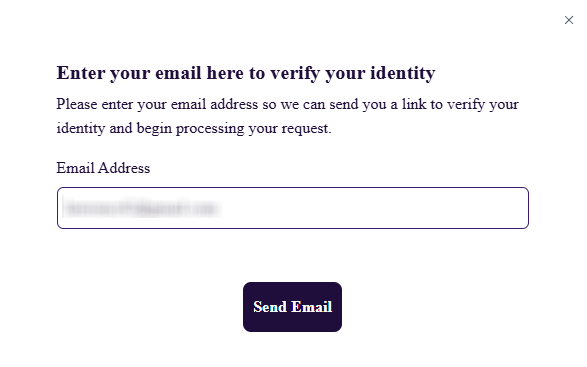
Verify via code or link (email/SMS)
Check your inbox (and Spam/Promotions) for a verification code or one-time link. Click the link or paste the code. This step helps prevent unauthorized access and safeguards personal data within privacy regulations. Tip: Keep the message until the process finishes.
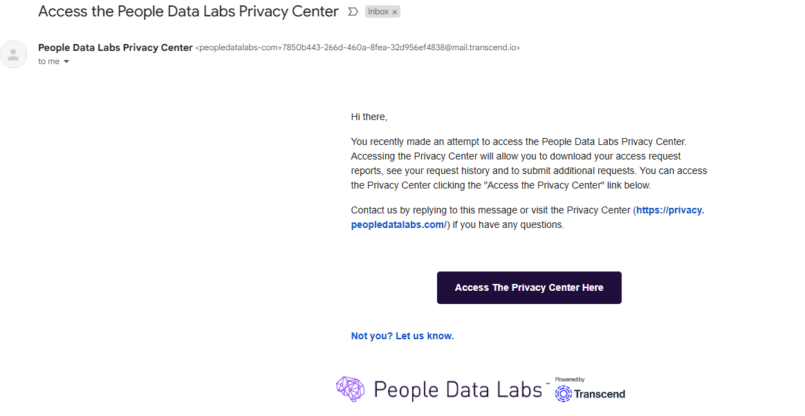
Confirm deletion / Do-Not-Sell request
After verification, request to remove where available. If you made an error, you can cancel before final submission and start again. Read any on-page disclosure notes about what is required or permitted. Think whether a follow-up may be necessary to comply with applicable laws. Submit and note any on-screen reference ID.
Track confirmation & timeline
You should see an on-page acknowledgement and receive an email receipt. Save it. If nothing arrives within the stated window, re-check Spam or contact support. Keep records for future resubmissions if data reappears through third parties or a partner feed. Tip: Set a calendar reminder.
Timelines, Verification & What to Expect
Most requests are completed within a practical window of a few business days up to ~14 days. The term depends on volume and verification. Expect an on-page acknowledgement and a follow-up email; keep that message. If you don’t hear back after ~14 days, check your Spam folder, then reach out through the portal or resubmit once. An authorized agent may be asked to provide proof when acting for someone else. Processing can include checks that are necessary to comply with policies and obligations required by applicable law; responses may disclose limited details about the request itself. If further information is required or permitted, support will follow up. Keep a note of dates for your records and monitor for any re-listing via third parties.
Edge Cases & Troubleshooting
- No access to the original email/phone: use the portal and explain; provide alternate verification or write to support.
- “Record not found”: try alternate spellings/old addresses; proceed with a general request.
- CAPTCHA or submission errors: refresh the page, try another browser, or disable blockers.
- Verification code not arriving: wait a few minutes, check Spam, then request a new code.
- Form rejects by region (EU/UK/CA): use regional options or email support.
- Account delete vs. public listing suppression: deleting an account differs from suppressing data in a database.
- Re-submitting after failure: wait 24–48 hours, then submit once with the same email.
Will my data reappear?
Listings can reappear due to data broker ecosystems, partner feeds, and third-party resellers continually refreshing datasets. Even after a successful request, new aggregation or disclosure from public sources can reintroduce fields. To reduce recurrence, keep your receipt emails, set a reminder every 3–6 months, and re-submit quickly if needed. Also review related removals across services that use the services or share data for business purposes or marketing purposes. This routine helps maintain your privacy and supports ongoing compliance with evolving policies and laws. Avoid absolute expectations; re-listing risk is real in complex supply chains.
Related removals
- 411.com
- Experian Health
- Lookify
- BeenVerified
- Spokeo
- Whitepages
- ZoomInfo
- Apollo.io
Manual vs Assisted Removal
Manual:
- Pros: No cost; full control over each request; you learn the flow; you decide when to opt again.
- Cons: Time-consuming; tracking receipts across many third parties; ongoing monitoring needed.
Assisted:
- Pros: Faster across many sites; verification and tracking dashboard; recurring checks help catch re-listings.
- Cons: Subscription cost; you share limited identifiers; less granular control per site.
“Excellent”
We remove your data for you - faster, verified, trackable.
Discover Which Sites Share Your Private Details—Instantly and Free.
2,865,794 have already used our service
FAQ
Receive expert privacy advice by email - 1-2 times per month, no fluff.
Share Article

Posted by Ava J. Mercer
Ava J. Mercer is a privacy writer at ClearNym focused on data privacy, data broker exposure, and practical privacy tips. Her opt-out guides are built on manual verification: Ava re-tests broker opt-out processes on live sites, confirms requirements and confirmation outcomes, and updates guidance when something changes. She writes with a simple goal - help readers take the next right step to reduce unwanted exposure and feel more in control of their personal data.
76 Articles

