
Opt Out Guides
PacificEast Opt Out Guide
Privacy Writer
A. J. MercerAva J. Mercer
Updated
Read
5 min

Removing your listing from PacificEast can protect your data privacy by limiting exposure of your name, address, and phone. The company operates a service that collects information from various public records and commercial resources on the PacificEast website. PacificEast provides tools that organizations use to reduce fraud and meet privacy regulations when handling consumer data across digital workflows. In this opt-out guide, you’ll get quick steps, official links, and a simple checklist. We include screenshots, timelines, and troubleshooting to help you verify identity information, track responses, and prevent reappearance without legal jargon or fear-based messaging; if you have a concern, we show where to contact PacificEast.
How to opt out of PacificEast
Open the official privacy page, enter your email or phone, and complete the procedure. Processing usually takes 1–3 days; watch for on-page confirmation. If anything fails, contact PacificEast via the listed privacy address.
Checklist:
- Open the official form
- Enter identifiers (email/phone)
- Complete CAPTCHA/verification
- Save the confirmation email
- Set a reminder to re-opt out
Find out if your private details were exposed

2,865,794 have already used our service
PacificEast – Quick Facts
| Parameter | Value |
| Domain | pacificeast.com |
| Data Types | contacts, addresses, possible social identifiers |
| Deletion Methods | web form/email |
| Identity Check | code via email/SMS or confirmation email |
| Typical Response Time | 1–3 days |
| Re-listing Risk | medium |
About PacificEast
The website is a data broker provider that serves for legitimate business use and the interests of safety. It can collect limited customer data from business clients and supports identity checks and communication. Resources can include public records and commercial databases. The service is not positioned for marketing.
Common data you may find:
- Names (and known aliases)
- Phone numbers
- Email addresses
- Current and past addresses
- Age range/year of birth (if available)
- Relatives/household links
- Property & real-estate indicators (if available)
- Social media profile links (if available)
- Court or lien references (if available)
Step-by-Step Guide
Open the official opt-out form
Go to the Do Not Sell or Share My Personal Information page. Use the page that explicitly handles submissions. Confirm you’re on the correct site and that the connection is secure. Keep your inbox or phone ready to receive a code, and cancel any autofill that inserts extra data you don’t need to share.

Submit your identifiers (email/phone + CAPTCHA)
Enter the email or phone associated with your record, then complete any CAPTCHA. Provide only what’s needed for the request. If optional fields appear, you can leave them blank. Take a redacted screenshot for your records, store it in a secure folder, and note the time you enter so you can compile a simple tracking log later.
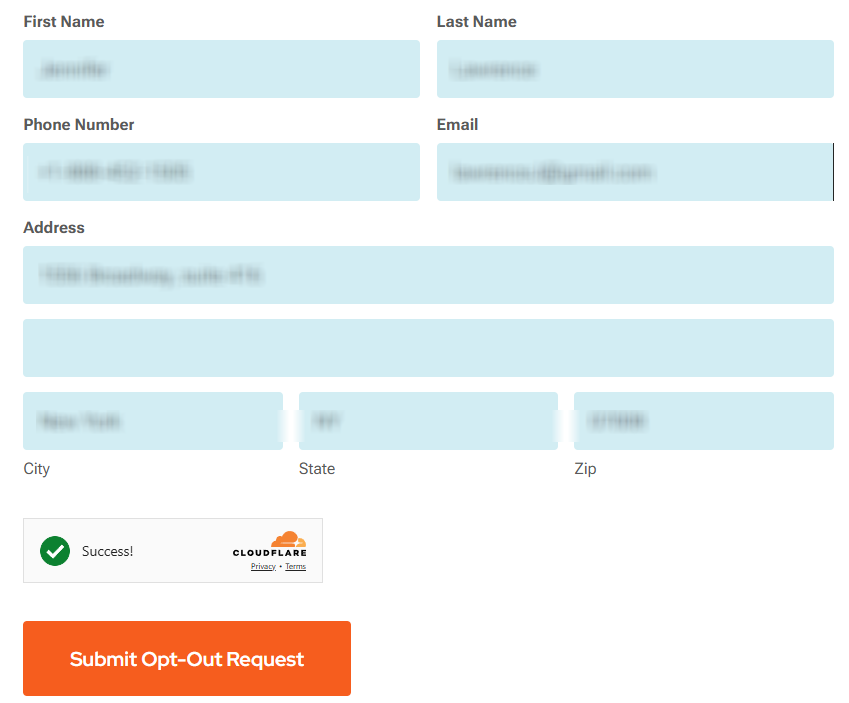
Confirm deletion / Do-Not-Sell request
On the confirmation screen, click the corresponding button. If the page offers an email receipt, enable it; this keeps your digital audit trail tidy.
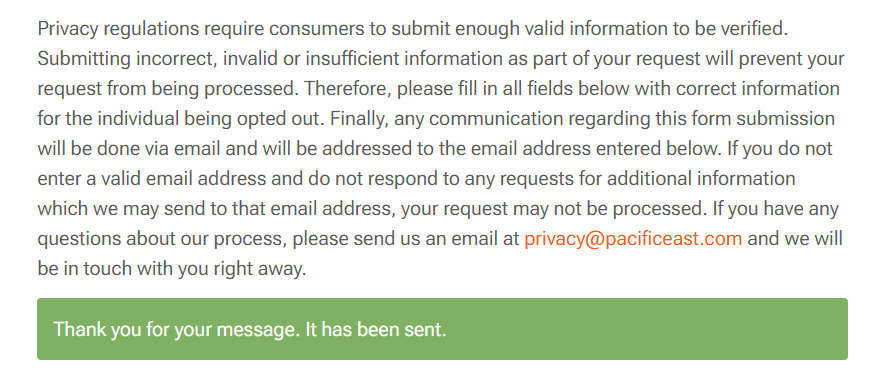
Track confirmation & timeline
Processing typically completes in about 1–3 days. You may see an on-page message instantly and a follow-up email when the action is logged. If a week passes with no response, contact the company at [email protected] or resubmit once. Keep all confirmations in one folder for future checks, and note any organization ticket numbers.
Timelines, Verification & What to Expect
Most queries finish within 1–3 days, with an on-page notice at submission and a follow-up email after review. If you receive a code, use it quickly so the process doesn’t stall. If no message arrives after 7 days, contact the company using the same identifiers you used, or send a concise follow-up via the privacy page and include any confirmation ID. Resubmit once if needed, then wait one more business cycle before trying again. Keep confirmations, dates, and any ticket numbers together. This helps prove your application and makes later data management easier under privacy regulations.
Edge Cases & Troubleshooting
- No access to the original email/phone: ask for an alternative mechanism via the privacy address; provide minimal detail.
- “Record not found”: try prior addresses or spellings; then send a brief, factual description by email.
- CAPTCHA or submission errors: refresh, switch browsers, or use a different network.
- Verification code not arriving: check Spam, filters, and allowlist the domain; ask for a new link/code.
- Form rejects by region (EU/UK/CA): reference applicable law and ask for an accessible alternative channel.
- Account deletion vs. public listing removal: specify whether you need to delete an account or remove a listing.
- Re-submitting after a failed attempt: wait 24 hours, then submit once more with the prior timestamp or ID.
Will my data reappear?
Re-listing can occur because partners, aggregators, privacy brokers, or third parties refresh feeds from multiple source systems and compile updates from public and commercial sources. Reduce risk by keeping confirmations, setting a reminder every 3–6 months, and repeating your opt-out of data if needed. Track addresses, emails, and dates in a simple sheet so you can respond fast. After finishing here, review removals on other people search sites to cover more of the ecosystem and help protect the interests of safety.
Related removals
- BeenVerified
- Spokeo
- Whitepages
- Intelius
- TruthFinder
- PeopleFinders
- Radaris
- FastPeopleSearch
Manual vs Assisted Removal
Manual:
- Pros: strong control; no fees; hands-on learning; repeat monitoring on your schedule.
- Cons: time-consuming; you must track confirmations, re-checks, and any new listings.
Assisted:
- Pros: faster workflows, checks handled, tracking dashboard, recurring checks that help ensure coverage.
- Cons: paid service; less granular control; may still need occasional checks by the user.
“Excellent”
We remove your data for you - faster, verified, trackable.
Discover Which Sites Share Your Private Details—Instantly and Free.
2,865,794 have already used our service
FAQ
Receive expert privacy advice by email - 1-2 times per month, no fluff.
Share Article

Posted by Ava J. Mercer
Ava J. Mercer is a privacy writer at ClearNym focused on data privacy, data broker exposure, and practical privacy tips. Her opt-out guides are built on manual verification: Ava re-tests broker opt-out processes on live sites, confirms requirements and confirmation outcomes, and updates guidance when something changes. She writes with a simple goal - help readers take the next right step to reduce unwanted exposure and feel more in control of their personal data.
76 Articles

