
Opt Out Guides
Oracle Opt Out Guide
Privacy Writer
A. J. MercerAva J. Mercer
Updated
Read
5 min
If your name, address, or phone number is shared beyond what you expect, it can create risks. For consumer privacy, it helps to know what details are stored and how to limit them. Oracle explains that it may process personal information from account information you provide and from interactions with Oracle, such as sites, chats, support, or events. If you use Oracle products or services, you may have more than one place to manage preferences. This guide gives quick steps, screenshot tips, official links, and realistic timelines so you can submit a request, verify it, and keep proof for follow-up.
How to opt out of Oracle
Open the official Privacy Choices page, select the request type, and use the opt-out form. Complete the CAPTCHA, then confirm through a link sent by email. Keep the confirmation message; handling time varies by request.
Checklist:
- Open the official opt-out form
- Enter identifiers (email/name)
- Complete CAPTCHA/verification
- Confirm via link
- Save the confirmation email
- Set a reminder to repeat the request
Find out if your private details were exposed

2,865,794 have already used our service
Oracle – Quick Facts
| Parameter | Value |
| Domain | oracle.com |
| Data Types | Contacts, addresses, identifiers, web/event preference signals |
| Opt-out Methods | Privacy Choices/inquiry form, profile settings, email links |
| Identity Verification | Email confirmation or code (varies by request path) |
| Typical Response Time | Varies (often days to weeks) |
| Re-listing Risk | Medium |
Oracle is a technology company, and its privacy policy explains how Oracle uses consumer data. Data may be collected directly or from third-party sources; it may include sensitive details, and Oracle may also use personal information for analytics and to tailor marketing and sales activities. It references business-to-business services to customers.
Common data you may find:
- Name and known aliases
- Email address and phone number
- Mailing address history
- Contact details used for business outreach
- Company data tied to employer context
- Behavioral data from cookies and web logs
- Event registration and attendance signals
- Preferences for communications and topics
- Account or profile identifiers
Step-by-Step Guide
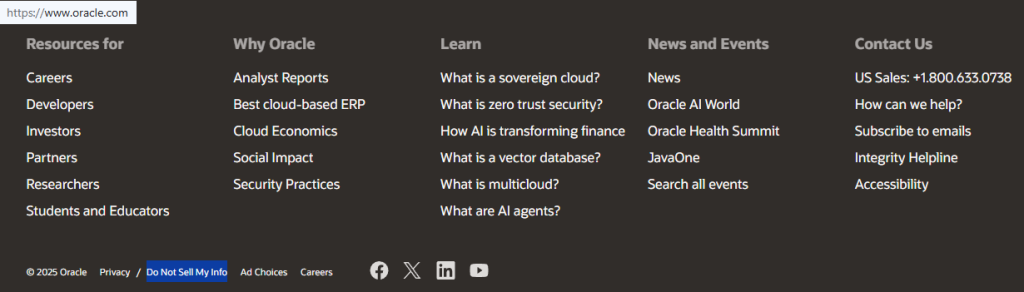
Open the official opt-out form
Go to Oracle’s Privacy Choices page and select the request type that fits what you want (marketing preferences, access, correction, or deletion). You’ll usually see a “Submit” button that opens a hosted form, and some options may redirect you to an account preference screen. Before taking screenshots, redact names, email addresses, and reference IDs. Tip: If the form won’t load, try a private window or a different browser.

Submit your identifiers (email/phone + CAPTCHA)
Fill in the fields, then complete the CAPTCHA. Keep your entry minimal and consistent with what Oracle already has on file. Avoid adding extra details that don’t help match you. Redact any personal information before sharing screenshots with support staff. Tip: Copy your submission text into a notes app so you can reuse it if the session expires.
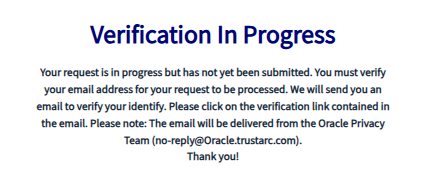
Verify via code or link (email/SMS)
Watch for a verification message in your inbox or via SMS. Some flows send a link; others send a short code you paste into a verification box. If your request is tied to an Oracle Account, you may be asked to sign in through SSO; keep your MFA device ready so the session doesn’t time out. Redact the code and identifiers in any screenshot. Tip: Check Spam/Junk and review your mailbox.
Confirm deletion / Do-Not-Sell request
If you are a California resident, you may see CCPA language; in the EU/EEA, the General Data Protection Regulation (GDPR) may shape what options are shown. Save the confirmation screen and email, and blur everything sensitive in screenshots.
Track confirmation & timeline
Save proof: a redacted screenshot of the success page plus the confirmation email. Some pages show a reference number; keep it in a notes file. If you manage preferences in an account page, actions are available on profile screens. Tip: Set a calendar reminder to check back and watch for any follow-up questions.
Timelines, Verification & What to Expect
You’ll often see an on-page receipt immediately, then an email that confirms the request or asks you to verify again. You might see a browser alert on screen, and requests may be routed globally. Timing depends on applicable laws and regulations, your jurisdiction, and the request type, but most confirmations arrive by email and may include a case number. Oracle notes you can exercise privacy rights by filling out the inquiry form, and it will respond to your request under relevant data protection laws. If you manage settings in an Oracle portal, you may complete parts of the flow by clicking the links and following the corresponding page, then following the corresponding instructions, then taking the actions within the account area, and using actions within each portal, such as changing contact fields. If nothing arrives after the page’s guidance, resubmit once and keep the confirmation.
Edge Cases & Troubleshooting
- No access to the original email/phone: If you are an Oracle customer, use your contract support channel for account issues; otherwise, use account help or the inquiry form explaining you can’t receive verification.
- “Record not found”: Try an alternate email/phone and confirm you’re on the right region page.
- CAPTCHA or submission errors: Clear cache, disable VPN/ad blockers, and retry in a new session.
- Verification code not arriving: Check Spam/Junk, wait 10 minutes, then request a resend once.
- Form rejects the request by region (EU/UK/CA): Use the regional choices shown on the Privacy Choices page for that country.
- Cloud accounts vs privacy requests: A cloud account closure is separate from marketing preference choices; for Oracle cloud console tenancy requests, follow the official delete steps and confirm the warning screen.
- Billing confusion: To cancel a paid subscription for Oracle products and services, use your account billing settings; this is separate from privacy requests.
- Still stuck: please go to the Contact Oracle page for resources and contact information.
Will my data reappear?
Reappearance can happen when datasets refresh, when a record is cached on a server, or when relevant third parties share updated lists for promotion. Data may transfer to third parties in the event of a reorganization, merger, joint venture, or disposition. Outreach can also come from distributors or resellers, including resellers for further follow-up related to your interests about complementary products and services, while providing customers with post-event materials. To reduce repeats, save confirmations, set a 3–6 month reminder, and resubmit quickly if you notice new messages. Check your profile preferences occasionally and keep a simple log (date, request type, result); consider related removals next if outreach continues.
Related removals
- ZoomInfo
- Apollo
- Clearbit
- Lusha
- RocketReach
- Seamless.AI
Manual vs Assisted Removal
Manual:
- Pros: More control over each request path and verification; easier to keep your own confirmation records; helpful if you only need to change one preference.
- Cons: More time and repeated monitoring; more troubleshooting if a form rejects your request.
Assisted:
- Pros: Faster workflows and a tracking dashboard; recurring checks so you don’t miss re-listings.
- Cons: You still need to share identifiers for matching; some products have separate preference centers, so coverage can vary.
“Excellent”
We remove your data for you - faster, verified, trackable.
Discover Which Sites Share Your Private Details—Instantly and Free.
2,865,794 have already used our service
FAQ
Receive expert privacy advice by email - 1-2 times per month, no fluff.
Share Article

Posted by Ava J. Mercer
Ava J. Mercer is a privacy writer at ClearNym focused on data privacy, data broker exposure, and practical privacy tips. Her opt-out guides are built on manual verification: Ava re-tests broker opt-out processes on live sites, confirms requirements and confirmation outcomes, and updates guidance when something changes. She writes with a simple goal - help readers take the next right step to reduce unwanted exposure and feel more in control of their personal data.
76 Articles

