
Opt Out Guides
Numberville Opt Out Guide
Privacy Writer
A. J. MercerAva J. Mercer
Updated
Read
5 min
Removing your data helps protect your privacy by limiting exposure of your name, address, and phone while reducing risks like fraud. Numberville provides a reverse phone lookup that can display a public-facing profile with contact information compiled from public records and commercial sources (neutral description; details vary). In this thorough guide, you’ll get step-by-step instructions, screenshots, and official links, including the opt-out page and privacy references. See the tips to handle requests manually, strengthen privacy and security, and remove your info efficiently.
How to opt out of Numberville
Go to the official page or link. Then, find your listing and make your request with your email/phone. Confirm via a verification code or link. Processing typically takes several days and may extend up to 30 days depending on volume.
Checklist:
- Open the official opt-out form
- Enter identifiers (email/phone)
- Complete CAPTCHA/verification
- Confirm via code/link
- Save the confirmation email
- Set a reminder to re-opt out
Find out if your private details were exposed

2,865,794 have already used our service
Numberville – Quick Facts
| Parameter | Value |
| Domain | numberville.com |
| Data Types | contacts, addresses, phone details, and possible social identifiers |
| Opt-out Methods | web form (online opt-out) |
| Identity Verification | code via email/SMS or confirmation email |
| Typical Response Time | several days to one month |
| Re-listing Risk | medium |
About Numberville
The platform is a people-search site focused on reverse phone lookup. It aggregates and displays consumer data from public and commercial sources and lets visitors view basic contact details tied to a number. Opt-out is handled via an online form referenced on their site resources.
Common data you may find:
- Names (and known aliases)
- Phone numbers
- Email addresses
- Current and past addresses
- Age range/year of birth (if available)
- Relatives/household links
- Property references (where available)
- Court or liens mentions (if available)
- Social profile links (if available)
- Basic location/city metadata
Step-by-Step Guide
Open the official opt-out form
Visit the website’s privacy page. If needed, locate your listing via the site’s search bar first. Then, choose the option to report/remove. Look for the buttons “Do Not Sell My Info.” Keep your browser’s first page of search results handy in case you need to re-find the listing later. Avoid sharing sensitive information beyond what’s requested.

Submit your identifiers (email/phone + CAPTCHA)
Enter your contact information (email/phone). If shown, also enter the record number already attached to the listing. Add a short note asking for your information to be removed. Complete the verification; review the form fields before you submit. Tip: Use a masked email to reduce marketing follow-ups later, or if you plan to delete the mailbox afterward.

Verify via code or link (email/SMS)
Check your inbox for a confirmation message. Click the verification link or enter the code to confirm the opt-out process. If you don’t get the message after a few minutes, resubmit the request once. Ensure there were no typos in your email or phone. Keep this message for your records to trace progress.
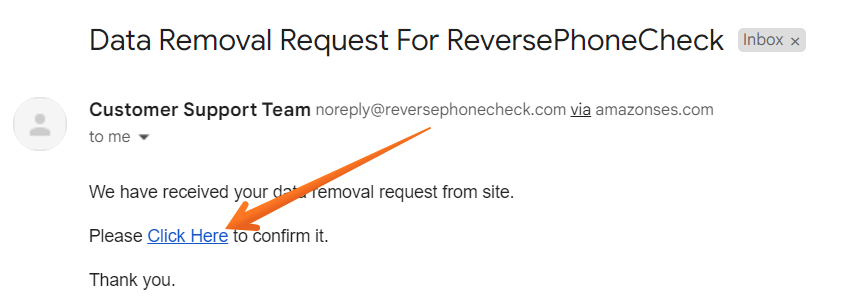
Confirm deletion / Do-Not-Sell request
On the confirmation page, review any on-screen status about your removal. If you see options related to do-not-sell/share, select the applicable choice to remove your personal information and limit processing. You can also request to delete the listing reference if offered. Do not upload a social security number or other sensitive personal information; standard contact details are usually enough.
Track confirmation & timeline
Save the confirmation email and note the date. Set a calendar reminder to check back. If nothing changes after the stated window, use the site’s contact page to follow up, then resubmit if needed. Blur any personal details if you capture screenshots for your records.
Timelines, Verification & What to Expect
Most requests are processed within a practical window of several days. However, some take up to 30 days depending on workload. Confirmation typically appears on-page and via email after you verify through a code or link. Keep the confirmation message to trace the status. If you don’t see progress after the upper window, contact support through the site’s privacy or contact page and resubmit once. Results vary because data may originate from public records and commercial sources, and some updates depend on when the database refreshes. When removing your information, be precise about the personal data you want suppressed. Keep a simple log for ongoing data management.
Edge Cases & Troubleshooting
- No access to the original email/phone: Use an available inbox and reference the record number. Explain the situation in your note.
- “Record not found”: Try alternate name formats or the exact phone; use a search engine and the exact URL if possible.
- CAPTCHA or submission errors: Retry after clearing cache or using another browser; ensure fields are complete.
- Verification code not arriving: Check Spam, wait a few minutes, then resubmit once.
- Region-limited form (EU/UK/CA): Use the privacy contact route if the online form rejects your region or doesn’t operate in your area.
- Account deletion vs. listing removal: If you need to cancel an account, complete that separately from suppressing a public profile.
- Re-submitting after a failed attempt: Wait a short period, then resubmit requests with the correct identifiers.
Will my data reappear?
Listings can reappear when partner feeds refresh, aggregators republish, or resellers sync older copies. This is common across people search sites and people-search sites that rely on many data sources. To reduce recurrence, set a reminder every 3–6 months, keep all confirmations, and re-submit quickly if you see a reappearing event. Regularly review related removal information from data broker sites to keep your privacy posture strong. Save notes about where you sent requests so you can automate reminders and protect your privacy over time. Avoid sharing unnecessary info that could refill a profile elsewhere; aim to remove your personal information from data where possible.
Related removals
- Whitepages
- Spokeo
- BeenVerified
- NumberGuru
- PeopleFinder
- USPhoneBook
- TruePeopleSearch
- AnyWho
Manual vs Assisted Removal
Manual:
- Pros: Full control, direct contact with each data broker, visibility into each submission, precise timing, and the ability to update contact data.
- Cons: Time-consuming, requires repeat monitoring, scattered forms, and ongoing legwork.
Assisted:
- Pros: Faster outreach across many data brokers in the industry, verification, tracing dashboard, recurring checks, and support for broad data broker opt-out coverage.
- Cons: Less hands-on control, subscription costs, and occasional need to verify identity.
“Excellent”
We remove your data for you - faster, verified, trackable.
Discover Which Sites Share Your Private Details—Instantly and Free.
2,865,794 have already used our service
FAQ
Receive expert privacy advice by email - 1-2 times per month, no fluff.
Share Article

Posted by Ava J. Mercer
Ava J. Mercer is a privacy writer at ClearNym focused on data privacy, data broker exposure, and practical privacy tips. Her opt-out guides are built on manual verification: Ava re-tests broker opt-out processes on live sites, confirms requirements and confirmation outcomes, and updates guidance when something changes. She writes with a simple goal - help readers take the next right step to reduce unwanted exposure and feel more in control of their personal data.
76 Articles

