
Opt Out Guides
NJ Parcels Opt Out Guide
Privacy Writer
A. J. MercerAva J. Mercer
Updated
Read
5 min
NJ Parcels is a website that provides real estate details. They surface your full name, address, and other property information. The platform aggregates information from public records and third-party sources to display contact information, property ownership, and tax assessments.
How to opt out of NJ Parcels
Go to the official opt-out page (information from njparcels.com), enter minimal details (email/phone), complete one-time verification, and confirm. Processing typically takes 3–7 days. Keep the confirmation email and set a reminder to re-check search results because data brokers like this may refresh their databases continuously.
Checklist:
- Open the official opt-out form
- Enter identifiers (email/phone)
- Complete CAPTCHA/verification
- Confirm via code/link
- Save the confirmation email
- Set a reminder to re-opt-out
Find out if your private details were exposed

2,865,794 have already used our service
NJ Parcels – Quick Facts
| Parameter | Value |
| Domain | njparcels.com |
| Data Types | Contacts, addresses, property records, potential voter records |
| Opt-out Methods | Web form/phone |
| Identity Verification | Confirmation email or code |
| Typical Response Time | 3–7 days |
| Re-listing Risk | Medium |
NJParcels is a data broker website focused on New Jersey property lookups. It aggregates information from public records and commercial sources to display real estate and property data. The service helps users search properties by address and view parcel details in one place. It provides real estate and property insights for New Jersey residents online.
Common data you may find:
- Names (and known aliases)
- Current and past places of residence
- Property & real-estate records
- Owner information
- Property tax and assessments
- Voter registration data (if available)
- Sales records and transaction dates
- Assessor IDs and parcel identifiers
- Map links
- Municipality and county references
Step-by-Step Guide
Open the official opt-out form
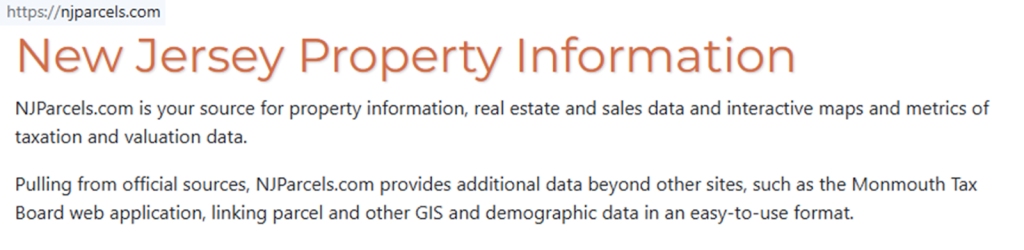
Visit the official opt-out/Do-Not-Sell page. You can also use the PeopleFinders flow as a model: click the “Next” button, then proceed. Look for a privacy or redaction request link. Before you proceed, confirm you’re on the correct domain and that the page references the state of New Jersey context. Tip: Use a disposable email address if you prefer. Blur any private data if you capture screenshots for your records. Remove your information phrasing when applicable.
Submit your identifiers (email/phone + CAPTCHA)
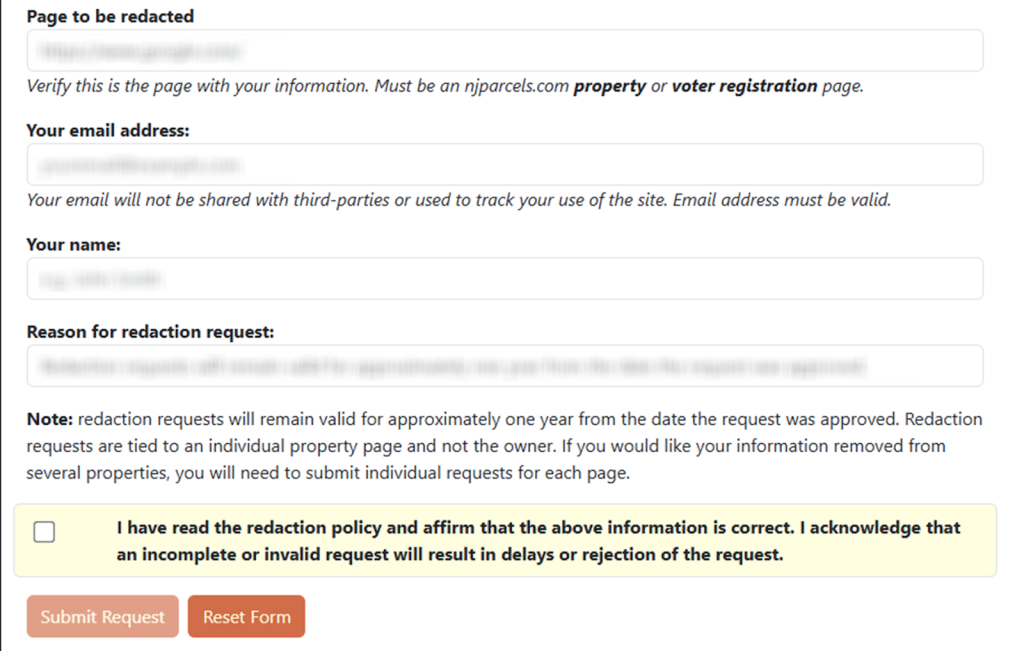
Enter your first, middle, and last name, as well as your primary email. Provide property data if prompted. Complete the CAPTCHA. If the form asks for city, county, or parcel details, add them for clarity. Some forms include consent checkboxes; read them carefully. Tip: If the page supports a phone number, add it to speed verification. If an error appears, retry once, then consider calling support.
Verify via code or link (email/SMS)
Check your inbox (and Spam) for a single-use link. Select the “Send” action only once to avoid duplicates. If you receive a path to a redaction request form, open it promptly. For SMS, enter digits exactly. Tip: If nothing arrives within an hour, resend, then try an alternative channel. Keep the message for monitoring.
Confirm deletion / Do-Not-Sell request
On the confirmation screen, choose the appropriate option: deletion/redaction or Do-Not-Sell/Share. Review any summary text to ensure personal information will be removed. Where available, include a profile URL or a specific property address. Tip: Take a timestamped screenshot (with sensitive items blurred) for your records and peace of mind. Consider mentioning to remove your info if a field asks for it.
Track confirmation & timeline
You should see an on-page notice and receive an email that your case is queued. Typical timing is 3–7 days, though some databases act faster. Set a calendar reminder to check search results afterward. Tip: If you spot personal information from data broker sites like this or sites like njparcels.com later, repeat the opt-out. Keep confirmations so future redaction is easier, and note any information available that has changed.
Timelines, Verification & What to Expect
Most cases finish in about 3–7 days, depending on workload. Confirmation usually appears by email, with some pages also showing an on-screen note after you finish. If nothing arrives, check Spam/Promotions, then confirm your filters. After 7 days without movement, use the support link on the privacy page to get help or re-try once with precise details. Keep your screenshots and messages; they help if you need a follow-up. Expect some chance of reappearance because third-party sources may republish property information. Periodically re-check and repeat steps if needed to protect your privacy and reduce exposure of personal data.
Edge Cases & Troubleshooting
- No access to the original email/phone: Use a new inbox, add a brief note in the form, then call the phone line.
- “Record not found”: Try alternate spellings, a different address, or county-level details.
- CAPTCHA or submission errors: Clear cache, switch browsers, and retry once.
- Verification code not arriving: Check Spam, whitelist sender, resend one time.
- Region-limited portal (EU/UK/CA): Call support if the online pathway is blocked.
- Account deletion: Account closure doesn’t affect public records; use a redaction path.
- Re-trying after failure: Wait a day, double-check names and parcel identifiers, then try again.
Will my data reappear?
Data can resurface when aggregators ingest material from partners, mirrors, or resellers. That’s common across data brokers like these and doesn’t mean your earlier action failed. To reduce recurrence, set a reminder every 3–6 months, keep confirmations, and act quickly if a profile returns. Also, review related removals, since connected services may mirror similar records, including information from NJParsels.com if you encounter that typo elsewhere. This steady habit of checking helps maintain control without absolute promises and supports a smaller digital footprint.
Related removals
- PeopleFinders opt-out
- Whitepages
- BeenVerified
- Spokeo
- TruthFinder opt-out
- Intelius opt-out
- Radaris
- FastPeopleSearch opt-out
Manual vs Assisted Removal
Manual:
Pros: Full control, better insight into what’s submitted, no fees, and you decide when to re-check.
Cons: Time investment, repeat monitoring, and possible reappearance mean ongoing effort.
Assisted:
Pros: Faster execution, verification handled for you, tracking dashboard, recurring checks, and status updates.
Cons: Subscription cost, less hands-on control, and occasional confirmations still needed.
“Excellent”
We remove your data for you - faster, verified, trackable.
Discover Which Sites Share Your Private Details—Instantly and Free.
2,865,794 have already used our service
FAQ
Receive expert privacy advice by email - 1-2 times per month, no fluff.
Share Article

Posted by Ava J. Mercer
Ava J. Mercer is a privacy writer at ClearNym focused on data privacy, data broker exposure, and practical privacy tips. Her opt-out guides are built on manual verification: Ava re-tests broker opt-out processes on live sites, confirms requirements and confirmation outcomes, and updates guidance when something changes. She writes with a simple goal - help readers take the next right step to reduce unwanted exposure and feel more in control of their personal data.
76 Articles

