
Opt Out Guides
My Health Record Opt Out Guide
Privacy Writer
A. J. MercerAva J. Mercer
Updated
Read
5 min
This portal can help you access your health information online and review medical data in one place. That convenience also raises ethical questions: if your name, address, or phone number is exposed, your privacy can be impacted. The service generally displays information like medicines, allergies, and test results that a healthcare provider uploads. It also shows items that may be available from connected services. This guide provides quick steps, screenshot tips, official links, timelines, and troubleshooting so you can protect your settings without panic.
How to opt out of My Health Record
Use the gov website via myGov to close your account or to opt out of sharing. Go to the official request page, submit your email/phone, and confirm via a code or link; you can also mail the request using the form. Online changes are often immediate, while mailed requests usually take 10–20 business days.
Checklist:
- Open the official form
- Enter identifiers (name/email/phone)
- Complete CAPTCHA/verification
- Confirm via code/link
- Save the confirmation email
- Set a reminder to resubmit
Find out if your private details were exposed

2,865,794 have already used our service
My Health Record – Quick Facts
| Parameter | Value |
| Domain | myhealthrecord.gov.au |
| Data Types | contact information, addresses, identifiers, and some health data |
| Opt-out Methods | myGov portal or mail request |
| Identity Verification | code via email/SMS; ID checks |
| Typical Response Time | online: same day; mail: 10–20 business days |
| Re-listing Risk | low |
About My Health Record
It is an electronic health service that stores health data so you can view it and share information for the coordination of care. It draws from health sources, including Medicare, uploads by health care providers, and other providers involved in your care, and it supports information sharing across the exchange in an electronic way, with access controls and privacy protection. In limited cases, information and resources may be disclosed to organizations when needed for system operations, and the service is built with transparency and security standards.
Common data you may find:
- Names and aliases
- Phone numbers
- Email addresses
- Current and past addresses
- Medicines and allergies
- Tests and procedures
- Medical history details
- View history log
- Representative settings and permissions
- Alerts and notifications
Step-by-Step Guide
Open the official opt-out form
Sign in through myGov on secure websites and open the linked service for your account. In the top navigation, select the profile/settings area, then find the option to permanently close your registration; to cancel, choose that option at the end of the page. If you use the PDF request, start it in electronic form, then print and sign it; keep a copy in electronic format for your files. For screenshots, blur personal IDs before saving. Tip: Use a private browser window if you are on a shared computer.

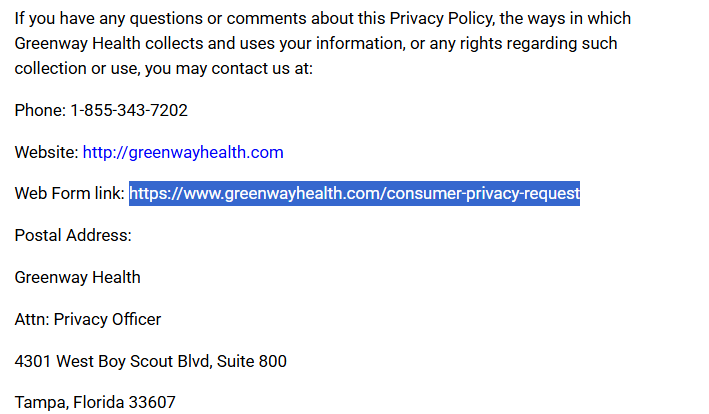
Submit your identifiers (email/phone + CAPTCHA)
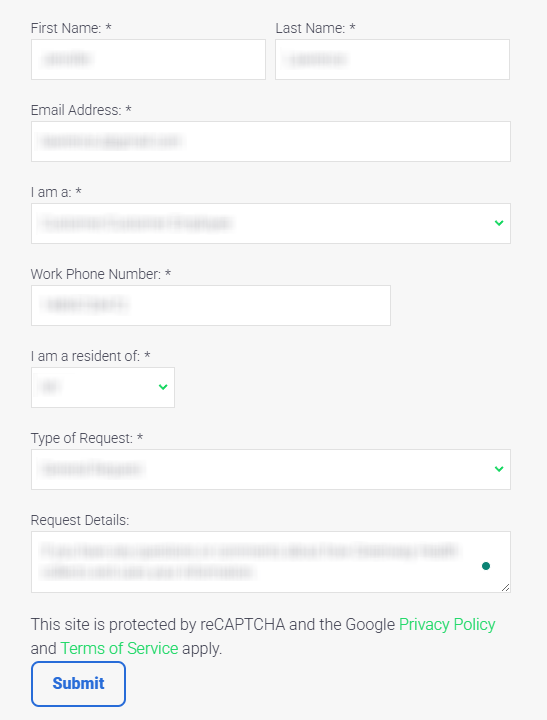
Enter your email/phone in the confirmation fields. Complete any security check (such as CAPTCHA) if it appears, then submit. If you mail the request, you need to fill every required field, add a phone number, and attach a certified ID as instructed. Incomplete details can delay processing. For screenshots, redact numbers and keep only the section that shows submission status. Tip: Save a timestamped note of what you sent and where.
Verify via code or link (email/SMS)
Watch for a message with a code or link and verify promptly. Check Spam/Junk and SMS filters. If you requested mail notices, a letter might arrive. If you requested SMS or email, you can receive confirmation electronically. For screenshots, redact the code and other personal details. Tip: If you see no message within 24 hours, request a resend and avoid repeated attempts.
Confirm deletion / Do-Not-Sell request
Read the final statements carefully before you confirm deletion, since it is permanent and affects what is visible in the portal. A clinic, hospital, or other provider may still keep copies outside this system, including billing companies, so your medical records there may not change. If you prefer limits instead of closing everything, use the Privacy & Access menu to set document controls and safeguard confidentiality; this is also where privacy and security details are explained. Tip: Review the privacy policy before you submit, and keep your screenshots redacted.
Track confirmation & timeline
Save the on-screen confirmation or mailed letter, and store it as confidential evidence of what you requested. If you previously opted out and later opt back in, keep both confirmations so you can compare what changed; this also helps if you need to explain information linked to your account. Tip: Set a calendar reminder every 3–6 months to review logs, settings, and any insurer notices that reference the portal.
Timelines, Verification & What to Expect
Online confirmations often appear right away and may also arrive by email or SMS; mailed requests commonly take 10–20 business days after delivery. If no confirmation arrives after 20 business days, use the support details and resubmit once. You may be able to limit sharing without closing the account by using the document controls (opt out of electronic sharing) and the sharing settings, and you can opt in again later if you want a new account. If you suspect a breach, change passwords, check notifications, and review your log; some sharing can be required by law for public health.
Edge Cases & Troubleshooting
- No access to the original email/phone: use the mail request and include updated contact information.
- “Record not found”: confirm your myGov-linked details match and try again later.
- CAPTCHA or submission errors: switch browsers, disable blockers, and retry once.
- Verification code not arriving: check filters, then request a resend once.
- Form rejects the request by region (EU/UK/CA): Medicaid users elsewhere should use local tools.
- Account closure vs. clinic copies: your healthcare provider may still keep separate copies and private documents.
- Re-submitting after a failed attempt: wait 24 hours, then submit once more.
- Access confusion: if an HIE is involved, ask the clinic which providers are connected and what their local controls allow.
Will my data reappear?
For this portal, closing an account is designed to be permanent, but information outside the portal can persist. New clinical uploads can appear again only if you create a new account later (opt-in) or choose to opt back, and some details may be shared across other systems. Your health plan, health insurance, insurance companies, and other third parties may keep copies of medical information for care, claims, or retention, and those copies can include protected health information. To reduce recurrence, keep confirmations, set a 3–6 month reminder, and re-submit quickly if needed.
Related removals
- Epic MyChart
- Oracle Health (Cerner)
- athenahealth patient portal
- eClinicalWorks healow
- FollowMyHealth
- U.S. Department of Veterans Affairs
- Medicare Blue Button
- Apple Health Records
Manual vs Assisted Removal
Manual:
- Pros: more control, faster personal access to settings, and a clear paper trail.
- Cons: time investment, repeated monitoring, and extra work if you change emails/phones or your health plan changes.
Assisted:
- Pros: speed, verification help, a tracking dashboard, and recurring checks to protect against relisting-style issues.
- Cons: you must permit a service to act and grant authorization, which can feel less direct.
“Excellent”
We remove your data for you - faster, verified, trackable.
Discover Which Sites Share Your Private Details—Instantly and Free.
2,865,794 have already used our service
FAQ
Receive expert privacy advice by email - 1-2 times per month, no fluff.
Share Article

Posted by Ava J. Mercer
Ava J. Mercer is a privacy writer at ClearNym focused on data privacy, data broker exposure, and practical privacy tips. Her opt-out guides are built on manual verification: Ava re-tests broker opt-out processes on live sites, confirms requirements and confirmation outcomes, and updates guidance when something changes. She writes with a simple goal - help readers take the next right step to reduce unwanted exposure and feel more in control of their personal data.
76 Articles

