
Opt Out Guides
MugshotLook Opt Out Guide
Privacy Writer
A. J. MercerAva J. Mercer
Updated
Read
5 min
Seeing personal information online can create a privacy risk, especially when a page shows your name, address, and contact details together. Mugshotlook.com may display information that it sources from public records and other various sources, then presents it on a single searchable webpage. This opt-out guide explains what you can do to remove your information, what details to prepare, and where to find the official site. You’ll also get a clear timeline, simple tips, and troubleshooting so you can protect your identity without guesswork.
How to opt out of MugshotLook
Start on the site footer and open the MugshotLook opt-out form. Enter identifiers, pass verification, then confirm via a link; it usually takes 7–30 days.
Checklist:
- Open the official form
- Enter identifiers (email/phone)
- Complete CAPTCHA/verification
- Confirm via code/link
- Save the confirmation email
- Set a reminder to re-opt-out
Find out if your private details were exposed

2,865,794 have already used our service
MugshotLook – Quick Facts
| Parameter | Value |
| Domain | mugshotlook.com |
| Data Types | addresses, emails, possible identifiers |
| Opt-out Methods | web form/email/mail |
| Identity Verification | code by message |
| Typical Response Time | 7–30 days |
| Re-listing Risk | medium |
The website is a data broker directory that can collect information from public records and commercial sources, then display personal information in a searchable database. It provides choices to opt out and to remove entries that show such data as addresses or social media profiles, depending on what appears on the website.
Common data you may find:
- Names and known aliases
- Current and past address history
- Emails
- Relatives or household profiles
- Social media profiles
- Property records (where available)
- Bankruptcy (if available)
- Criminal records (if available)
Step-by-Step Guide
Open the official opt-out form
Go to the website and scroll to the footer area. Look for “Do Not Sell Or Share My Personal Info.” Then, click it to open the opt-out portal. Avoid look-alike pages. Verify the domain before entering anything. If you take a screenshot for your records, blur or redact personal information first. Tip: If a pop-up blocks the page, disable extensions and reload once.

Submit your identifiers (email/phone + CAPTCHA)
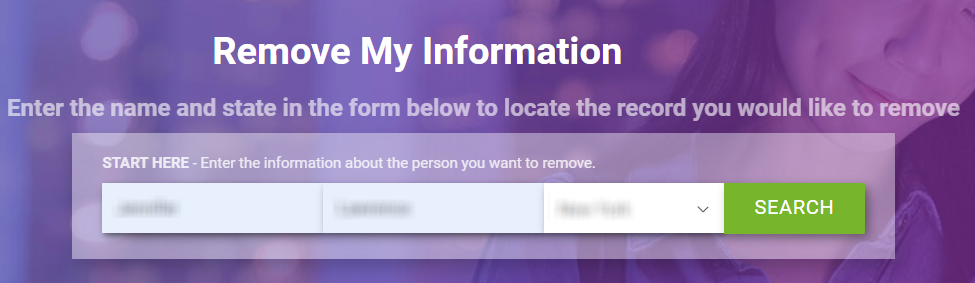
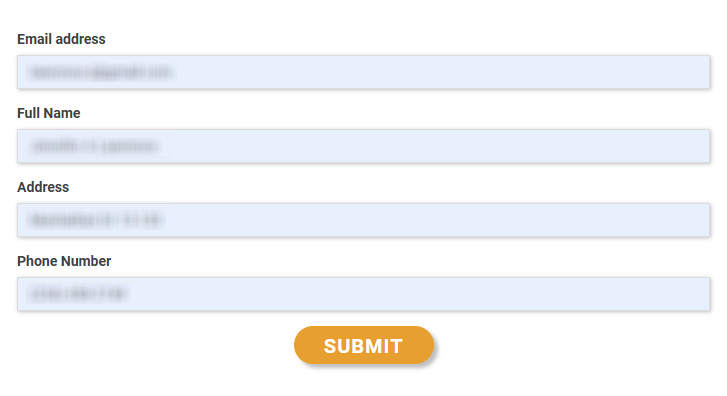
On the main screen, enter your first name and last name, as well as the state. Add your email and phone number only if the form asks for them. Use any state selector if present, then click the Search button to view matches. Choose the correct row and click Continue to proceed. Keep inputs minimal so you don’t share extra personal information. Tip: If the form errors, refresh once or try a private window, then try again.
Verify via code or link (email/SMS)
After you proceed, you’ll receive a message with a link. Check your email inbox. Follow the on-screen steps to verify. This should complete the process. Save proof of what you did. Redact personal information before sharing screenshots. Tip: If nothing arrives, look in Spam or Promotions and use the resend option once.
Confirm deletion / Do-Not-Sell request
Once verification succeeds, you should reach a final screen where you can remove your information and send the opt-out request. Click the final button to finish. Keep any notes short (full name + listing URL is usually enough). Tip: If you see multiple matches for the same person, repeat the steps for each entry you want removed.
Track confirmation & timeline
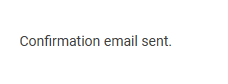
After the final step, save the report number if one appears and keep the single confirmation email in a folder for later reference. Processing can take time, so wait the full 7–30 day window before following up. If the page still appears after that window, repeat the process. Tip: Set a 3–6 month reminder so you can remove your info again if re-listing happens.
Timelines, Verification & What to Expect
After verification, processing often takes 7–30 days. You may see an on-page status message right away, and you may receive one email within minutes, depending on the flow used. If you don’t receive anything or nothing changes after the full window, use the site’s contact information once and include only the minimum facts needed (your full name and the corresponding URL). If you already repeated the steps one time, avoid repeated daily attempts, because that can restart the workflow.
Edge Cases & Troubleshooting
- No access to the original email/SMS: use a current email and include the corresponding URL; ask for an alternate verification method.
- “Record not found”: try name variants, nearby cities, or a different state; also, re-run the search with fewer filters.
- CAPTCHA errors: refresh, clear cookies, or try another browser; disable extensions and try again once.
- Code not arriving: wait 15 minutes, then use the resend option one time.
- Form rejects the attempt by region (EU/UK/CA): use the privacy choices shown; if mail is offered, use that method.
- Account deletion vs. public listing removal confusion: a paid plan is separate from the public page; follow the listing steps.
- Re-submitting after a failed attempt: wait 24 hours, then try again and save new proof.
Will my data reappear?
It can. A data broker may refresh its database from aggregators, partner feeds, and resellers, so a page can return after you remove it. The risk varies, but it’s smart to keep proof, set a 3–6 month reminder, and re-run the same steps quickly if you see your information again. Other data broker sites like MugshotLook can also store other sensitive data. Some services sell your personal information for marketing, so reducing exposure across multiple sources helps.
Related removals
- BeenVerified
- Intelius
- PeopleFinders
- Spokeo
- Whitepages
- Radaris
Manual vs Assisted Removal
Manual:
- Pros: more control, lower cost, and you can remove your data at your own pace while keeping your own records.
- Cons: it takes time, you must monitor for re-listing, and you may need to repeat steps across data brokers like multiple directories.
Assisted:
- Pros: faster workflows, verification help, tracking dashboards, and recurring checks.
- Cons: it costs money, and you still need accurate details for matching.
“Excellent”
We remove your data for you - faster, verified, trackable.
Discover Which Sites Share Your Private Details—Instantly and Free.
2,865,794 have already used our service
FAQ
Receive expert privacy advice by email - 1-2 times per month, no fluff.
Share Article

Posted by Ava J. Mercer
Ava J. Mercer is a privacy writer at ClearNym focused on data privacy, data broker exposure, and practical privacy tips. Her opt-out guides are built on manual verification: Ava re-tests broker opt-out processes on live sites, confirms requirements and confirmation outcomes, and updates guidance when something changes. She writes with a simple goal - help readers take the next right step to reduce unwanted exposure and feel more in control of their personal data.
76 Articles

