
Opt Out Guides
MineralHolders Opt Out Guide
Privacy Writer
A. J. MercerAva J. Mercer
Updated
Read
5 min

Removing your data from the MineralHolders website reduces the privacy risk of having your name, address, phone, and property details publicly available. The platform collects information from public records, commercial datasets, oil and gas filings, and mineral/royalty summaries and puts it into a public profile. Rules can differ by state. Further, you’ll see the official page, what to provide, and what to do if the result is delayed. You’ll also learn what to do if a record tied to a relevant mineral entry returns later or if a field is not accurate.
How to opt out of MineralHolders
Open their removal page, send the needed information, confirm by email/SMS, and wait 1-7 days for the listing to be limited. To finish online, stay on the official website only.
Checklist:
- Open the official form
- Enter identifiers (email/phone)
- Complete CAPTCHA/verification
- Confirm via code/link
- Save the confirmation email
- Set a reminder to resubmit later
Find out if your private details were exposed

2,865,794 have already used our service
MineralHolders – Quick Facts
| Parameter | Value |
| Domain | mineralholders.com |
| Data Types | contacts, addresses, mineral/royalty records, property notes |
| Opt-out Methods | web form/email |
| Identity Verification | code by email or SMS |
| Typical Response Time | 1–7 days |
| Re-listing Risk | medium |
MineralHolders is a public data service that shows ownership and mineral details taken from public records, commercial sources, and industry/energy publications, so visitors can review what is posted. It may display mineral, royalty, and property-related information, but it is not a government website.
Common data you may search for:
- Names and contact information
- Current or past addresses
- Mineral and royalty interests
- Property and well references
- Company or operator names
- State/county record notes
- Oil and gas production items
- Business or ownership relations
- Energy-related accounts
Step-by-Step Guide
Open the official opt-out form
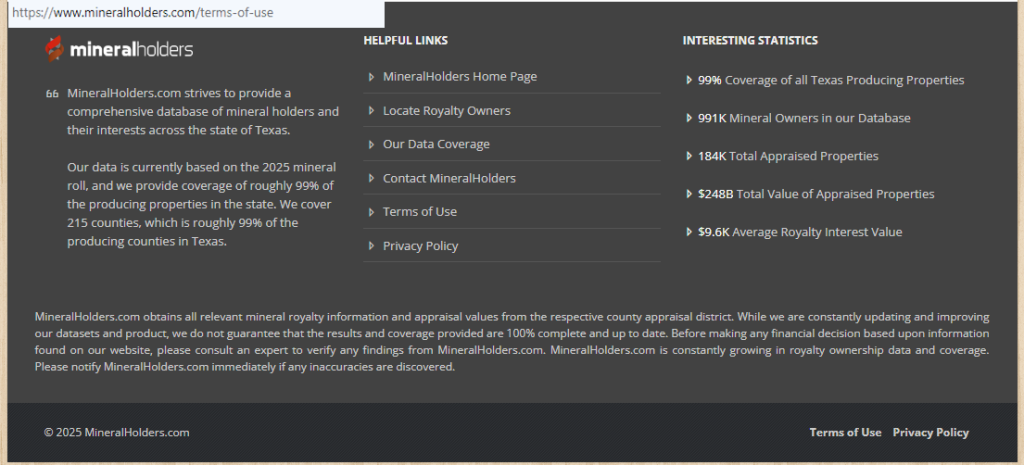
Open the official website and look for the Terms of Use page; avoid any unauthorized copy. Read the short note before you sign in or continue as a guest. You can also scan the help section to see current instructions.
Submit your identifiers (email/phone + CAPTCHA)
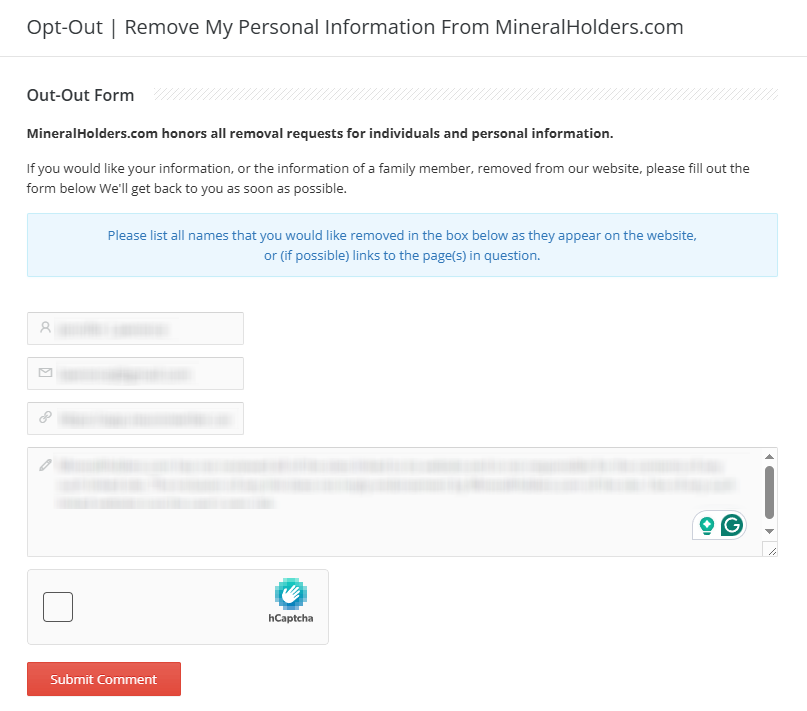
On the page, fill out the required fields with your name and contact information so they can produce a match against the base record. Complete the CAPTCHA. If you’re not comfortable attaching a document, blur sensitive parts.
Verify via code or link (email/SMS)
Check your inbox or phone for the message and enter the code to complete verification. This confirms your right to limit personal information stored about you. If the message is missing, check Spam or resend it once.
Confirm deletion / Do-Not-Sell request
Choose the option that matches your purpose: hide the entry, limit display, or mark it as do not sell/share. Mention if the record shows a Texas item, a 2025 mineral roll detail, or a royalty line you want hidden. Add notes for custom removals if there is more than one listing.

Track confirmation & timeline
Keep the email, screenshot, and any code in one place. Most changes appear in 1–7 days, but data coming from local sources can take longer. If you see no change after 14 days, go back to the website, look for the contact option, and send a short follow-up. Re-check the page later to confirm.
Timelines, Verification & What to Expect
The platform currently handles most removals in about 1–7 days. Confirmation usually arrives by email, though sometimes it is shown on the page right after verification. If nothing happens after 14 days – especially for records tied to a 2025 mineral roll or to royalty/material from counties – submit again and note the term of the first query. If you still see the listing, contact the support and give the reference number. Keep in mind that some sources must keep limited information for legal or operational reasons, so permanent removal cannot be guaranteed.
Edge Cases & Troubleshooting
- No access to original email/phone: explain the change and give a current contact.
- “Record not found”: resend with additional information so staff can search for it faster.
- CAPTCHA or upload errors: try another browser/device.
- Code not arriving: check Spam, then resend once.
- Region blocks (EU/UK/CA): note the relevant law and ask for manual handling.
- Account vs listing: cancel the account, then submit the public removal.
- Lease-linked entry: add the lease number in the notes.
- Need corrections: say which inaccuracies are discovered.
Will my data reappear?
Records can return when source feeds refresh, when counties republish energy material, or when data brokers may re-aggregate from partner sites. The site can show the same profile again even after you clear it. Always opt to keep your confirmation emails, set a 3–6 month reminder, and repeat the same steps if the entry shows up. This helps you react quickly while still keeping personal information under control.
Related removals
- EnergyOwnerView
- SubsurfaceRightsHub
- CountyOilandGasRecords
- LeaseIndexOnline
- RoyaltyContactFinder
- SurfaceOwnersDirectory
- WellProductionLookup
- LandAndSubsurfaceProfiles
Manual vs Assisted Removal
Manual:
- Pros: Full control, no extra cost, and you can use free tools and official pages to work through the sites covered.
- Cons: It’s slow across many listings, and there are actually several disadvantages when energy and property exposures keep refreshing.
Assisted:
- Pros: Platforms automate repeat checks, show a data broker directory, and provide tracking; good for business users who need a comprehensive clean-up.
- Cons: Paid plans starting at certain tiers, and identity steps may still be needed.
“Excellent”
We remove your data for you - faster, verified, trackable.
Discover Which Sites Share Your Private Details—Instantly and Free.
2,865,794 have already used our service
FAQ
Receive expert privacy advice by email - 1-2 times per month, no fluff.
Share Article

Posted by Ava J. Mercer
Ava J. Mercer is a privacy writer at ClearNym focused on data privacy, data broker exposure, and practical privacy tips. Her opt-out guides are built on manual verification: Ava re-tests broker opt-out processes on live sites, confirms requirements and confirmation outcomes, and updates guidance when something changes. She writes with a simple goal - help readers take the next right step to reduce unwanted exposure and feel more in control of their personal data.
76 Articles

