
Opt Out Guides
MediaWallah Opt Out Guide
Privacy Writer
A. J. MercerAva J. Mercer
Updated
Read
5 min

Removing your data from MediaWallah reduces exposure of your name, address, and phone number, improving privacy. MediaWallah is a data broker that aggregates records and may display profiles sourced from public records and commercial providers – information from various origins. In this opt-out guide, you’ll get quick steps, screenshots, and official links to request suppression. We outline where to go on the official website, how to verify, and how long it typically takes. You’ll also find basic troubleshooting if a code or email doesn’t arrive, plus a short checklist to repeat the request if needed. If you prefer voice assistance, see the section on support and when to call.
How to opt out of MediaWallah
Visit the Do-Not-Sell page, submit your name and email, then verify via a code or link. Processing usually completes within 7–15 days. Keep your confirmation so you can opt again if your listing returns.
Checklist:
- Open the official opt-out form
- Enter identifiers (name/email) and request details
- Complete CAPTCHA/verification
- Confirm via code/link
- Save the confirmation email
- Set a reminder to re-opt-out
Find out if your private details were exposed

2,865,794 have already used our service
MediaWallah – Quick Facts
| Parameter | Value |
| Domain | mediawallah.com |
| Data Types | Contacts, addresses, identifiers, possible social/profile links |
| Opt-out Methods | Web request; phone support |
| Identity Verification | Code or confirmation email |
| Typical Response Time | 7–15 days |
| Re-listing Risk | Medium |
MediaWallah is a data broker and identity service that aggregates consumer information from various sources, including public records and commercial sources, and displays profile matches to support audience and identity uses. It offers mechanisms to limit use or sharing and provides a request channel for eligible users.
Common data you may find:
- Names (and known aliases)
- Phone numbers
- Email addresses
- Current and past addresses
- Age range or year of birth (if available)
- Relatives/household links
- Property or real-estate references (where available)
- Professional or social profile links (if available)
- Advertising/identifier matches
- General marketing segments (where applicable)
Step-by-Step Guide
Open the official opt-out form
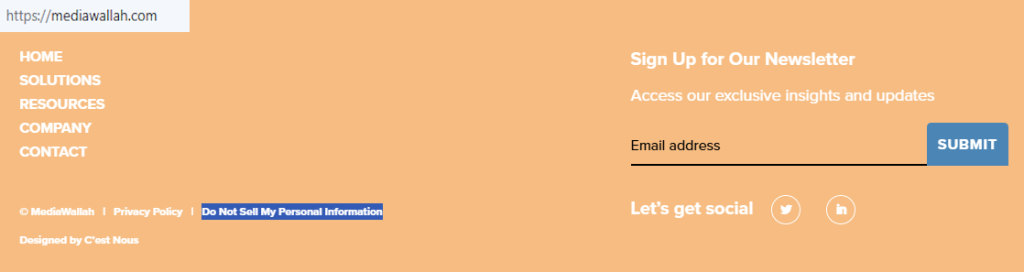
Go to mediawallah.com and scroll to the footer. Select “Do Not Sell My Personal Information” to open the request page. Review the privacy notice to understand what the request covers. Allow the page to load fully if you use blockers. Use a desktop browser for clarity and stable fields. Avoid public Wi-Fi when submitting. Keep this tab open until an on-page acknowledgment appears.
Submit your identifiers (email/phone + CAPTCHA)
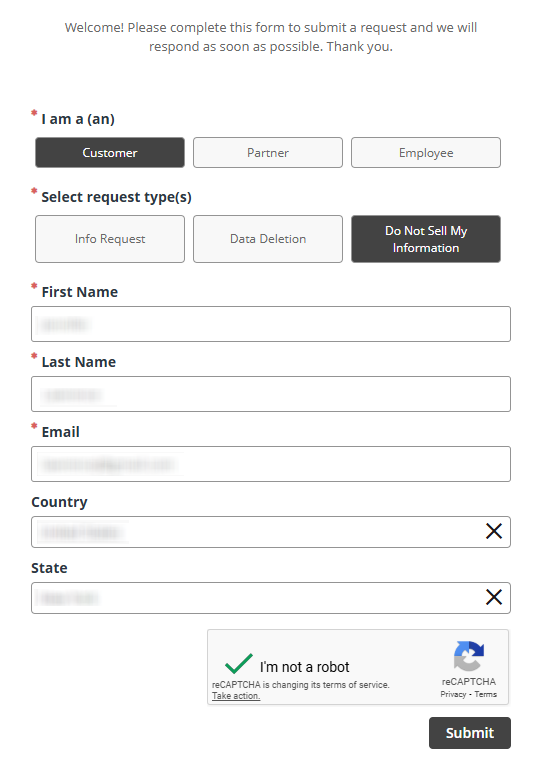
Choose your relationship and request type. Enter your name, email, and request details, then complete the CAPTCHA. Provide only the minimum needed. Before saving any screenshot for your records, blur sensitive data. When ready, click the submit button once and wait for the on-page notice. Keep the window open in case a follow-up prompt displays.
Verify via code or link (email/SMS)
Check your inbox for a message asking you to validate the request. If you provided a phone number, you may receive a code by SMS. Follow the link/enter the code to confirm. Look in Spam/Promotions if nothing appears within a few minutes. Add the sender to your safe list if filters are strict.
Confirm deletion / Do-Not-Sell request
After verification, you should see on-page confirmation. You can also receive a follow-up email. Where options exist, select suppression/deletion or Do-Not-Sell based on your region. Save a PDF copy of the confirmation for your files. Keep messages together so future requests are easier to reference.

Track confirmation & timeline
Keep the confirmation email and note the date. Typical processing takes 7–15 days. If you’re a California resident and prefer voice support, you may call the posted support number. Set a reminder to recheck your status in a few weeks. If your information resurfaces online, repeat the request promptly and file the new message with the original thread.
Timelines, Verification & What to Expect
Most requests are completed within 7–15 days. You’ll usually see an immediate on-page acknowledgment and an email after verification. If you don’t see an email, check Spam/Promotions. If nothing arrives after 15 days, submit a fresh request through the same page. Alternatively, use the phone option listed for California residents. After that, retry once with the same email so records match. Keep confirmations, note the date you verified, and set a reminder.
Edge Cases & Troubleshooting
- No access to the original email/phone: submit a new request using a reachable channel and complete verification.
- “Record not found”: try prior addresses or a different email.
- CAPTCHA or submission errors: disable blockers, refresh, or switch browsers.
- Verification code not arriving: check Spam, wait a few minutes, then resend once.
- Region limits (EU/UK/CA): use the region-appropriate option or available phone channel.
- Account deletion vs. listing removal: deleting an account differs from suppression; choose what matches your goal.
- Re-submitting after a failure: wait briefly, then resubmit with consistent identifiers.
Will my data reappear?
Re-listing can occur because aggregators, partner feeds, and resellers refresh datasets on their own schedules. Even after removal, new imports may add variations. Reduce recurrence by keeping confirmations, setting a 3–6 month reminder, and repeating the request quickly if needed. Monitor where your data surfaces online and prioritize major sources first. Consistent identifiers make processing smoother. Consider handling related removals next to close common paths where information can return. Treat suppression as routine maintenance rather than a one-time action.
Related removals
- Acxiom
- LiveRamp
- Neustar
- Oracle Advertising
- BeenVerified
- Spokeo
- Whitepages
- PeopleFinders
Manual vs Assisted Removal
Manual:
- Pros: Full control; free; learn where your data appears; schedule repeat monitoring.
- Cons: Time-consuming; many separate requests; must track confirmations; repeat for re-listings.
Assisted:
- Pros: Faster execution; verified steps; tracking dashboard; recurring checks.
- Cons: Paid service; limited to supported sites; occasional review still needed.
“Excellent”
We remove your data for you - faster, verified, trackable.
Discover Which Sites Share Your Private Details—Instantly and Free.
2,865,794 have already used our service
FAQ
Receive expert privacy advice by email - 1-2 times per month, no fluff.
Share Article

Posted by Ava J. Mercer
Ava J. Mercer is a privacy writer at ClearNym focused on data privacy, data broker exposure, and practical privacy tips. Her opt-out guides are built on manual verification: Ava re-tests broker opt-out processes on live sites, confirms requirements and confirmation outcomes, and updates guidance when something changes. She writes with a simple goal - help readers take the next right step to reduce unwanted exposure and feel more in control of their personal data.
76 Articles

