
Opt Out Guides
Lusha Opt Out Guide
Privacy Writer
A. J. MercerAva J. Mercer
Updated
Read
5 min
Exposing your name, address, and phone number can create a serious privacy concern. Lusha is a platform and software for professionals and companies that aggregate business details from publicly available sources and commercial inputs on its website into a profile with contact information. In this step-by-step guide, the user gets quick actions, screenshots, official references, and clear timelines. Find out how to submit a removal request, confirm all changes, and keep a reminder to remove your information correctly. We aim to protect privacy while keeping the process simple, neutral, and online.
How to opt out of Lusha
Open the official opt-out page, fill in the form with your email, then verify using a code sent. The process typically completes in a few days, and customers will receive an update.
Checklist:
- Open the official form
- Enter identifiers (email)
- Complete CAPTCHA/verification
- Confirm via code
- Save the receipt email
- Keep a reminder to re-check
Find out if your private details were exposed

2,865,794 have already used our service
Lusha – Quick Facts
| Parameter | Value |
| Domain | lusha.com |
| Data Types | Names, addresses, emails, work numbers, LinkedIn identifiers |
| Opt-out Methods | Web form/email |
| Identity Verification | Code via email/SMS |
| Typical Response Time | 3–7 days |
| Re-listing Risk | Medium |
About Lusha
Lusha is a business-focused service used by customer-facing teams to find business contact information. It can collect information from public databases and commercial partners for legitimate purposes, helping sales teams. Lusha’s privacy policy explains choices, consent options, and how it keeps limited data to honor suppression.
Common personal information you may find:
- Names and known aliases
- Email addresses
- Work numbers
- Company, title, and professional detail
- Current and past addresses
- LinkedIn and social network references
- Work domain and business website
- Department or category
- Region hints (including UK)
- Notes about accuracy and do-not-sell/share preferences
Step-by-Step Guide
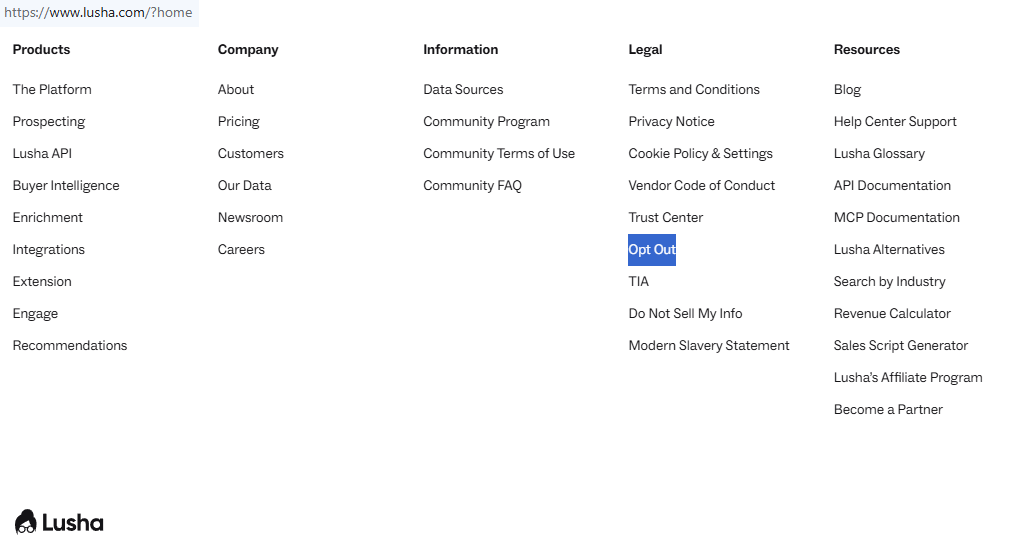
Open the official opt-out form
In your browser, go to Lusha’s privacy center on the website and open the suppression page. Review the privacy policy note and cookies banner. Use a secure connection and avoid sharing screenshots with sensitive content. Tip: Bookmark the page to repeat erasure if needed.
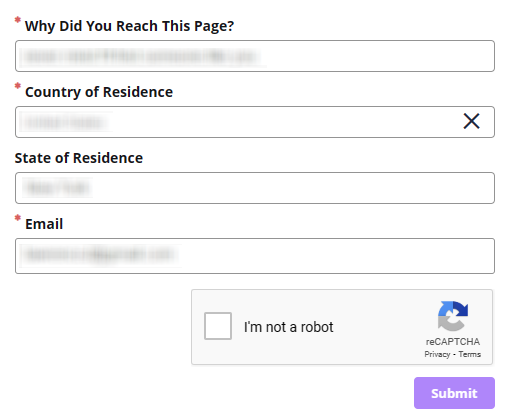
Submit your identifiers (email/phone + CAPTCHA)
Enter your email and, if applicable, a work phone in the designated fields, then complete the CAPTCHA. If you use multiple addresses, submit each one in separate steps. Tip: Avoid including proprietary IDs in any saved images.
Verify via code or link (email/SMS)
Open your inbox for a message from Lusha and complete verification using the provided link or code. Check Spam/Junk if it’s missing after a few minutes. Tip: Add the sender to improve security and delivery.
Confirm deletion / Do-Not-Sell request
On the confirmation screen, choose deletion or a do-not-sell preference to limit future exposure. For legal clarity, this guide is not legal advice. Lusha may retain minimal identifiers to respect consent choices. Tip: Save a PDF for your agreement records.
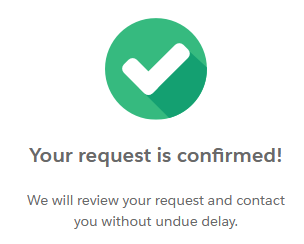
Track confirmation & timeline
Most actions finish within 3–7 days. If nothing changes after a week, resubmit once and then address the privacy team through the listed channel. Note any dates; this helps with future opt checks. Tip: Schedule periodic search sweeps on Google.
Timelines, Verification & What to Expect
A practical window is 3–7 days after you verify. Updates usually arrive by email; sometimes, there’s an on-page status after you click through. If you get no response after seven days, resubmit once, then address the privacy team with the time you submitted. Data brokers may use suppression lists to prevent reintroduction; organizations can retain limited tokens to honor your choice. Keep copies of steps, reference numbers, and any agreement notes. This calm approach balances privacy, accuracy, and security without promises.
Edge Cases & Troubleshooting
- No access to original email/number: write the privacy contact, explain, and offer alternate proof of identity.
- “Record not found”: try other addresses, then submit a broad suppression.
- CAPTCHA or submission issues: clear cookies, reload, and retry later.
- Code not arriving: check Spam/Junk, wait 15 minutes, then resend once.
- Region filtering (EU/UK/CA): use the contact channel and cite local rights.
- Account vs listing: if you need to cancel access, use account settings.
- Re-try after failure: wait a day, then try again before escalating.
Will my data reappear?
Reappearance can occur when partners, resellers, or other sources sell similar records again. Even after suppression, third-party inputs may repopulate entries. Keep your receipt, keep a 3–6 month reminder, and quickly re-file if you see a new listing. Check related services next, and periodically search your name and company. This is common across ecosystems of data brokers; steady maintenance helps reduce exposure over time.
Related removals
- ZoomInfo
- Apollo
- RocketReach
- Clearbit
- Hunter
- Seamless.AI
- Skrapp
- AnyMailFinder
Manual vs Assisted Removal
Manual:
- Pros: full control, no cost, you see each policy and content detail, flexible timing.
- Cons: time-consuming, needs repeat monitoring, and you must track outcomes.
Assisted:
- Pros: faster handling, verification help, tracking dashboard, recurring checks.
- Cons: paid option, some steps still need your consent, scope varies by company.
“Excellent”
We remove your data for you - faster, verified, trackable.
Discover Which Sites Share Your Private Details—Instantly and Free.
2,865,794 have already used our service
FAQ
Receive expert privacy advice by email - 1-2 times per month, no fluff.
Share Article

Posted by Ava J. Mercer
Ava J. Mercer is a privacy writer at ClearNym focused on data privacy, data broker exposure, and practical privacy tips. Her opt-out guides are built on manual verification: Ava re-tests broker opt-out processes on live sites, confirms requirements and confirmation outcomes, and updates guidance when something changes. She writes with a simple goal - help readers take the next right step to reduce unwanted exposure and feel more in control of their personal data.
76 Articles

