
Opt Out Guides
LiveRamp Opt Out Guide
Privacy Writer
A. J. MercerAva J. Mercer
Updated
Read
5 min

Removing your personal data from LiveRamp lowers the exposure of your name, address, and phone number. LiveRamp is a data collaboration company that connects identifiers for identity resolution using public records and commercial data sources. This guide shows how to submit a request, verify your identity, and track timing. You’ll place an opt-out cookie on your web browser and opt out using your email address. We also mention solutions to not personalize the online ads; you may still see advertisements or online ads you see due to contextual delivery by third-party ad networks. For regional options, please visit the official privacy portal.
How to opt out of LiveRamp
Go to the official privacy/opt-out page and enter your email address, then verify via a code or link. Processing typically takes a few days and can take up to 48 hours for some signals. You may see results, but they are less likely to be personalized or interest-based and should reduce targeted advertising tied to devices.
Checklist:
- Open the official opt-out form
- Enter email
- Complete CAPTCHA/verification
- Confirm via code/link
- Save the confirmation email
- Set a reminder to re-opt out
Find out if your private details were exposed

2,865,794 have already used our service
LiveRamp – Quick Facts
| Parameter | Value |
| Domain | liveramp.com |
| Data Types | Contacts, addresses, device/ID signals, related data sources |
| Opt-out Methods | Web form; regional portals; mobile settings |
| Identity Verification | Code or confirmation email |
| Typical Response Time | A few days (some signals may take up to two days) |
| Re-listing Risk | Medium |
About LiveRamp
LiveRamp provides an enterprise platform for identity resolution and data collaboration. Individuals may exercise their right via regional pages to manage data subject rights. The company may maintain aggregate household data based on your email and process signals for measurement. Note that LiveRamp may contact you to confirm details required to complete a personal information request.
Common data you may find:
- Names (and known aliases)
- Email addresses
- Phone numbers
- Current and past addresses
- Age range/year of birth (if available)
- Relatives/household links
- Property records (where available)
- Professional licenses or social profile links (if available)
- Device signals (device ID/advertising ID)
- Data that we can link to a particular IP address
Step-by-Step Guide
Open the official opt-out form
Open the privacy choices page in a web browser and keep cookies enabled long enough to place an opt-out cookie. This preference is a permanent opt until removed; avoid deleting that cookie by clearing your browser. Because a cookie tells web sites using consent frameworks about your choice, an opt-out cookie on your web device helps prevent LiveRamp matching for ads. If you wish to opt for regional rules, please visit the correct page first.

Submit your identifiers (email + CAPTCHA)
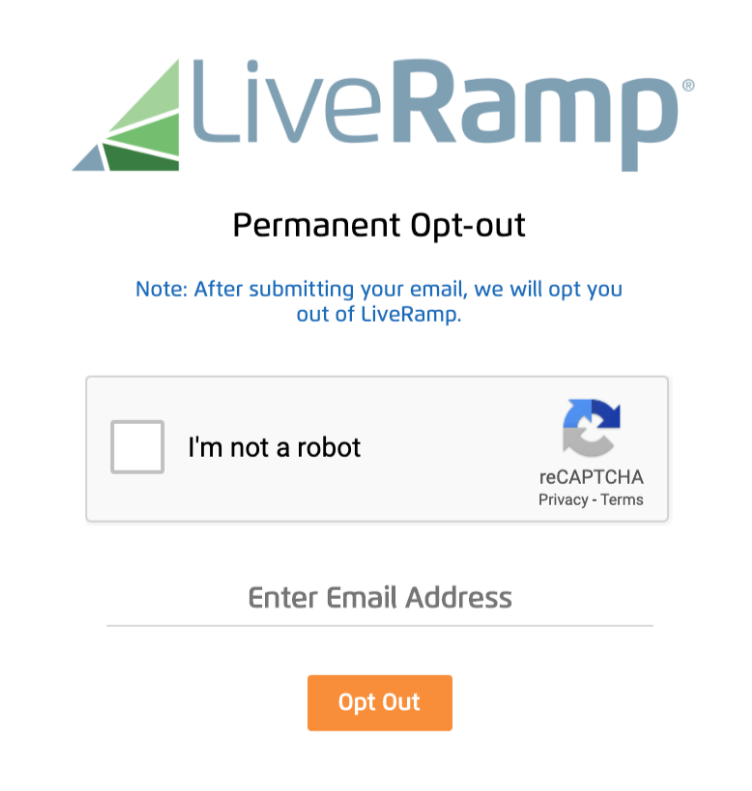
Enter your email address and complete the CAPTCHA. If you would like to make a request for everyone in your household, you can make a request for everyone, listing each household member only as instructed. If you feel comfortable providing your email and additional data, add it to improve matching. This helps the company process the opt-out request efficiently.
Verify via code or link (email/SMS)
Check your inbox (and Spam) and verify your identity using the link or code sent to the active email you control. If nothing arrives, please submit once more. After verification, LiveRamp will cease using matched signals tied to your account, and settings tied to your device can also be honored. If policies require more detail, support may contact you.
Confirm deletion / Do-Not-Sell request
Choose delete and/or Do-Not-Sell/Share as available in your region. You can also opt out of interest-based ads that are tied to your device, which can reduce personalization in apps. If you have multiple environments (cookies on your browser or app IDs), repeat as needed; the right to opt varies by jurisdiction.
Track confirmation & timeline
You should get an on-page confirmation and an email. Keep screenshots. If you wish to ask for help, please contact regional support (e.g., the French privacy team) and include your personal information query number. For comprehensive and effective coverage across environments, we also recommend visiting the opt-out pages of related services.
Timelines, Verification & What to Expect
Most requests are completed within several days; certain preferences can take up to 48 hours to apply. Confirmation usually arrives on-page and via email. If there’s no update after the practical window, contact support and provide your reference. Settings stored as cookies used by your web session or used by your web browser can be removed by clearing your browser files; if that happens, repeat the process. If preferences are tied to your device, consider resetting the advertising ID or repeating the steps after major system changes.
Edge Cases & Troubleshooting
- No access to original inbox: use another active email and note the situation in the form.
- “Record not found”: try a different info and confirm you’re on the correct region page.
- CAPTCHA issues: switch your browser or refresh the page.
- Code not arriving: wait a few minutes, check Spam, then please submit again.
- Region restricted: use your-rights.liveramp.uk to exercise your rights.
- Removal vs account: cancel targeted advertising; you will still see context-driven placements.
- Re-submit after resets: repeat the cookie opt-out mechanism when settings disappear.
Will my data reappear?
Re-listing can happen as partners refresh feeds across a multi-site ecosystem, and an advertising domain may sync identifiers again. You may see ads online even after preferences are applied. We also recommend visiting the opt-out resources of related providers. Consider visiting the opt-out pages every 3–6 months. If you switch devices or erase settings, repeat the flow; some profile signals are tied to your mobile device. If you have chosen to opt once, keep confirmations so you can still opt again quickly when needed.
Related removals
- Acxiom
- Oracle Advertising (BlueKai)
- Experian Marketing Services
- TransUnion / Neustar (OneID)
- Epsilon
- Lotame
- Quantcast
- Tapad
Manual vs Assisted Removal
Manual:
- Pros: Full control over each step and timing; no service fees; you keep confirmations and references locally; works across all web browsers and device IDs.
- Cons: Time-consuming across multiple devices and sessions; requires ongoing monitoring and repeats after cache clears; easy to miss portal changes or region rules; tracking outcomes can be inconsistent.
Assisted:
- Pros: Faster execution with guided workflows; centralized dashboard for status and history; recurring checks to catch re-listings; help with verification and follow-ups.
- Cons: Paid service; you must share minimum details to process requests.
“Excellent”
We remove your data for you - faster, verified, trackable.
Discover Which Sites Share Your Private Details—Instantly and Free.
2,865,794 have already used our service
FAQ
Receive expert privacy advice by email - 1-2 times per month, no fluff.
Share Article

Posted by Ava J. Mercer
Ava J. Mercer is a privacy writer at ClearNym focused on data privacy, data broker exposure, and practical privacy tips. Her opt-out guides are built on manual verification: Ava re-tests broker opt-out processes on live sites, confirms requirements and confirmation outcomes, and updates guidance when something changes. She writes with a simple goal - help readers take the next right step to reduce unwanted exposure and feel more in control of their personal data.
76 Articles

