
Opt Out Guides
Kiwi Searches Opt Out Guide
Privacy Writer
A. J. MercerAva J. Mercer
Updated
Read
5 min
Removing your data from Kiwi Searches helps protect your privacy by limiting exposure of your name, address, and phone number. The website shows information compiled from public records and commercial sources in a people directory. In this guide, you’ll get quick steps, screenshots, official links, and timelines to remove yourself from Kiwi Searches across the platform. We cover where to begin, how to verify, and how to confirm completion, so your personal information is harder to find online. The guide is neutral and practical – just follow the steps and click through as shown.
How to opt out of Kiwi Searches
Open the official contact form, provide minimal identifiers, then verify via code or link. Processing typically takes 3–7 business days. Keep the confirmation so you can confirm the information removed stayed suppressed.
Checklist:
- Open the official opt-out form
- Enter identifiers (email/phone)
- Complete CAPTCHA/verification
- Confirm via code/link
- Save the confirmation email
- Set a reminder to re-opt out
Find out if your private details were exposed

2,865,794 have already used our service
Kiwi Searches – Quick Facts
| Parameter | Value |
| Domain | kiwisearches.com |
| Data Types | contacts, addresses, possible social identifiers, relatives |
| Opt-out Methods | web form/email |
| Identity Verification | code via email/SMS or confirmation email |
| Typical Response Time | 3–7 days |
| Re-listing Risk | medium |
About Kiwi Searches
Kiwi Searches is a people directory that aggregates publicly available content from public records and commercial partners, then displays it. You can instantly search for your name, phone, location history, and related pointers, plus limited links to social media profiles. Kiwi Searches is a data broker operating among other data brokers.
Common data you may find:
- Names (and known aliases)
- Phone numbers
- Email addresses
- Current and past addresses
- Age range/year of birth (if available)
- Relatives/household links
- Property references (if available)
- Court or bankruptcy mentions (if available)
- Professional licenses/social profile links (if available)
- Reverse phone pointers
Step-by-Step Guide
Open the official opt-out form
Go to the privacy or help page and start the process. If you locate a profile, keep that tab open. Copy its URL and note the record details. State that you want to remove your information. Mention that this platform participates in data broker ecosystems. Tip: Use the footer link to ensure you’re on the right page.
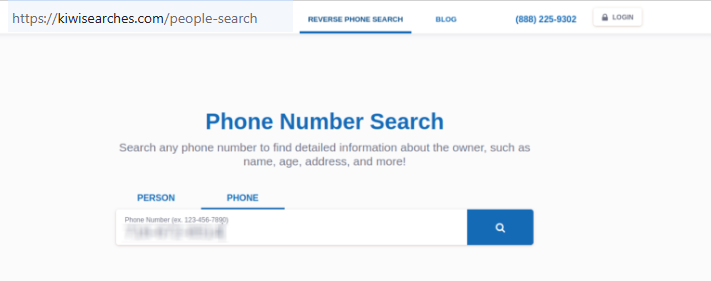
Submit your identifiers (email/phone + CAPTCHA)
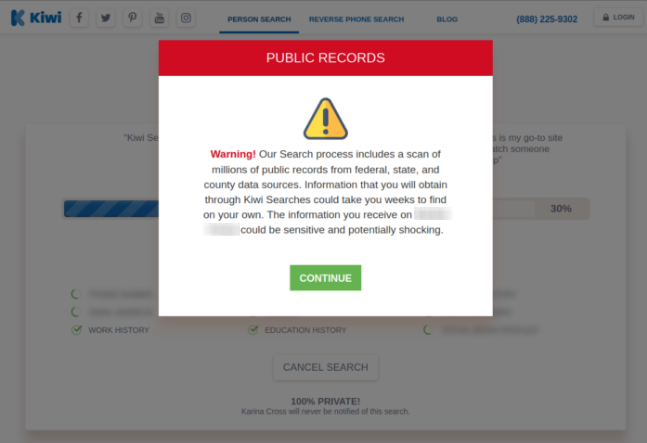
Provide your name, email address, phone number, current address, and the URL of your listing to help staff locate the record. If information is incorrect, say so briefly but include what appears so they can match it. For privacy, consider a throwaway email. Tip: Ignore the popups; mask sensitive screenshots and avoid using false information.
Verify via code or link (email/SMS)
Watch your email inbox for a code or link and verify promptly. If nothing arrives, check Spam and request a fresh message. This step confirms identity without extra proof. Tip: keep a copy for your personal record.
Confirm deletion / Do-Not-Sell request
Submit a concise note that this is an opt-out request. You may reference your first and last name used during the initial lookup. Tip: Do not delete confirmations – you may need them later.
Track confirmation & timeline
Most cases finish in 3–7 business days. Keep the confirmation email and note the date. If the entry still appears after that window, reply in the same thread and ask for status. Set a reminder to review later.
Timelines, Verification & What to Expect
Expect a practical 3–7 days window after verification. Confirmation usually arrives by email, and some users see a brief message. If nothing by day seven, reach out via the same contact route and identifiers. Include only what’s needed, such as the current address shown, so your case remains accurate and easy to match. If required, send one clean follow-up. Avoid attachments unless requested. Keep a simple log so you can show prior correspondence if escalation is needed.
Edge Cases & Troubleshooting
- No access to the original email/phone: provide an alternate channel and the exact URL so support can match your record.
- “Record not found”: try another spelling or alias and include it in your note.
- CAPTCHA or submission errors: refresh, try another browser, or switch to the contact form.
- Verification code not arriving: check Spam, wait briefly, then request a new link.
- Region blocks (EU/UK/CA): use the generic privacy email.
- Account deletion vs listing: closing an account doesn’t remove a public entry—submit a dedicated removal.
- Re-submitting: send a concise follow-up with the prior ticket.
Will my data reappear?
Re-listing can happen when feeds refresh, partner imports update a database, or resellers circulate public record material. To reduce recurrence, save confirmations, set a 3–6 month reminder, and check the search results regularly. If it returns, respond on your existing thread. Keep notes on dates and outcomes so you can demonstrate that the info removed was previously confirmed. This steady approach helps protect your privacy without extra documents.
Related removals
- TruthFinder
- Whitepages
- PeopleLooker
- Spokeo
- FastPeopleSearch
- BeenVerified
- Radaris
- Intelius
Manual vs Assisted Removal
Manual:
- Pros: Full control; no extra cost; you choose the exact copy; direct access to confirmations.
- Cons: Time-consuming across many sites; requires ongoing monitoring; repetitive checks.
Assisted:
- Pros: Faster across multiple services; verified submissions; tracking dashboard; recurring scans.
- Cons: Subscription cost; less control over message text; occasional verification still required.
“Excellent”
We remove your data for you - faster, verified, trackable.
Discover Which Sites Share Your Private Details—Instantly and Free.
2,865,794 have already used our service
FAQ
Receive expert privacy advice by email - 1-2 times per month, no fluff.
Share Article

Posted by Ava J. Mercer
Ava J. Mercer is a privacy writer at ClearNym focused on data privacy, data broker exposure, and practical privacy tips. Her opt-out guides are built on manual verification: Ava re-tests broker opt-out processes on live sites, confirms requirements and confirmation outcomes, and updates guidance when something changes. She writes with a simple goal - help readers take the next right step to reduce unwanted exposure and feel more in control of their personal data.
76 Articles

