
Opt Out Guides
Giant Partners Opt Out Guide
Privacy Writer
A. J. MercerAva J. Mercer
Updated
Read
5 min

Removing your data helps reduce exposure of your name, address, and phone in marketing databases and limits ad retargeting risk. Giant Partners is a marketing agency and provider that aggregates consumer records from public records and commercial sources to personalize outreach across a broad network. This guide explains quick steps to submit a request, verify by code or link, and confirm completion—plus timelines, tips, and screenshots. You’ll get official links, what you’ll need, and how to follow up. We also cover how to opt out, cancel future marketing communications, and avoid listings that reappear, including practical notes regarding our services and personal information regarding verification, registration, and record matching. You may voluntarily include a brief context to improve matching.
How to opt out of Giant Partners
Go to the official privacy/CCPA page and open the form, submit your email address and/or phone, then verify via code or confirmation link. Processing typically completes within 10–30 days, and you’ll receive an acknowledgment. Keep the receipt for your records.
Checklist:
- Open the official form
- Enter identifiers (email/phone)
- Complete CAPTCHA/verification
- Confirm via code/link
- Save the confirmation email
- Set a reminder to re-opt out
Find out if your private details were exposed

2,865,794 have already used our service
Giant Partners – Quick Facts
| Parameter | Value |
| Domain | giantpartners.com |
| Data Types | contacts, addresses, emails, phones, inferred interests, ad interaction metadata |
| Opt-out Methods | web form/email/mail |
| Identity Verification | code via email/SMS or confirmation email |
| Typical Response Time | 10–30 days |
| Re-listing Risk | medium |
The platform is a US corporate marketing firm that collects and uses consumer data from public records and commercial sources to run campaign targeting and promotion, as described in this privacy policy. It offers CCPA/CPRA options, deletion, and do-not-sell/share tools, and provides multiple contact methods. It may use a pixel to measure usage and interact with events for analytics trend insights.
Common data you may find:
- Names and known aliases
- Phone numbers
- Emails
- Current and past addresses
- Age range or year of birth (if available)
- Relatives or household links
- Property and real estate references
- Professional licenses or social profile links (if available)
- Advertising interaction metadata
- Inferred profile segments (interests/demographic ranges)
Step-by-Step Guide
Open the official opt-out form
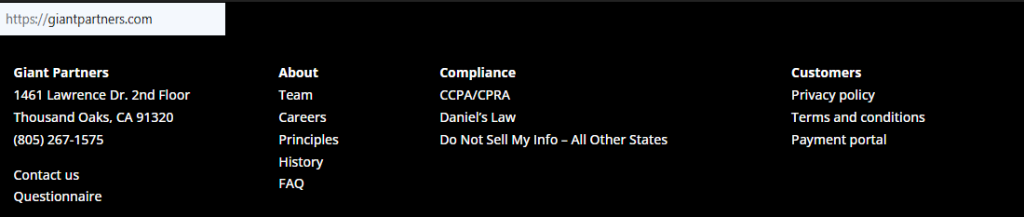
Go to the privacy/CCPA area and select the “Do Not Sell/Share” option. Confirm you’re on the official site before entering any data. If available, use the link listed by the State of California Department of Justice registry or the site footer’s compliance links. If you interact with forms on public Wi-Fi, avoid entering payment or credit card details. If you must contact customer support, use the official contact information only. Keep your request text short and clear.
Submit your identifiers (email/phone + CAPTCHA)
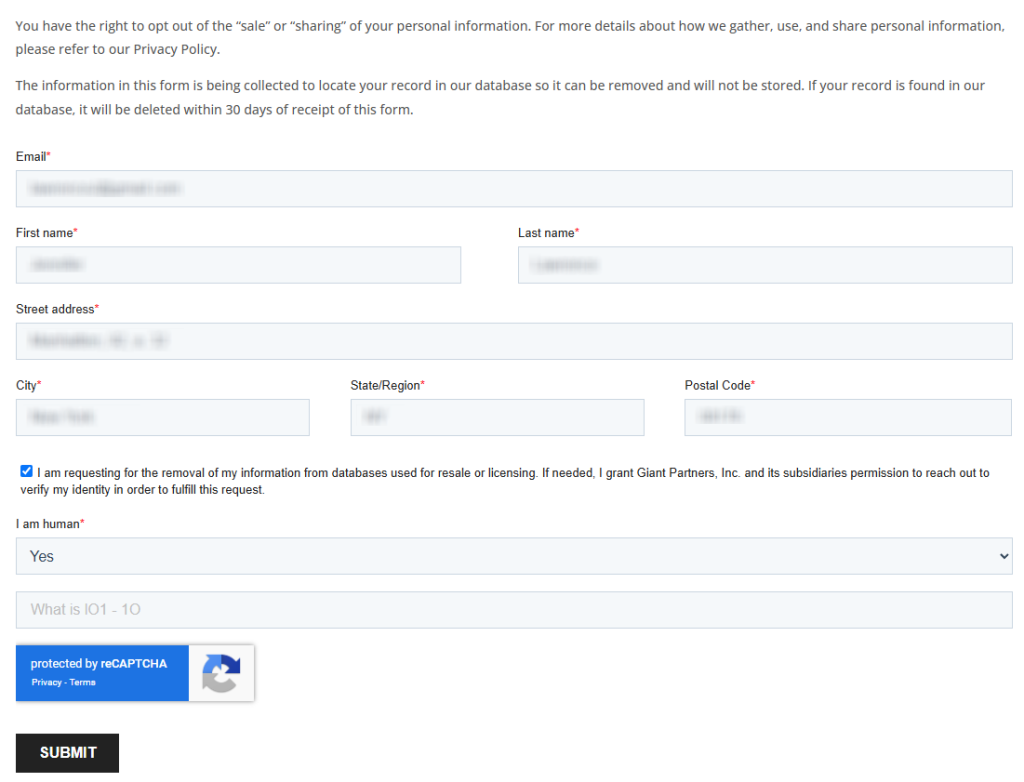
Enter your name, email address, and required fields. Complete the CAPTCHA, then review any “use and disclose” notices in the relevant section. Provide only what’s necessary and avoid attachments unless asked; if a document is requested, redact non-needed fields. You can manually save a screenshot, but blur PII first. You may voluntarily add brief notes (e.g., past addresses) to aid matching.
Verify via code or link (email/SMS)
Watch for a verification text message code or a clickable link. Check Spam/Junk and Promotions tabs. Open on the same device to prevent session mismatch. If no code arrives within 10–15 minutes, resend once and confirm filters. Don’t forward codes to others; third-party forwarding may void verification. Keep the verification communication for your records; personally identifiable numbers like SSN are not needed.
Confirm deletion / Do-Not-Sell request
After verification, choose deletion or do-not-sell/share. If offered, select suppression of promotional ad delivery, email, phone, and mobile outreach. The law prohibits using certain data for different reasons – fraud, audit, or security. A receipt will provide information about the status, retention period, and next steps. Save it; if systems collect and use limited identifiers to process the query, that’s to assist us with matching across the directory. A second click can create duplicates.

Track confirmation & timeline
Expect an acknowledgment within 10 days and completion within 45 days (sometimes up to 90 with notice). Confirmation usually arrives by email or on-page, including any agreement checkboxes, legal obligations notes, or law enforcement exceptions. If silent after 30 days, contact us via the privacy page and resubmit once. Updates can generate reports as systems analyze usage to synchronize tools. If the company undergoes a merger, acquisition, or bankruptcy, your existing choices should persist where applicable law and consent rules permit, and administrative steps may be needed to reflect changes.
Timelines, Verification & What to Expect
Most requests receive an acknowledgment in about 10 days and resolve within 10–45 days; some cases extend to 90 days with notice. Confirmation typically arrives by email (or on-page after submission), and you may be asked to verify identity with a code, short form, or document. If you don’t hear back after 30 days, use the privacy contact options (email/phone) and quote your prior query ID; resubmit once if needed. Some data may be retained to comply with legal obligations or security, payment processing, and recordkeeping. Suppression across campaign channels may phase in as monitoring completes and tools update the database.
Edge Cases & Troubleshooting
- No access to original email/phone: use an alternate channel from the privacy page and supply replacement verification.
- “Record not found”: try variant spellings/addresses, then file a general deletion query.
- CAPTCHA/submission errors: clear cookies, switch browser, or try mobile.
- Verification code not arriving: resend once; check filters; whitelist domain.
- Region limits (EU/UK/CA): file the application and cite your region.
- Account deletion vs listing removal: choose deletion or do-not-sell for public-facing suppression.
- Re-submitting after failure: wait 24–48 hours, then submit once with fresh details; your Inc-level registry reference may help support.
Will my data reappear?
Yes, it can. Listings may repopulate from affiliates, upstream feeds, third parties, partner imports, or scraped sources that use data. Re-listing doesn’t always mean a new collection; it may be synchronization from partners using aggregate sets and trend models. Reduce recurrence: set a reminder every 3–6 months, keep confirmation emails, and re-submit quickly if you see reappearance. Consider periodic checks on related brokers and monitor usage of old numbers or addresses across the network where you interact with sites and apps.
Related removals
- Lookify
- Experian Health
- 411.com
- Data Axle
- Spokeo
- PeopleFinders
- BeenVerified
- Whitepages
Manual vs Assisted Removal
Manual:
- Pros: Full control, learn the exact section and steps, free; you decide what to disclose and when.
- Cons: Time-consuming; must repeat follow-up; may need to manually track multiple queries and sites.
Assisted:
- Pros: Faster execution, identity verification help, tracking dashboard, recurring checks; bulk requests to third parties handled for business purposes.
- Cons: Paid; you still provide limited identifiable information for verification; outcomes vary by applicable law windows.
“Excellent”
We remove your data for you - faster, verified, trackable.
Discover Which Sites Share Your Private Details—Instantly and Free.
2,865,794 have already used our service
FAQ
Receive expert privacy advice by email - 1-2 times per month, no fluff.
Share Article

Posted by Ava J. Mercer
Ava J. Mercer is a privacy writer at ClearNym focused on data privacy, data broker exposure, and practical privacy tips. Her opt-out guides are built on manual verification: Ava re-tests broker opt-out processes on live sites, confirms requirements and confirmation outcomes, and updates guidance when something changes. She writes with a simple goal - help readers take the next right step to reduce unwanted exposure and feel more in control of their personal data.
76 Articles

