
Opt Out Guides
Find Who Calls You Opt Out Guide
Privacy Writer
A. J. MercerAva J. Mercer
Updated
Read
5 min
Exposed name, address, and phone raise privacy risks. Find Who Calls You is a data broker with a reverse phone number look-up service that hosts a database of phone calls and user reports; it may display limited personal information. This guide shows how to send a focused removal request, what the website typically publishes, and how long it can take. You’ll learn how to opt via a simple opt-out guide with screenshots, official links, and timelines. We keep it neutral and DIY so you can protect your identity quickly and free of hassle; use Google to locate your specific page if needed. Review what to do if you need to remove your information again later.
How to opt out of Find Who Calls You
Visit the site, open your page, copy its URL, and send one removal request that includes your phone. If a confirmation link arrives, verify it. Typical processing can take up to 30 days to remove.
Checklist:
- Search for your phone
- Copy the link
- Send the letter
- Save the confirmation email
- Set a reminder to re-opt out
Find out if your private details were exposed

2,865,794 have already used our service
Find Who Calls You – Quick Facts
| Parameter | Value |
| Domain | findwhocallsyou.com |
| Data Types | contacts, addresses, possible social identifiers |
| Opt-out Methods | web form/email |
| Identity Verification | code via email/SMS or confirmation letter |
| Typical Response Time | up to 30 days |
| Re-listing Risk | medium |
The platform is a data broker with a reverse lookup focus. It aggregates caller feedback and basic metadata from public and commercial sources. The service groups reports by number and publishes content with caller tags. Find Who Calls You is a data directory.
Common data you may look for:
- Names (and known aliases)
- Phones
- Email mentions in comments
- Current/past locations or area codes
- Call categories and timestamps
- Carrier/line type indicators
- Links users share (social/profile)
- The list of data elements may vary
- Personal data details are limited
- Personal information should be reviewed
Step-by-Step Guide
Search for the phone number
Search once on the website and open the dedicated tab for your record. Copy the exact link for reference. Keep the tab open so you can include it in your message. Do not post new comments with extra details. Tip: Use a private window and run a quick scan to confirm there’s only one matching entry.

Copy the URL
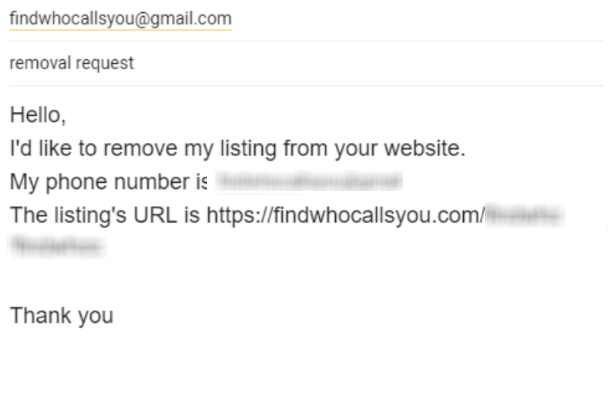
Prepare a short note, including a single email, your phone, and the link. Keep wording minimal and factual. Write to [email protected]. Tip: Save a copy of your submission for tracking and future follow-ups.

Track confirmation & timeline
Save the acknowledgment and set a reminder to recheck. If nothing changes within the window, reply in the same thread with dates and the link. Tip: Maintain a simple spreadsheet for recurring checks; this helps if you need a Find Who Calls You review later.
Timelines, Verification & What to Expect
Processing commonly completes within a practical window of a few days to about 30 days. Confirmation usually arrives by message; occasionally, you may see an on-page acknowledgment. If no response after the window, resend once in the same thread with the original date and link, then allow a week. Keep copies of all correspondence and screenshots for reference. If the information persists, submit one additional follow-up and continue to monitor periodically. Stay calm and document each step; clear, concise requests tend to move faster and better safeguard your privacy.
Edge Cases & Troubleshooting
- No access to original contact: note ownership and ask for alternate verification.
- “Record not found”: confirm formatting; keep the single link you copied for reference.
- CAPTCHA/submission errors: clear cache, switch browsers, or send by message instead.
- Verification not arriving: check Spam, wait 24 hours, then resend once.
- Region-blocked form (EU/UK/CA): use the link above and reference local rights generically.
- Account vs listing confusion: specify you want listing removal, not account closure.
- After failure: reply in the same chain with dates and screenshots; learn how to opt efficiently next time.
Will my data reappear?
Re-listing can happen because aggregators, partner feeds, and new comments may recreate similar pages online. To reduce recurrence, keep confirmations, set a reminder every 3–6 months, and re-submit quickly if needed. Check related removal guides next, since similar directories may repopulate each other. Avoid absolute expectations; periodic monitoring and prompt action are the most practical ways to protect your privacy over time and to guide you on how to cancel repeat results.
Related removals
- Whitepages
- Spokeo
- BeenVerified
- FastPeopleSearch
- AnyWho
- 411.com
- NumLookup
- WhoCallsMe
Manual vs Assisted Removal
Manual:
- Pros: no cost, full control, ongoing checks on your schedule.
- Cons: time required, repeat monitoring, scattered confirmations.
Assisted:
- Pros: faster execution, verification handled, tracking dashboard, recurring checks.
- Cons: paid option, less hands-on control.
“Excellent”
We remove your data for you - faster, verified, trackable.
Discover Which Sites Share Your Private Details—Instantly and Free.
2,865,794 have already used our service
FAQ
Receive expert privacy advice by email - 1-2 times per month, no fluff.
Share Article

Posted by Ava J. Mercer
Ava J. Mercer is a privacy writer at ClearNym focused on data privacy, data broker exposure, and practical privacy tips. Her opt-out guides are built on manual verification: Ava re-tests broker opt-out processes on live sites, confirms requirements and confirmation outcomes, and updates guidance when something changes. She writes with a simple goal - help readers take the next right step to reduce unwanted exposure and feel more in control of their personal data.
76 Articles

