
Opt Out Guides
Find People Fast Opt Out Guide
Privacy Writer
A. J. MercerAva J. Mercer
Updated
Read
5 min

Removing your personal information matters because a public listing can expose your name, address, and phone number. This can reduce privacy and increase risks like identity theft, harassment, or someone trying to stalk you. Find People Fast typically displays entries sourced from public records. These are business records, court records, voter registrations, and other publicly available information. The site organizes them in a directory format. Some services may sell your personal information or share it through partner feeds, so limiting what’s shown can reduce unwanted contact. This step-by-step guide includes screenshots, official links, and timelines so you can submit a request, save proof, and follow up calmly.
How to opt out of Find People Fast
Use the site’s request page, open the matching record, and submit the online form with the record link and basic identifiers, then confirm using a verification email link or code. Typical processing is 2–7 days, and some entries are removed within 72 hours.
Checklist:
- Find and open your profile
- Copy your profile URL
- Enter identifiers in the form
- Complete the CAPTCHA
- Set a reminder to re-opt-out
Find out if your private details were exposed

2,865,794 have already used our service
Find People Fast – Quick Facts
| Parameter | Value |
| Domain | findpeoplefast.net opt |
| Personal Data Types | contacts, addresses, and other details |
| Opt-out Methods | web form/email/postal |
| Identity Verification | confirmation via email |
| Typical Response Time | 2–7 days |
| Re-listing Risk | medium |
About the site
This platform can operate as a people-search site and a data broker. It may collect data from various sources, including public records and commercial sources, and present results in a searchable database for publicly available records.
Common data you may see:
- Names and aliases
- Phone lookup results
- Email lookup results
- Address lookup results
- Relatives/household links
- Professional license references
- Property and location signals
- Court filings or dockets
- Social media profiles
- Financial history notes (if available)
Step-by-Step Guide
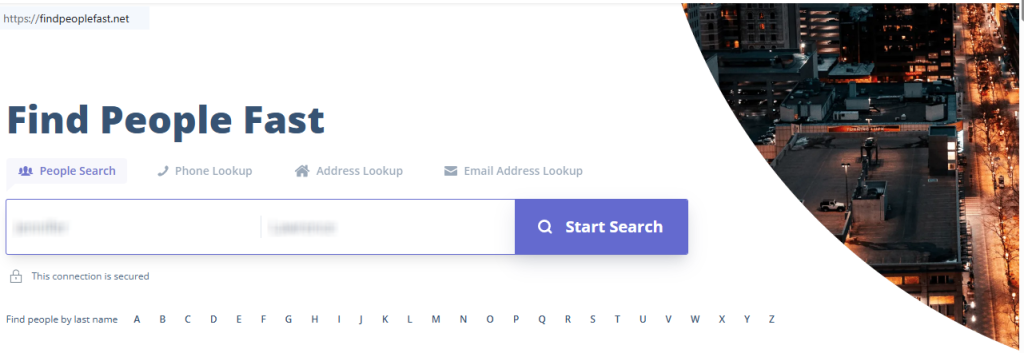
Find and open your profile
Search your name and state, then open the matching record page. If needed, click “view free details” to reach the full report. Tip: Use the age and state filters to avoid a wrong match. Before you remove anything, check the city and relatives, and save only minimal images with sensitive fields blurred.
Copy your profile URL
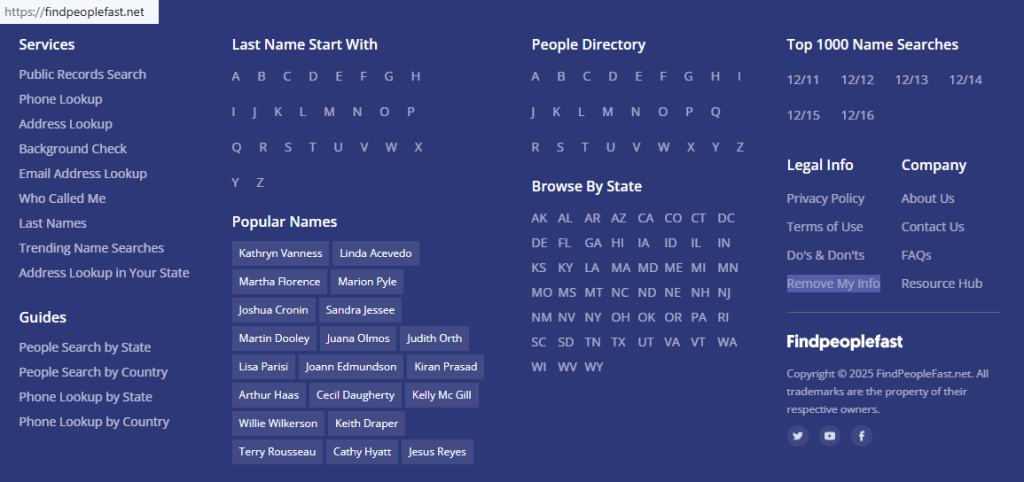
Copy the link from your browser’s address bar on the record page. Keep it in a private note. If you see more than one match, copy each link separately. You’ll be able to remove each record cleanly. If you save images for your notes, redact identifying details.

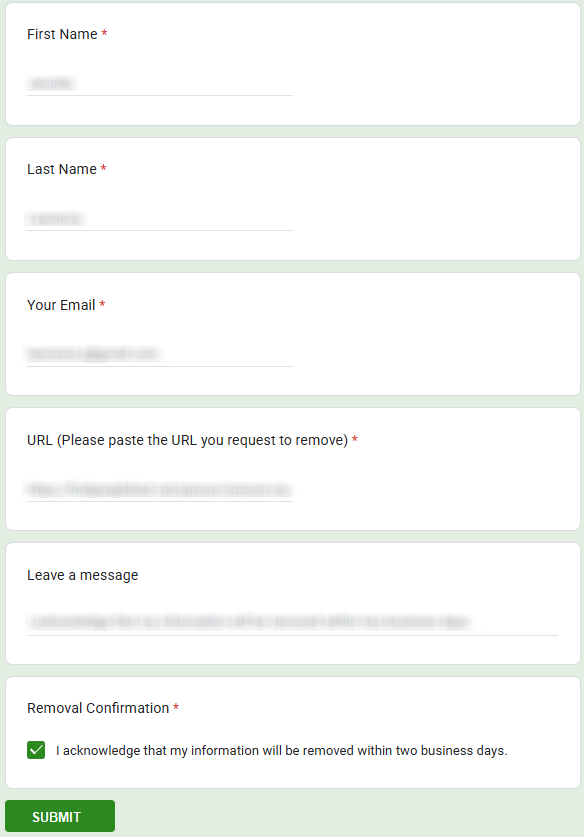
Enter identifiers (name/email + CAPTCHA)
Go to the opt out of findpeoplefast.net page and complete the form. Paste the record link, enter the requested fields, and enter your email when asked. Complete the human check, then submit once. If you get an error, switch browsers or try again later instead of submitting repeatedly.
Confirm deletion / Do-Not-Sell request
After you submit, look for an on-page confirmation and a message in your inbox. Follow the link to delete the record. Some flows say click “begin removal process”, then record and click the ‘open report’ button; choose “remove my record.” You may be taken to a new confirmation screen. Save the confirmation message.
Track confirmation & timeline
Save the confirmation email and note the date. Re-check the same record link after a few days. If nothing changes after 7 days, submit one more request and keep the newest confirmation. If you’re handling many sites, a removal service can automate tracking.
Timelines, Verification & What to Expect
Most requests are processed in 2–7 days. Confirmation often appears on the page and arrives by email as a link or code. Check Spam/Promotions, and keep proof with personal details redacted. If there is no response after 7 days, resubmit once using the same record link and identifiers. For ongoing privacy, set a 3–6 month reminder so you can repeat the opt-out if the record returns.
Edge Cases & Troubleshooting
- No access to the original email: submit with a new email, then ask support about alternate verification.
- Record not found: broaden your search and confirm you’re opening the right record.
- Submission errors: clear cookies, disable blockers, and try again later.
- Verification code not arriving: check Spam/Promotions, then resubmit once after 15 minutes.
- Form rejects the request by region (EU/UK/CA): try mail or the site contact option.
- Account closure vs. public record suppression: cancel any optional account, but still submit a request for the public record.
- Re-submitting after a failed attempt: wait 24 hours, then submit again with the same record link.
Will my data reappear?
A public listing can return when aggregators refresh feeds, when data brokers like resellers update partner files, or when new updates arrive. This is common with third-party data brokers, so keep your confirmations and re-check every 3–6 months. If the record returns, remove it again quickly. For broader coverage, check sites like other online directories and review removals from multiple data brokers to shrink your digital footprint.
Related removals
- Spokeo
- Whitepages
- TruePeopleSearch
- BeenVerified
- Intelius
- Radaris
- PeopleFinders
Manual vs Assisted Removal
Manual:
- Pros: more control; you can remove each record yourself; clear documentation for each request; you can repeat manually on your schedule.
- Cons: time investment and repeated monitoring; you must track each site and record by hand; a risk that a record returns unnoticed.
Assisted:
- Pros: may automate monitoring and recurring checks; central tracking and verification support; helps cover many sites.
- Cons: you share details with a provider; coverage varies by plan.
“Excellent”
We remove your data for you - faster, verified, trackable.
Discover Which Sites Share Your Private Details—Instantly and Free.
2,865,794 have already used our service
FAQ
Receive expert privacy advice by email - 1-2 times per month, no fluff.
Share Article

Posted by Ava J. Mercer
Ava J. Mercer is a privacy writer at ClearNym focused on data privacy, data broker exposure, and practical privacy tips. Her opt-out guides are built on manual verification: Ava re-tests broker opt-out processes on live sites, confirms requirements and confirmation outcomes, and updates guidance when something changes. She writes with a simple goal - help readers take the next right step to reduce unwanted exposure and feel more in control of their personal data.
76 Articles

