
Opt Out Guides
Exactag Opt Out Guide
Privacy Writer
A. J. MercerAva J. Mercer
Updated
Read
5 min
Safeguarding your data helps reduce the exposure of your name, address, and phone number to unintended audiences. As an ad-measurement and attribution platform, Exactag typically aggregates and displays records from partner feeds and commercial sources for reporting and analysis, not consumer search. In this guide, you’ll get clear, fast steps, screenshots, and official links to the privacy portal. You’ll learn all the information on data protection, including where to submit a request, how to verify it, and how long it usually takes. We also cover timelines, what confirmations to expect, and how to re-check later. If you prefer assistance, see our comparison below. This walkthrough is simple and neutral, so you can act quickly and keep a record of your confirmation for future reference.
How to opt out of Exactag
Go to the official privacy policy page, submit your email or phone, and verify via code or a confirmation link. Requests usually complete within 7–14 days. Keep the confirmation for your records and set a reminder to repeat if listings reappear.
Checklist:
- Open the official page
- Choose an option to delete your data
- Confirm the deletion
- Set a reminder to re-opt out
Find out if your private details were exposed

2,865,794 have already used our service
Exactag – Quick Facts
| Parameter | Value |
| Domain | exactag.com |
| Data Types | contacts, addresses, possible social identifiers, event logs |
| Opt-out Methods | web form/email |
| Identity Verification | code via email/SMS or confirmation email |
| Typical Response Time | 7–14 days |
| Re-listing Risk | medium |
About Exactag
The platform is an attribution and analytics vendor that aggregates and displays event-level reports from public and commercial sources and partners. It focuses on measuring campaigns and touchpoints, not public people-search. Requests route through its privacy channels to control data use and visibility in reporting systems.
Common data you may find:
- Names (and known aliases)
- Email addresses
- Phone numbers
- Current and past addresses
- Age range or year of birth (if available)
- Relatives or household links (if available)
- Campaign and channel identifiers
- Page impressions and event logs
- Device or browser attributes
- Professional or social profile links (if available)
Step-by-Step Guide
Open the official page
Go to the website’s privacy policy and open the corresponding page. If a banner appears, accept cookies so all fields load correctly. If the site shows a settings panel, check that cookies allow the necessary fields to render. To avoid sharing more than needed, capture screenshots with any sensitive items blurred. If you see references to Exactag GmbH or regional requirements like GDPR, follow the listed steps exactly before proceeding.

Choose an option to delete your data
Depending on the data you want to delete, the website offers different opt-out options. For example, you may want to prevent personal information from appearing in advertising materials or verify what cookies are used to avoid them. To choose one of these options, click on the link you need.
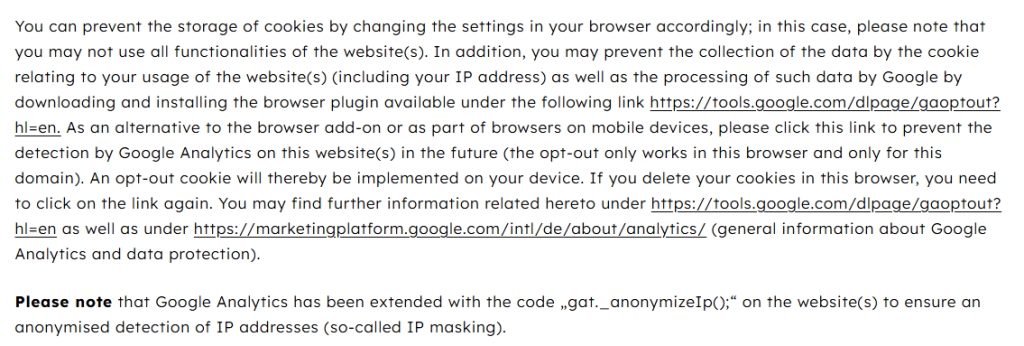
Confirm deletion
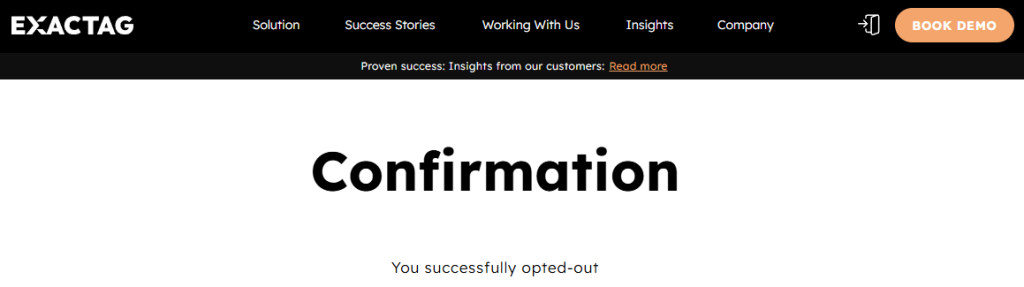
After selecting the appropriate option and completing all steps, you will receive confirmation that your personal data has been successfully deleted. Please save this notification; if necessary, please contact support to ask for statistical analysis or additional user-level data.
Track confirmation & timeline
Store the confirmation email and note the impression time. Processing personal data removal typically requires 7–14 days. If no reply by day 14, please contact us via the listed email or contact form and reference your case. You have a right to request status updates. If needed, send a polite follow-up and, if unresolved, resubmit once. For EU/EEA users, ttdsg and dsgvo rules may apply alongside gdpr.
Timelines, Verification & What to Expect
Most requests are completed in 7–14 days. You’ll usually see an on-page confirmation immediately after verifying, followed by an email confirmation. If nothing arrives, re-check Spam or filters and ensure your domain settings accept cookies for the portal session to work. If there’s no response after 14 days, use the privacy policy page to find the official address or contact form and ask for a status update; include your reference number, date, and any user key or code used. Resubmit the form once if you suspect a submission error. Keep all messages. Where regional laws like ttdsg or gdpr apply, the service may ask for limited verification to match records. Stay patient, document steps, and escalate only if needed.
Edge Cases & Troubleshooting
- No access to the original email/phone: use the privacy channel to update identifiers; verify ownership of the new contact.
- “Record not found”: confirm spelling and region; provide alternate identifiers once.
- CAPTCHA or submission errors: refresh, try another browser, or disable strict blockers.
- Verification code not arriving: wait 10 minutes, re-send once, then try SMS/email alternate.
- Form rejects by region (EU/UK/CA): choose the correct region option; cite local rights.
- Account deletion vs public removal: request listing suppression, not account closure, if no login exists.
- Re-submitting after a failed attempt: wait 24 hours, then re-run steps and keep proof.
Will my data reappear?
Re-listing can happen when aggregators refresh partner feeds, when a cookie enables linkage, or when resellers push updates. That means your details could surface again even after a successful removal. To reduce recurrence, keep confirmation emails and set a reminder every 3–6 months to review your status and re-submit quickly if needed. If a profile returns, repeat the process and reference your prior confirmation. Also consider checking related services that use similar signals so you can address duplicates in one session. Avoid absolute expectations—data ecosystems update frequently.
Related removals
- Adjust (mobile attribution)
- AppsFlyer (attribution)
- Kochava (attribution)
- Branch Metrics (deep linking/attribution)
- Singular (measurement)
- Neustar/TransUnion (marketing)
- Lotame (DMP)
Manual vs Assisted Removal
Manual:
- Pros: Full control over each step; no cost; you decide what to submit; hands-on learning.
- Cons: Time-consuming; must monitor and repeat; form quirks; tracking is manual.
Assisted:
- Pros: Faster execution; verification support; tracking dashboard; recurring checks included.
- Cons: Paid service; you still verify identity; provider access needed.
“Excellent”
We remove your data for you - faster, verified, trackable.
Discover Which Sites Share Your Private Details—Instantly and Free.
2,865,794 have already used our service
FAQ
Receive expert privacy advice by email - 1-2 times per month, no fluff.
Share Article

Posted by Ava J. Mercer
Ava J. Mercer is a privacy writer at ClearNym focused on data privacy, data broker exposure, and practical privacy tips. Her opt-out guides are built on manual verification: Ava re-tests broker opt-out processes on live sites, confirms requirements and confirmation outcomes, and updates guidance when something changes. She writes with a simple goal - help readers take the next right step to reduce unwanted exposure and feel more in control of their personal data.
76 Articles

