
Opt Out Guides
Data Axle Opt Out Guide
Privacy Writer
A. J. MercerAva J. Mercer
Updated
Read
5 min
Introduction
Removing your data from Data Axle reduces the privacy exposure of your name, address, and phone. The company compiles personal information from public records and one commercial source for its platform and marketing tools.
How to opt out of Data Axle
Visit the official privacy policy area, open the online form, and enter a primary email address plus phone if asked. Complete verification (code or confirmation link).
Checklist:
- Open the official form
- Enter identifiers (email/phone)
- Complete CAPTCHA/verification
- Confirm via code/link
- Save the confirmation email
- Set a reminder to re-opt out
Find out if your private details were exposed

2,865,794 have already used our service
Data Axle – Quick Facts
| Parameter | Value |
| Domain | data-axle.com |
| Data Types | contacts, addresses, possible social identifiers, demographics |
| Opt-out Methods | web form/email |
| Identity Check | code by email/SMS or confirmation email |
| Typical Response Time | 30 to 60 days |
| Re-listing Risk | medium |
About Data Axle
The company is a data broker and marketing services company that aggregates consumer and business info. Data Axle’s files may draw on public data and partners. The service powers directory, analytics, and direct marketing uses, and provides choice tools for California consumer preferences (Data Axle is a member of the ANA).
Common data you may find:
- Names and known aliases
- Phone numbers
- Email addresses
- Current and past addresses
- Age range or year of birth
- Relatives/household links
- Property indicators
- Professional licenses/social media profiles
- Directory and business affiliations
Step-by-Step Guide
Open the official opt-out form
Go to the footer at the bottom and click “Do Not Sell or Share My Data.” Review the privacy policy if you want context, then open the tab. Use a private window for privacy and security. If the site stalls, refresh or try another browser.

Submit your identifiers (email/phone + CAPTCHA)
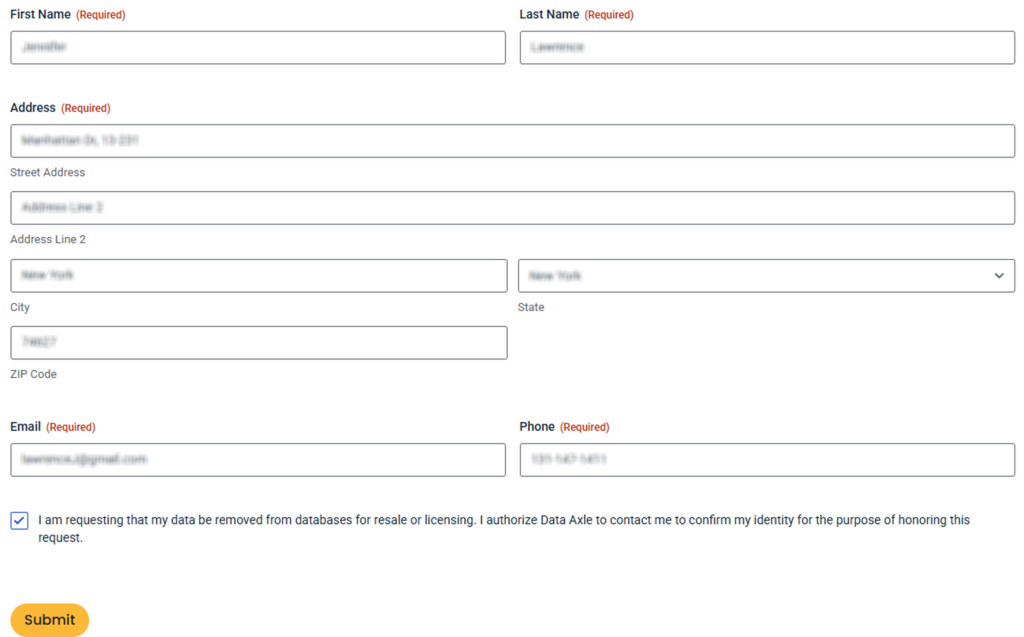
Enter your name, address, and email; consider adding the phone. Complete the CAPTCHA and submit once. Only provide what’s needed to locate the correct data in the database. Blur sensitive content in screenshots to improve safety.
Verify via code or link (email/SMS)
Watch for a code or one-click link. Check Spam/Promotions. Use the code only on the official page you opened from the website. If nothing arrives after a short wait, try resending and follow up later if needed.
Confirm deletion / Do-Not-Sell request
On the confirmation screen, choose deletion or do-not-sell options and finalize the process. If you see errors, use the portal contact route and include your request number.
Track confirmation & timeline
Save the confirmation email and retain the request number. Updates usually propagate within one to two months. If your listing persists afterward, submit one fresh request and keep replies.
Timelines, Verification & What to Expect
Expect an on-screen note and an email. Keep that message as proof. If you see no change by the end of the window, use the portal’s path and include identity details (e.g., prior place of residence). If needed, re-opt once using the same identifiers. For compliance under any act or law, rely on the official privacy policy and portal instructions.
Edge Cases & Troubleshooting
- No access to original email/phone. Use the portal contact option and ask for an alternative authorization method.
- “Record not found.” Try prior addresses or variations of your name; search the directory first.
- CAPTCHA or submission errors. Clear cache, switch browsers, or retry the site later.
- Code not arriving. Wait a few minutes, check Spam, then try to resend; confirm the email.
- Region limits (EU/UK/CA). Use the appropriate privacy route for your region.
- Account deletion vs listing. Closing an account is separate; you still opt out of listings.
- Re-submitting after a failure. Wait a day, then submit again and keep the confirmation.
Will my data reappear?
Aggregators and partners refresh files, so entries may return. To reduce recurrence, set a 3–6 month reminder, keep confirmations, and remove new appearances quickly. We recommend checking similar brokers like Data Axle for parallel removal actions. Re-listing risk is medium and may vary by client workflows and media channels.
Related removals
- Experian
- Acxiom
- Epsilon
- Dun & Bradstreet
- Verisk
- LiveRamp
- Neustar
Manual vs Assisted Removal
Manual – Pros
- Control over each process and choice
- No cost; learn each website’s steps
Manual – Cons
- Time-consuming monitoring across many company portals
- Different rules and layouts
Assisted – Pros
- Faster across many company lists, with tracking
- Dashboard to send confirmations and maintain history
Assisted – Cons
- Subscription fee
- You may still verify a request
“Excellent”
We remove your data for you - faster, verified, trackable.
Discover Which Sites Share Your Private Details—Instantly and Free.
2,865,794 have already used our service
FAQ
Receive expert privacy advice by email - 1-2 times per month, no fluff.
Share Article

Posted by Ava J. Mercer
Ava J. Mercer is a privacy writer at ClearNym focused on data privacy, data broker exposure, and practical privacy tips. Her opt-out guides are built on manual verification: Ava re-tests broker opt-out processes on live sites, confirms requirements and confirmation outcomes, and updates guidance when something changes. She writes with a simple goal - help readers take the next right step to reduce unwanted exposure and feel more in control of their personal data.
76 Articles

