
Opt Out Guides
Buyerlink Opt Out Guide
Privacy Writer
A. J. MercerAva J. Mercer
Updated
Read
5 min
Buyerlink profiles can expose your name, address, and phone number, which can affect your digital privacy if reused across the web. The company operates an online marketplace and service for performance-based marketing and lead distribution, which may collect and display information from public records and commercial sources. This guide gives quick steps, screenshots, and a realistic timeline so you can remove data or limit a sale/share choice. You’ll learn where to search for the page, how to verify by email or SMS, and how to track your request. We also show how to protect yourself with a simple reminder and how to review confirmations for details. Keep your profile harder to find for buyers and sellers in real estate and beyond.
How to opt out of Buyerlink
Use the official privacy portal, choose Do Not Sell/Share, provide identifiers, then verify. Most requests finish in a few days. Keep confirmations and repeat later if needed.
Checklist:
- Open the official opt-out form
- Enter identifiers (email/phone)
- Complete CAPTCHA/verification
- Confirm via code/link
- Save the confirmation letter
- Keep a reminder to re-opt-out
Find out if your private details were exposed

2,865,794 have already used our service
Buyerlink – Quick Facts
| Parameter | Value |
| Domain | buyerlink.co |
| Data Types | names, addresses, possible social identifiers, interest fields |
| Opt-out Methods | web form/email |
| Identity Verification | code via email/SMS or confirmation letter |
| Typical Response Time | 3–7 days |
| Re-listing Risk | medium |
Buyerlink is a company that aggregates consumer data to connect advertisers with lead opportunities across verticals such as real estate. Records generally come from public records and commercial resources. Its privacy options let an individual delete personal data through the stated channel. Controls include ad preference choices and a privacy policy overview.
Common data you may find:
- Names and known aliases
- Phone numbers
- Email addresses
- Current and past addresses
- Age range or year of birth (if available)
- Relatives or household data
- Property & real estate records
- Court or bankruptcy filings (if available)
- Professional licenses or social media profiles (if available)
- Marketing interest fields and lead form info
Step-by-Step Guide
Open the official opt-out form
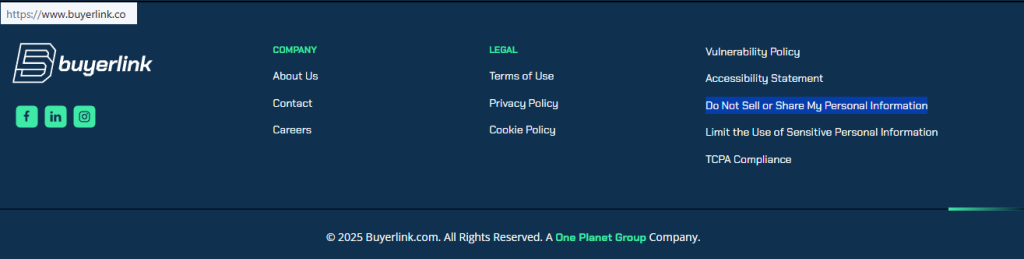
On the Buyerlink website, scroll to the footer and select the Do Not Sell or Share My Personal Information tab. If you have an account, sign in first for accurate matching. Skim the privacy policy there to understand choices. Tip: Blur any sensitive content if you post screenshots publicly, and store notes for later review.
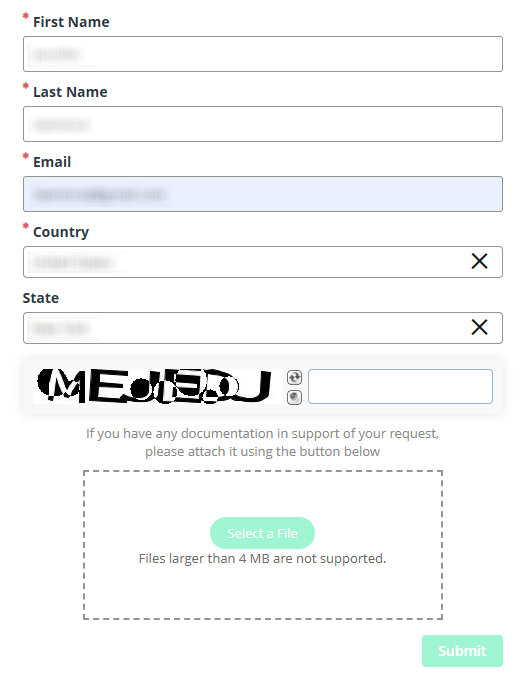
Submit your identifiers (email/phone + CAPTCHA)
Enter your email and phone, complete the CAPTCHA, then click the button to submit. Provide only necessary details; avoid extra info unless asked. Tip: Use the same identifiers you used before so the company can process your query quickly.
Verify via code or link (email/SMS)
Watch for a message with a code or link. If nothing arrives, check Spam and then resend once. Some portals let you communicate via an alternate channel. Tip: Add the sender to contacts to improve delivery and security. Keep the verification letter for later audit.
Confirm deletion / Do-Not-Sell request
Choose deletion or do-not-sell/share, then confirm. If offered, limit personalized content while you wait. Note any reference number and save the on-screen confirmation. Tip: If you also use social media logins elsewhere, consider updating preferences to reduce matching.
Track confirmation & timeline
Most queries are completed in 3–7 days. Keep a dated note and store confirmations together. If you see a related listing later, re-run the procedure. Tip: Set a calendar reminder to repeat every few months and include the date you send each follow-up.
Timelines, Verification & What to Expect
Expect a practical window of 3–7 days for processing. Confirmation usually appears on-screen and by email. If nothing arrives after 7 days, use the published contact and then address one more time. Keep copies of messages, any reference numbers, and dates. Cookie choices may be browser-specific, so repeat them on other devices. Deletion targets stored records; a do-not-sell/share choice limits transfers categorized as a sale. Maintain one folder for proofs so you can act quickly if a future demand arises in this section of your records.
Edge Cases & Troubleshooting
- No access to the original email/phone: File with current identifiers and explain the change; include prior details if known.
- “Record not found”: Try former addresses or name variants; wait, then try again.
- CAPTCHA or submission errors: Refresh, clear cookies, or use another browser.
- Verification code not arriving: Check Spam, wait briefly, then resend once.
- Region limits (EU, UK, or California): Use the same portal and select your region; some rights differ.
- Account deletion vs public listing removal: Deleting an account may not remove marketing data; file a privacy query.
- Re-submitting after failure: Wait briefly and resubmit; keep one log for tracking.
- Want to cancel? Close any content marketing letters via the unsubscribe control; this does not replace a privacy query.
Will my data reappear?
Reappearance happens when aggregators refresh from a source, partners redistribute, or another data broker or related broker ingests older feeds. To reduce recurrence, set a 3–6 month reminder, keep confirmations, and resubmit quickly if needed. Store a concise note of dates and outcomes. Also, analyze related brokers you use and update preference choices where available. No single action is absolute; ongoing attention helps protect your exposure without overcommitment. A privacy expert may help if issues persist.
Related removals
- 411.com
- Experian Health
- Lookify
- Spokeo
- PeopleFinders
- Intelius
- Whitepages
Manual vs Assisted Removal
Manual:
- Pros: Full control; no fees; you learn the procedure and can review each step later.
- Cons: Time needed; must repeat monitoring; harder to track across many sites.
Assisted:
- Pros: Faster; verification handled; tracking dashboard; recurring checks.
- Cons: Subscription cost; less granular control.
“Excellent”
We remove your data for you - faster, verified, trackable.
Discover Which Sites Share Your Private Details—Instantly and Free.
2,865,794 have already used our service
FAQ
Receive expert privacy advice by email - 1-2 times per month, no fluff.
Share Article

Posted by Ava J. Mercer
Ava J. Mercer is a privacy writer at ClearNym focused on data privacy, data broker exposure, and practical privacy tips. Her opt-out guides are built on manual verification: Ava re-tests broker opt-out processes on live sites, confirms requirements and confirmation outcomes, and updates guidance when something changes. She writes with a simple goal - help readers take the next right step to reduce unwanted exposure and feel more in control of their personal data.
76 Articles

