
Opt Out Guides
BackgroundChecks.com Opt Out Guide
Privacy Writer
A. J. MercerAva J. Mercer
Updated
Read
5 min
Removing your listing matters because your name, home address, and phone number can be exposed in places you did not expect, raising everyday privacy risks. BackgroundChecks.com provides background check services for screening workflows, and its notices describe that details can be gathered from you and other sources, such as public records research. Depending on the report, this can include contact details, email addresses, and other personal information used to match records. This guide gives quick steps, screenshots, official links, and a simple timeline, so you can submit a request and keep proof of what you sent.
How to opt out of BackgroundChecks.com
Start on the official privacy page or the Contact route, submit the identifiers requested (email/phone), then confirm by code or link so the request can be processed; timing varies, but many requests finish in 7–14 days.
Checklist:
- Open the official request page
- Enter identifiers (email/phone)
- Complete CAPTCHA and confirm
- Confirm via code/link
- Save the confirmation email
- Set a reminder to re-check
Find out if your private details were exposed

2,865,794 have already used our service
BackgroundChecks.com – Quick Facts
| Parameter | Value |
| Domain | backgroundchecks.com |
| Data Types | contacts, addresses, identifiers, screening-related records |
| Removal Methods | web request; email; mail (by request type) |
| Identity Verification | confirmation by email/code; ID may be requested |
| Typical Response Time | 7–14 days (varies) |
| Re-listing Risk | low |
About BackgroundChecks.com
BackgroundChecks.com offers background screening products and services. Its privacy policy says it collects personal information you provide and shares it with clients and third-party service providers for processing and required disclosure. It describes a safeguard for information and states that the privacy policy applies. It supports conducting background checks under its terms of service.
Common data you may find:
- Identity data, alias, and similar identifiers
- Current and past addresses, email addresses, and telephone numbers
- Social security number
- Driver’s license number
- Passport number
- Identification number from an ID image (if you send one)
- Physical descriptions, including eye color and height
- Employment history and license verification
- Criminal search results, such as county criminal history report details
- Offender registry references
Step-by-Step Guide
Open the Privacy Policy page
On BackgroundChecks.com, scroll to the footer and open the privacy policy so you can find the instructions. This is the safest place to confirm which request form to use, what personal information they ask for, and what verification method (code/link or confirmation email) applies. Review how they handle personal data, disclosure, and sharing with service providers or any partners. Tip: If you screenshot the page, redact personal information.

Email the support
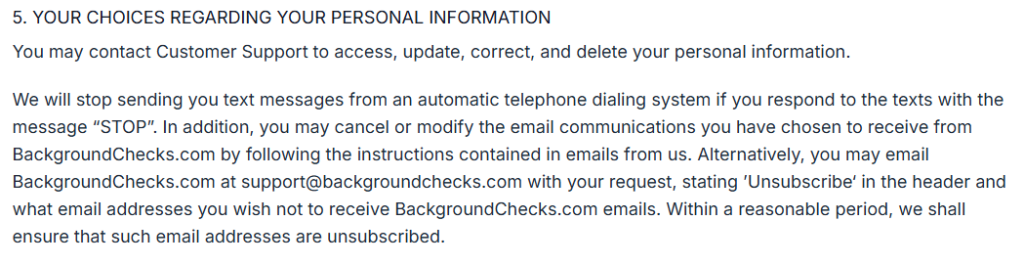
If you can’t use the web form, email [email protected] to opt out and remove your listing. Include only the identifiers needed to match you in their database (name plus email addresses or telephone number). Don’t attach ID documents unless requested; if you must, redact extra personal data. If your request involves a report under the FCRA (Fair Credit Reporting Act), ask for the correct disclosure route. For a CCPA request under the California Consumer Privacy Act, the legacy notice describes emailing [email protected] with your name, addresses, email addresses, and phone numbers.
Track confirmation & timeline
After submission, look for an on-page receipt or an email confirmation. Save it so you can prove your disclosure request and follow up if needed. Tip: Set a calendar reminder to re-check and re-submit an opt-out if your listing returns due to updates from service providers or other third-party sources.
Timelines, Verification & What to Expect (shortened)
Most requests show a confirmation on the page or arrive by email, then processing usually takes 7–14 days. Your verification may be a code/link, a ticket number, or a short reply message. Save that proof so you can reference it later. If you get no response after 14 days, use the site’s contact channel and resubmit once with the same identifiers. Keep your messages private and redact personal information in any screenshots. If your request relates to a consumer report under the Fair Credit Reporting Act (FCRA), keep the confirmation for your records.
Edge Cases & Troubleshooting
- No access to the original email/phone: use the Contact route and ask for a different way to confirm identity; an ID image may be needed.
- “Record not found”: try prior addresses or a different email tied to the screening flow; then submit again once.
- CAPTCHA or submit errors: refresh, turn off extensions, and try another browser or device.
- Code not arriving: wait 10 minutes, check spam/SMS filters, then resend once.
- Form blocked by region (EU/UK/CA): ask how GDPR and the General Data Protection Regulation process are handled for your area.
- Account deletion vs. listing removal: a login change may not remove screening files tied to a consumer report.
- Re-submit after failure: wait an hour, then send one clean request with the same identifiers.
- How to cancel: if you have an account, use account settings or contact support to end access; to stop sending you marketing, use unsubscribe steps in the privacy policy.
Will my data reappear?
Some entries can return because multiple systems and vendor feeds refresh records, and similar names can be matched again in a database. A service may also pull updated details from third-party websites, which can re-create a match even after a past request. This is a common issue across the data broker ecosystem, especially when partners update address or contact fields. To reduce repeat postings, set a 3–6 month reminder, keep confirmation emails, and resubmit quickly if you see the same entry again. If a result looks like a mix-up, include a short note in your follow-up and ask for a corrected record. For broader coverage, complete related removals next, so fewer sources can re-publish your personal information.
Related removals
- BeenVerified
- Intelius
- Whitepages
- Spokeo
- FastPeopleSearch
- PeopleFinders
Manual vs Assisted Removal
Manual:
- Pros: more control over what you share and what you keep; no subscription; you can repeat checks on your own schedule.
- Cons: time spent tracking confirmations and re-checking; more chances to miss a step or lose the proof.
Assisted:
- Pros: faster workflows, clear status tracking, and repeat checks; help managing hard cases, code confirmations, and follow-ups.
- Cons: you share data with a helper and rely on their process; coverage can vary across sites, and you may still need to answer emails.
“Excellent”
We remove your data for you - faster, verified, trackable.
Discover Which Sites Share Your Private Details—Instantly and Free.
2,865,794 have already used our service
FAQ
Receive expert privacy advice by email - 1-2 times per month, no fluff.
Share Article

Posted by Ava J. Mercer
Ava J. Mercer is a privacy writer at ClearNym focused on data privacy, data broker exposure, and practical privacy tips. Her opt-out guides are built on manual verification: Ava re-tests broker opt-out processes on live sites, confirms requirements and confirmation outcomes, and updates guidance when something changes. She writes with a simple goal - help readers take the next right step to reduce unwanted exposure and feel more in control of their personal data.
76 Articles

