Opt Out Guides

ArrestFacts Opt Out Guide
See what ArrestFacts knows about you
875,583 have already made this search
Privacy Writer
A. J. MercerAva J. Mercer
Updated
Read
5 min
See what ArrestFacts knows about you
875,583 have already made this search
Removing listings helps protect your privacy. Search results can show your name, address, and phone number, making personal information easily accessible to the public. ArrestFacts is a people directory that aggregates public materials and may display arrest information and related details drawn from public records and commercial sources. In this complete guide, you’ll get quick steps, screenshots, and official links to make a removal request, plus timelines and tips. Use this easy step-by-step guide to find your record from arrestfacts.com and learn how to remove yourself from data broker sites.
How to opt out of ArrestFacts
Go to the arrestfacts.com website, locate your listing, then use the link to make an opt-out request with your email or phone and check via a confirmation link. Processing usually takes 1–3 days, depending on volume. Save any information for future reference.
Checklist:
- Open the official form
- Enter identifiers (email/phone)
- Complete CAPTCHA/verification
- Confirm via code/link
- Save the email
- Set a reminder to re-opt out
Find out if your private details were exposed

875,583 have already used our service
ArrestFacts – Quick Facts
| Parameter | Value |
| Domain | arrestfacts.com/rain-street.org |
| Data Types | contacts, addresses, possible court references, arrest reports, identifiers |
| Opt-out Methods | web form via “Information Control”; contact form fallback |
| Identity Verification | code via email/SMS or email |
| Typical Response Time | 1–3 days |
| Re-listing Risk | medium (check periodically) |
About ArrestFacts
The platform is a data broker website that aggregates and displays public records and related consumer data. Information generally comes from public sources and commercial sources. Users can locate a profile and use the site’s Information Removal flow.
Common information you may find:
- Names and known aliases
- Phone numbers
- Email addresses
- Current and past addresses
- Age range or year of birth (if available)
- Relatives or household links
- Court references (if available)
- Property or real estate mentions (if available)
- Mugshot or arrest record references (where present)
- Social profile links (if available)
Step-by-Step Guide
Open the official opt-out form
On your listing page, look for the link near the profile area. If you only have a URL, open it directly; otherwise, search by name plus city and state to find your criminal record. Use a private browser window for privacy. Do not upload documents unless asked. If needed, use the site’s Contact page as a fallback.
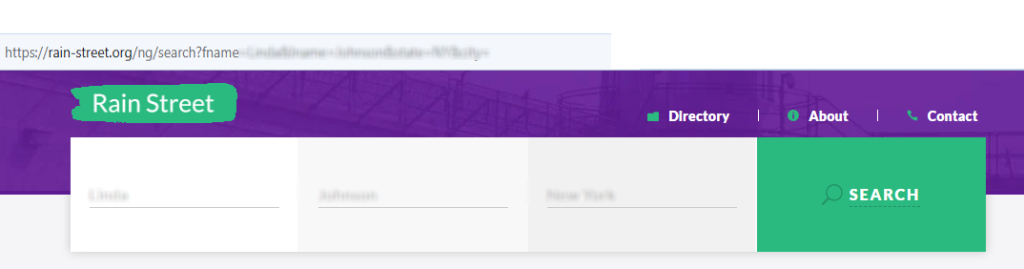
Submit your identifiers (email/phone + CAPTCHA)
Enter the email or phone where you can receive a code, then fill out the form. Some pages ask you to complete a CAPTCHA for anti-abuse. Double-check the URL in the notes field. Keep screenshots. Blur any personal details before sharing.
Verify via code or link (email/SMS)
Watch your inbox or device for a code or a link. If it doesn’t arrive, check Spam and Promotions. Resend once if needed, then wait a bit; mail filters can delay messages. Use the exact email you entered on the form so staff can check and connect your request.
Confirm deletion / Do-Not-Sell request
Complete the flow on the page after you click the link. If there’s a choice between deletion, suppression, or “Do Not Sell or Share,” choose the option best aligned with your goal. Keep any message you receive. Avoid multiple duplicate submissions on the same day.
Track confirmation & timeline
Keep the email and note the date. Typical time to remove your personal information is 1–3 days. If the information remains after several days, reply to the message or use the site’s Contact form with the listing URL. Set a calendar reminder to recheck in 3–6 months in case of re-listing.
Timelines, Verification & What to Expect
Most requests are completed within 1–3 days. You usually receive an email and may also see an on-page notice when the form is accepted. If nothing arrives, check Spam, then resend the query once using the same email you used initially. After 3–5 days with no update, contact the site through its Contact page and include the profile URL and the email used for verification. Avoid sending multiple daily forms; a single, complete submission helps staff locate your case. Keep your messages in a folder so you can reference them if the listing reappears later.
Edge Cases & Troubleshooting
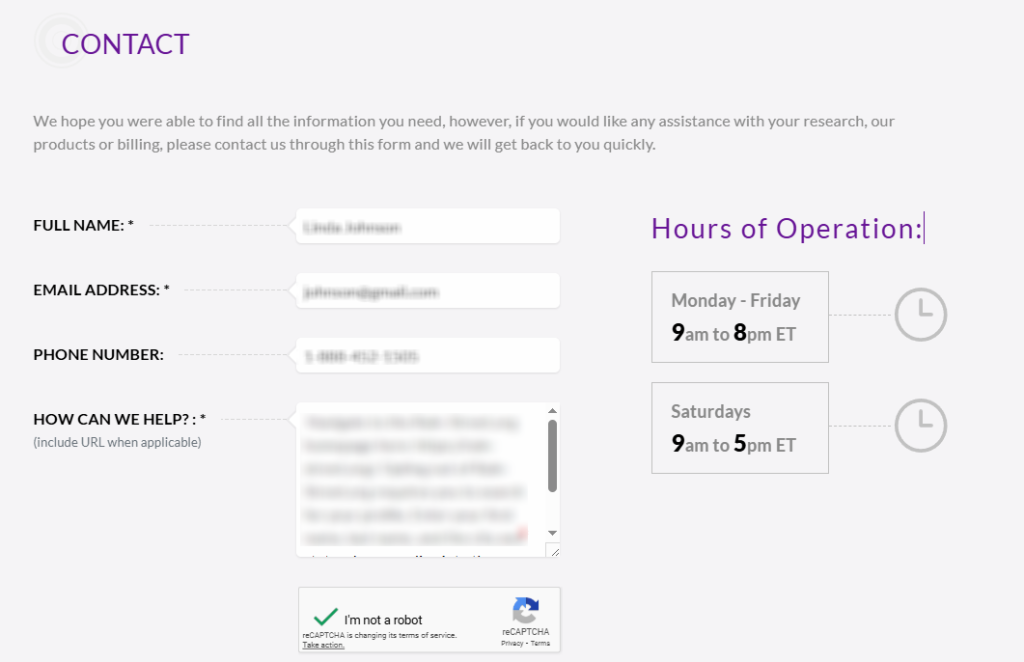
- No access to the original email/phone: use the Contact form and include the listing URL plus a new email.
- “Record not found”: refine search with city/state; try known aliases.
- CAPTCHA or submission errors: reload the page, switch browsers, or retry later.
- Verification code not arriving: check Spam, wait 10–15 minutes, then resend once.
- Form rejects by region (EU/UK/CA): use the generic Contact page and cite regional rights.
- Account deletion vs. public listing removal: removing an account is different from suppressing a record; choose the listing flow.
- Resubmitting after failure: wait a short period, then submit again with the exact listing URL.
Will my data reappear?
Re-listing can happen when aggregators, partner feeds, or resellers refresh a database or when public sources update. This does not mean the prior removal failed; it reflects how information moves across people search sites. To reduce recurrence, keep emails, set a reminder every 3–6 months, and resubmit quickly if the listing returns. You can also monitor related mugshot websites and similar services that syndicate public arrest records. Avoid absolute expectations; periodic review is a practical way to protect your privacy over time.
Manual vs Assisted Removal
Manual:
Pros
- full control over each request;
- no cost; l
- earn the steps to remove your arrest record and how sites show records;
- good for single profiles.
Cons
- time investment;
- repeat monitoring;
- periodic resubmissions if listings reappear.
Assisted:
Pros
- faster execution;
- verification routed for you;
- tracking dashboard;
- recurring checks to catch re-listing.
Cons
- paid service;
- vendor access to some personal information
We remove your data for you - faster, verified, trackable.
Discover Which Sites Share Your Private Details—Instantly and Free.
875,583 have already used our service
FAQ
You should receive an email with a link or code. Processing often completes within 1–3 days. Keep the message for future reference and re-check the listing later.
Filter by city and state, then open likely matches to compare addresses or age range. When you find your information, copy the URL for the form so staff can match your submission.
Aggregators refresh feeds, and public sources update. Re-listing is possible across people search sites. Resubmit and set a reminder for periodic checks.
No. Use the listing’s link and check by email or phone. Some users prefer Contact as a fallback, but the on-page flow is standard.
Check Spam/Promotions, wait briefly, then resend once. If still missing, use the Contact page and include the listing URL, the email used, and the date you submitted.
It’s a people directory that collects and shows public records and commercially available data. Profiles may reference court records or arrest record mentions.
Typically, 1–3 days, depending on volume and verification. Save your email and check back later to ensure the information is suppressed.
Use Information control on the profile to remove your information from arrestfacts.com, then check the information. If needed, provide details through Contact, including the exact URL.
Verification (code or link) prevents unauthorized changes. It helps match the query to the correct profile. Use the same email you entered on the form so support can check it and provide a free consultation.
Use the Contact page form. Include your listing URL, email used for the submission, and a short description. Hours of operation are listed on the page.
If the listing is still live after several days, or if it reappears later due to data refreshes, resubmit once with your prior email and the listing URL.
Anyone whose information appears in a listing can ask for suppression. If you’re helping someone else, use their reachable email or the Contact page and explain your role.

Posted by Ava J. Mercer
Ava J. Mercer is a privacy writer at ClearNym focused on data privacy, data broker exposure, and practical privacy tips. Her opt-out guides are built on manual verification: Ava re-tests broker opt-out processes on live sites, confirms requirements and confirmation outcomes, and updates guidance when something changes. She writes with a simple goal - help readers take the next right step to reduce unwanted exposure and feel more in control of their personal data.
View AuthorMore Background & Criminal Removal Guides
- AdvancedBackgroundChecks Opt Out Guide
- Affordable Background Checks Opt Out Guide
- ArrestFacts Opt Out Guide
- Background Check Gateway Opt Out Guide
- BackgroundCheckers Opt Out Guide
- BackgroundChecks.com Opt Out Guide
- CyberBackgroundChecks Opt Out Guide
- EasyBackgroundChecks Opt Out Guide
- GovernmentRegistry Opt Out Guide
- GovWarrantSearch Opt Out Guide
- InfoTracer Opt Out Guide
- JailBase Opt Out Guide
- LocatePeople Opt Out Guide
- MugshotLook Opt Out Guide
- Mugshots Opt Out Guide
- National Public Data Opt Out Guide
- Public Information Services Opt Out Guide
- Public Information Services Opt Out Guide
- Search Public Records Opt Out Guide
- SearchQuarry Opt Out Guide
- SmartBackgroundChecks Opt Out Guide
- SpyFly Opt Out Guide
- TruthRecord Opt Out Guide