
Opt Out Guides
Aristotle Opt Out Guide
Privacy Writer
A. J. MercerAva J. Mercer
Updated
Read
5 min

Removing data from Aristotle helps reduce the exposure of personal information. This concerns your name, address, and phone number. The site supports campaign and public affairs tools and may display contact details drawn from public records and commercial sources; information collected can include personal data summarized on official pages.
How to opt out of Aristotle
Go to the official Do-Not-Sell/Share page, submit your email or phone, then confirm via a code or link. Processing usually completes in 3–10 days, depending on identity checks and volume. Keep the confirmation for your records, and note any options that limit “personal data,” sell or share, or delete your personal details.
Checklist:
- Open the official opt-out form
- Enter identifiers (email/phone)
- Complete CAPTCHA/code check
- Confirm via code/link
- Save the confirmation email
- Set a reminder to re-opt-out
Find out if your private details were exposed

2,865,794 have already used our service
Aristotle – Quick Facts
| Parameter | Value |
| Domain | aristotle.com |
| Data Types | contacts, addresses, possible social identifiers, property/public records |
| Identity Verification | code via email/SMS or confirmation email |
| Opt-out Methods | web form/email/mail (as available) |
| Typical Response Time | 3–10 days |
| Re-listing Risk | medium |
About Aristotle
Aristotle provides political data, software, and identity tools for campaigns and advocacy. It aggregates and displays consumer data from public records and commercial sources; information described on policy pages covers how they may share information with third parties and third-party vendors for services on our behalf. Practices may reference analytics, data analytics, and data analytics providers, all as described in this privacy policy.
Common data you may find:
- Names (and known aliases)
- Phone numbers
- Email addresses
- Current and past addresses
- Age range or year of birth (if available)
- Relatives or household links
- Property records (where available)
- Court or lien filings (if available)
- Professional licenses or social profile links (if available)
- Basic voter or district info (where permitted)
Step-by-Step Guide
Open the official opt-out form
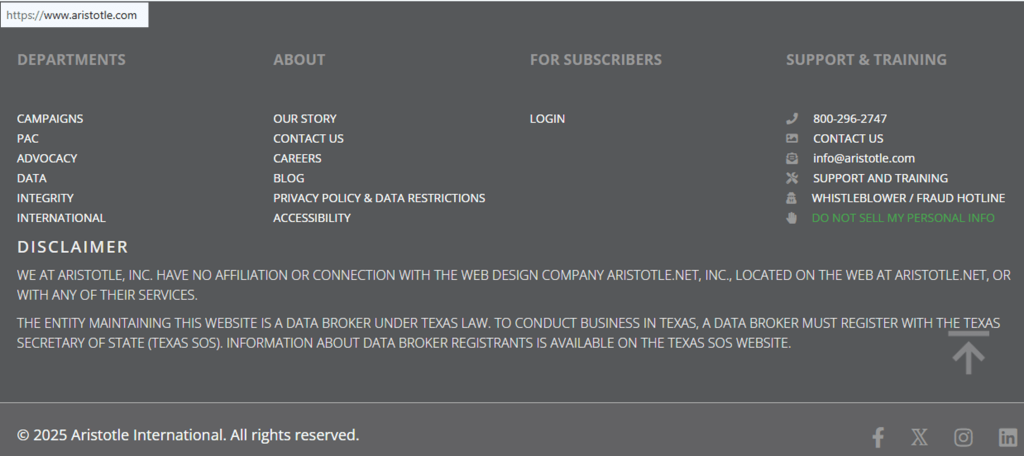
Visit the Do-Not-Sell/Share or privacy request page linked from the site footer. Look for the option labeled “Do Not Sell My Personal Information.” Tip: Do not disclose personal details in screenshots; blur anything sensitive, including racial or ethnic origin. Note that transmission over the Internet can expose data points beyond your control; keep copies only to the extent technically feasible.
Submit your identifiers (email/phone + CAPTCHA)
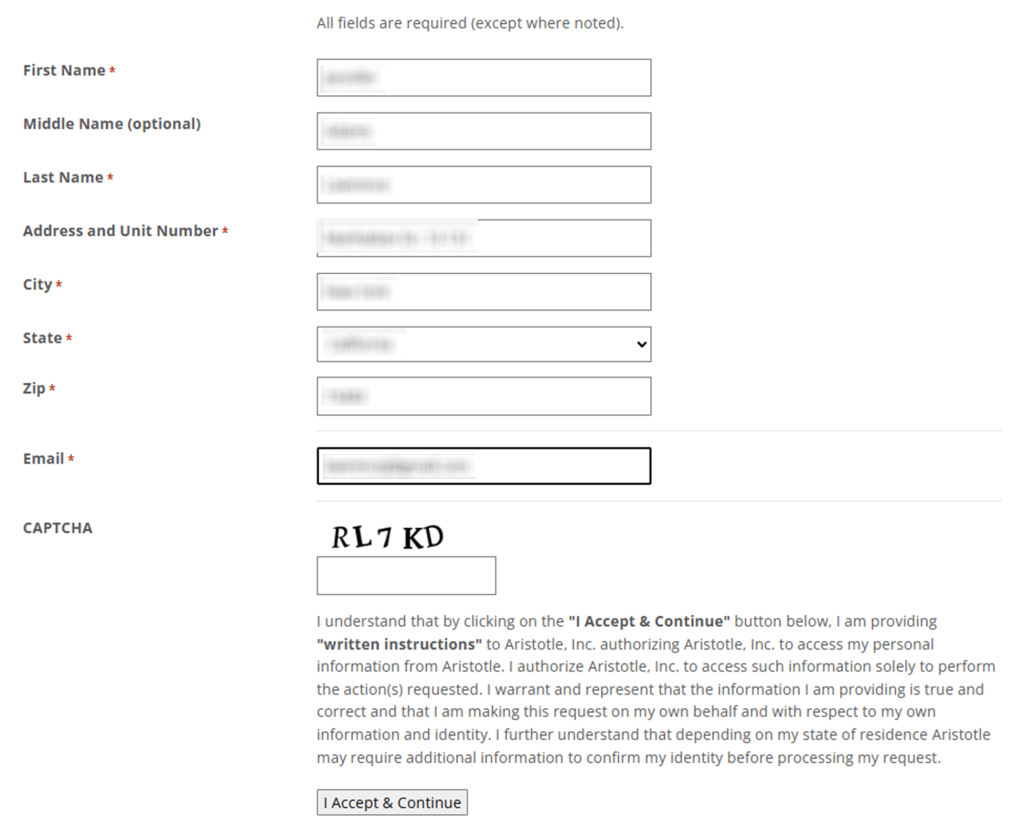
On the form, enter only the information you provide that’s necessary to match your record: name, email, phone, and current address. Complete the CAPTCHA. If choices include access, delete, limit, or “do not sell,” pick what you need. Using a private window helps ensure you don’t share your personal details accidentally. Where the form mentions how the site collects your personal information, follow the prompts. Tip: Save a local copy and note the request ID.
Verify via code or link (email/SMS)
Check your inbox or SMS for a message. Click the link or enter the code to validate the request, then watch for a follow-up acknowledging receipt; you might receive personal confirmations or status updates. If nothing arrives, check Spam/Promotions and try a resend. Avoid forwarding unredacted screenshots containing sensitive personal details, and don’t share your personal identifiers with unknown third parties. If you spot inaccurate personal data later, plan to file a correction, based on the terms and conditions of service.
Confirm deletion / Do-Not-Sell request
After validation, a confirmation screen may appear. Select the actions you want: delete your personal details, access data, or limit/sell personal preferences such as “do not sell.” Some pages also mention processing your personal data under regional rules. You can also note any options related to transferring information to third parties or disclosure controls. Tip: Keep the request ID, date, and screenshots for follow-up, and avoid sharing them with unauthorized contacts.
Track confirmation & timeline
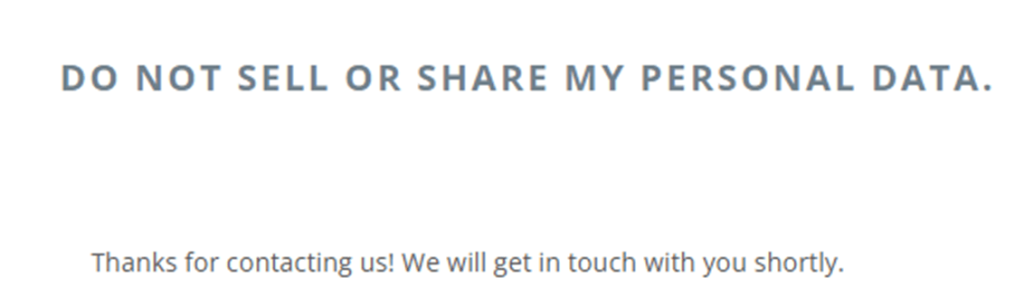
Most requests finish in 3–10 days. You’ll usually get an email update regarding your personal information; the information includes the request number and date. If there’s no update after 10 days, please contact Aristotle using the link on the privacy page and resubmit once. Some responses cite applicable privacy frameworks and add to the purposes for which data is handled. Note that data stored may be retained as needed, and outcomes can vary by region and applicable law.
Timelines, Identity Checks & What to Expect
Most requests are completed in 3–10 days, with confirmations shown on-page and by email. If you still see your listing after that window, resubmit once and follow up. Options can include “Limit the Use of My Sensitive Personal Information,” a right to correct records that appear inaccurate, and a right to withdraw consent where offered. Policies often note they do not knowingly collect personal data from minors. If anything seems unclear, refer to the customer information described on the official pages. Keep in mind that practices about disclosure to third parties, data protection, and the use of personal information may differ by region and applicable law.
Edge Cases & Troubleshooting
- No access to the original email/phone: Use the alternate channel listed on the form; include proof of identity if asked.
- “Record not found”: Try former names or old addresses; submit one request per identity.
- CAPTCHA or submission errors: Refresh or switch browsers; a private window often helps.
- Code message not arriving: Check Spam; resend once; try SMS if available; avoid third-party blockers.
- Region limits (EU/UK/CA): Use regional pages; some rights vary by privacy laws.
- Account deletion vs. public listing removal: Deleting an account doesn’t remove broker records; file a separate request under sell or share limits.
- Re-submitting after failure: Wait 24 hours, then retry; keep confirmations for future reference and information to third parties.
Will my data reappear?
Re-listing can occur when aggregators refresh from public records, partner feeds, or resellers, or when third parties republish profiles.
To reduce recurrence, set a 3–6 month reminder, keep confirmations, and re-submit quickly if needed. Avoid posting screenshots that use personal identifiers publicly. If policies mention how they use your personal details or disclose personal data, review those sections before filing again.
Remember that outcomes can depend on data protection rules and laws, and some retention is permitted where data stored is necessary.
Manual vs Assisted Removal
Manual:
- Pros: Free, full control over each request, learn the process, and decide what to use the information for.
- Cons: Time-consuming, requires repeat monitoring, tracking multiple case IDs.
Assisted:
- Pros: Faster submission, identity checks handled, tracking dashboard, recurring checks, and reminders.
- Cons: Paid service, less granular control per request.
“Excellent”
We remove your data for you - faster, verified, trackable.
Discover Which Sites Share Your Private Details—Instantly and Free.
2,865,794 have already used our service
FAQ
Receive expert privacy advice by email - 1-2 times per month, no fluff.
Share Article

Posted by Ava J. Mercer
Ava J. Mercer is a privacy writer at ClearNym focused on data privacy, data broker exposure, and practical privacy tips. Her opt-out guides are built on manual verification: Ava re-tests broker opt-out processes on live sites, confirms requirements and confirmation outcomes, and updates guidance when something changes. She writes with a simple goal - help readers take the next right step to reduce unwanted exposure and feel more in control of their personal data.
76 Articles

