
Opt Out Guides
AllAreaCodes Opt Out Guide
Privacy Writer
A. J. MercerAva J. Mercer
Updated
Read
5 min
AllAreaCodes in 2025 can show your name, city, and phone number together, effectively displaying personal details to anyone who runs a lookup. The platform is a data broker that provides access to reverse phone number searches and area code information built from public records and commercial sources. When data appears this way, it can affect your online privacy. This step-by-step guide explains how to protect your personal information quickly and calmly. You’ll get clear instructions, screenshots, and an overview of the opt-out process so you know what to expect.
How to opt out of AllAreaCodes
Go to the official AllAreaCodes site and open the “Remove Name” page, which functions as the main opt-out form. Then enter your phone once, choose how to receive a verification code, and submit a single opt-out request. If a listing exists, information should be removed within several business days, depending on caching and partner feeds.
Checklist:
- Open the official form
- Enter your phone
- Complete verification
- Confirm via code or link
- Save the confirmation email
- Set a reminder to re-opt-out later
Find out if your private details were exposed

2,865,794 have already used our service
AllAreaCodes – Quick Facts
| Parameter | Value |
| Domain | allareacodes.com |
| Data Types | Phone lookups, contacts, addresses, and other contact details |
| Opt-out Methods | Online form and privacy email |
| Identity Verification | One-time code via SMS, call, or email |
| Typical Response Time | A few business days; information will be removed after processing |
| Re-listing Risk | Medium |
About AllAreaCodes
AllAreaCodes is a data broker ensuring access to North American number and area lookups, showing which cities and regions match a prefix. The website allows quick checks on basic contact details and location hints based on public sources. Since AllAreaCodes provides phone tools that many people use, it often appears on lists of data brokers to remove when you clean up your search results. In practice, it combines data into small, easy-to-scan records.
Common data you may find:
- Name and basic contact record associated with the phone
- City, state, and ZIP plus area code information
- Approximate region associated with the phone number on a simple map
- Basic notes about the phone carrier or line type
- Limited relationship clues built from personal data
- A profile from dozens of data sources pointing to one listing
- Pointers that may later feed into information from public sites
Step-by-Step Guide
Open the privacy page
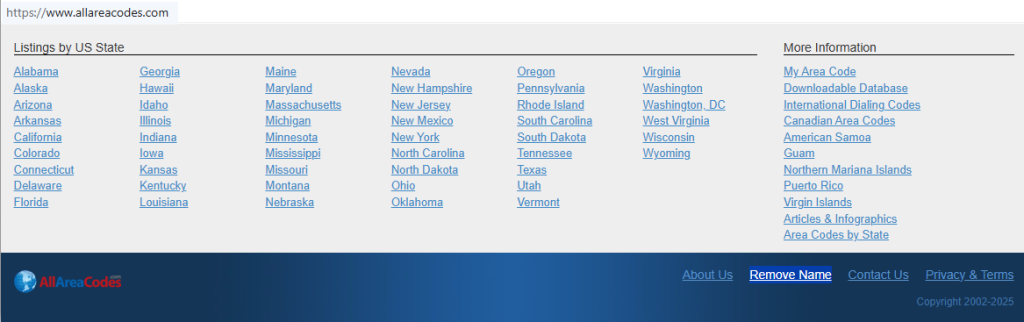
First, go to the AllAreaCodes site and scroll to the footer. Click the “Remove Name” or similar privacy link to reach the page that functions as the official opt-out form for this directory. Check the URL so you know you are on the correct domain. Take note of the fields and buttons you see, since these steps outlined will be the same if you return later.
Enter your phone number
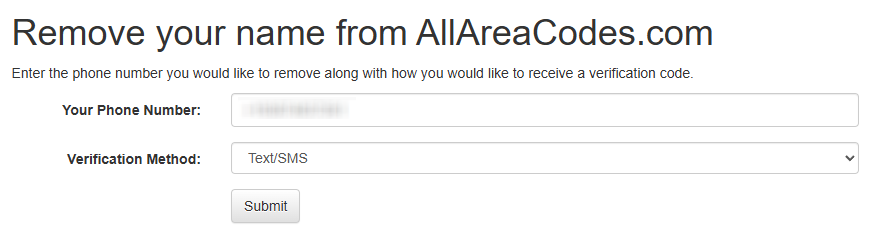
On the form, you will usually see spaces for your phone and verification details. Carefully enter your phone number and double-check it. Choose where to receive the code, such as by text or call. Complete verification on the page. Consider using a disposable email address that still works.
Verify via code or link (email/SMS)
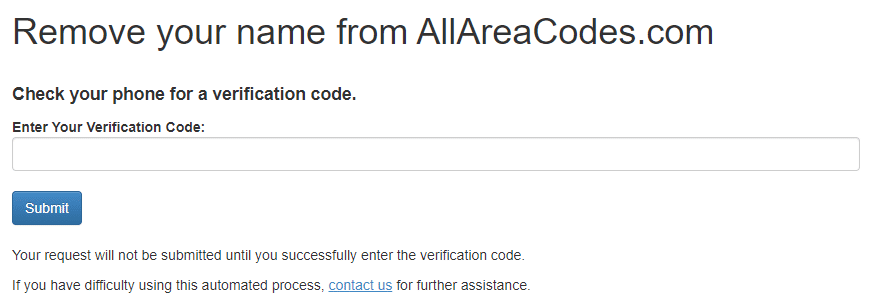
Next, watch your phone or email for a verification code. Enter the code exactly as shown into the confirmation box. If you do not see the message, check Spam or Junk folders. Alternatively, request another message after a short wait. Avoid repeated attempts. Once the code is accepted, the site ties your request to the correct listing so the change can move forward. Keep a copy of the message in case you need to show it later that you finished this part.
Confirm deletion / Do-Not-Sell request
When verification is complete, review the confirmation screen. If you see options labeled “Delete,” “Do Not Sell,” or similar language, choose the one that best fits your goal to opt out of the data listing and sell your personal information less widely. Submit the final confirmation. Take a screenshot of this page. Blur any displayed personal information before saving it. Write down the date.

Track confirmation & timeline
Over the next few days, monitor the inbox tied to your valid email address. Some sites send a brief message that your request was received and that information should be removed within a certain window. You can also search for your record again after about a week to confirm that the listing is gone. If it still appears, repeat the form once more, attaching any notes that information has been removed before and resurfaced.
Timelines, Verification & What to Expect
Most requests are processed within several business days. It is common to see on-page confirmation as soon as you finish the form, followed by a short message to the email you used. Exact timing varies because some records sit in caches or partner feeds before they update. A practical expectation is that your data will change within about a week. If you do not hear back after 7–10 days, search the site again. Stay calm and limit the amount of extra personal information you share; repeat only what the form requires.
Edge Cases & Troubleshooting
- No access to the original email/phone: Describe the record and explain that you no longer control the number.
- “Record not found”: Try slight variations of the name or number; if nothing matches, the listing may already be gone.
- Captcha or submission errors: Switch browsers, clear cache, or try a different device; waiting and retrying later often helps.
- Verification code not arriving: Confirm coverage and filters, request it once more, then contact support if delivery still fails.
- Region limits (EU/UK/CA): Note if you are a resident of California or live under another privacy law, and politely request help.
- Account deletion vs listing removal confusion: Deleting an account elsewhere does not automatically change data here; the site-specific steps are still needed.
- Re-submitting after a failed attempt: Wait a short time, repeat the form carefully, and keep screenshots of the steps outlined to show support if required.
Will my data reappear?
Even after a successful opt-out, partner feeds and data brokers like other phone directories can add information back. A single profile from dozens of data sources can repopulate a listing if new records arrive. Often, there are three ways to remove ongoing exposures: repeat the form yourself, use automated service plans from a trusted company, or tighten how your details show up in other places online. Over time, dozens of data brokers can copy similar records, so you may see ways to remove your personal traces on more than one site. Set a reminder every 3–6 months to search for your listing and remove your personal data or remove your info again if needed, helping protect your personal information long term.
Related removals
- 411.com
- Whitepages
- Spokeo
- Intelius
- BeenVerified
- PeopleFinder
Manual vs Assisted Removal
Manual:
- Pros: Full control over what you send and to whom; no subscription; you only use built-in privacy tools; you can prioritize specific data brokers to remove first.
- Cons: Time-consuming when many sites are covered by different forms; easy to miss new listings or reappearances; requires ongoing checks on your own schedule.
Assisted:
- Pros: A single dashboard that shows progress across many sites; tracking opt-outs and renewals; options for custom removals on hard-to-fix profiles.
- Cons: Paid plans starting at different price points; not every site participates, so some tasks remain manual; you must share enough data for help to be effective.
“Excellent”
We remove your data for you - faster, verified, trackable.
Discover Which Sites Share Your Private Details—Instantly and Free.
2,865,794 have already used our service
FAQ
Receive expert privacy advice by email - 1-2 times per month, no fluff.
Share Article

Posted by Ava J. Mercer
Ava J. Mercer is a privacy writer at ClearNym focused on data privacy, data broker exposure, and practical privacy tips. Her opt-out guides are built on manual verification: Ava re-tests broker opt-out processes on live sites, confirms requirements and confirmation outcomes, and updates guidance when something changes. She writes with a simple goal - help readers take the next right step to reduce unwanted exposure and feel more in control of their personal data.
76 Articles

