
Opt Out Guides
Adstra Opt Out Guide
Privacy Writer
A. J. MercerAva J. Mercer
Updated
Read
5 min

Removing your data helps protect your privacy by reducing the exposure of your name, place of residence, and phone number. Adstra aggregates consumer records from public and commercial sources to support advertising uses. In this guide, you’ll get a step-by-step overview with quick actions, screenshots, official links, timelines, and tips to complete an opt-out successfully. We also include troubleshooting and a reminder so you can exercise control later if listings return. For details, please visit our privacy policy.
How to opt out of Adstra
Go to the official privacy/opt-out page on the website, enter your identifiers, pass the CAPTCHA, and confirm via a single message or link. Processing usually takes 7–14 days. If needed, use the portal for an authorized agent to send a query.
Checklist:
- Open the official opt-out form
- Enter identifiers
- Complete verification
- Confirm via code/link
- Save the confirmation email
- Set a reminder to re-opt-out
Find out if your private details were exposed

2,865,794 have already used our service
Adstra – Quick Facts
| Parameter | Value |
| Domain | adstradata.com |
| Data Types | contacts, addresses, emails, and possible social identifiers |
| Opt-out Methods | web form/email |
| Identity Verification | via email/SMS or confirmation letter |
| Typical Response Time | 7–14 days |
| Re-listing Risk | medium |
This provider is a technology platform that helps marketers and brands connect audiences by aggregating consumer information for digital advertising, measurement, reporting, and data management across the Internet and network channels, using public records and commercial sources in the advertising industry.
Common data you may find:
- Names (and known aliases)
- Phone numbers
- Emails
- Current and past addresses
- Age range or year of birth (if available)
- Relatives/household links
- Property references
- Professional licenses or social profile links (if available)
- Marketing segments for ad targeting
- Basic interaction metadata
Step-by-Step Guide
Open the official opt-out form
Go to the company’s “Do Not Sell My Personal Information” page. Launch a desktop browser to avoid technical hiccups and do not over-share. The website is designed to operate across standard user software. Tip: Keep screenshots redacted.

Submit your identifiers (email/phone + CAPTCHA)
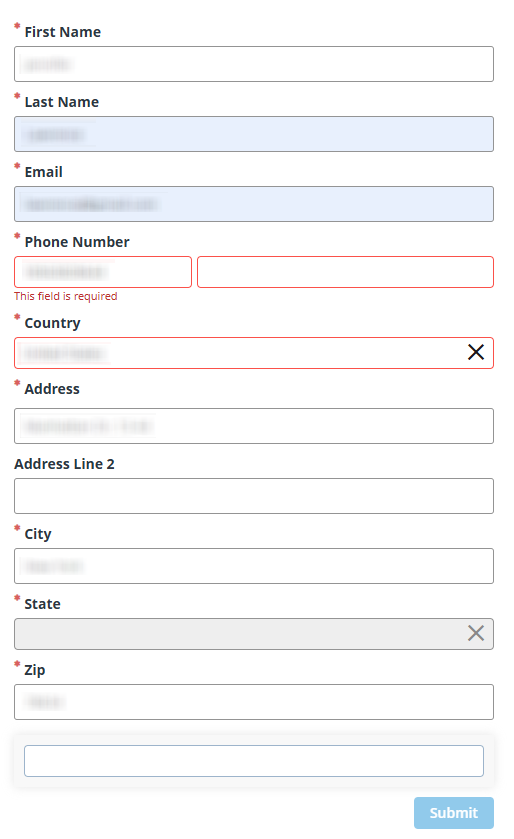
Enter your email address, phone number, and place of residence, complete the verification, and click on the “Submit” button. Provide only what’s requested; avoid extra personal information. Tip: A dedicated inbox on your device can help track confirmations.
Verify via code or link (email/SMS)
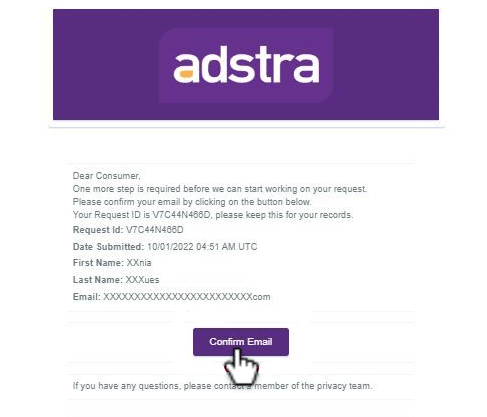
Check your inbox or mobile for a verification message or link and use it promptly to enable processing. If nothing appears, check Spam/Promotions, then ask for a new message. Tip: Keep the electronic confirmation for your records.
Confirm deletion / Do-Not-Sell request
Choose deletion and/or Do Not Sell/Share, then confirm. This helps exclude behavioral targeting and related advertisement uses when you browse. Tip: Note any case number; your agency or client team can reference it if they participate in follow-ups with the advertiser.
Track confirmation & timeline
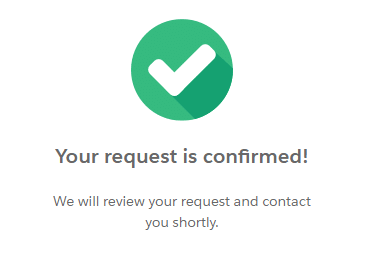
Users should receive an on-page receipt and an email. Most cases finish in 7–14 days. Keep confirmations, then set a 3–6 month reminder. If no update after two weeks, resubmit once with the same identity details so support can identify your profile quickly and resolve the issue.
Timelines, Verification & What to Expect
Expect 7–14 days for completion. Confirmation typically appears on-page immediately and via email shortly after. If you used SMS, watch for a follow-up message. If nothing arrives within 48 hours, request a fresh verification, then wait for the stated window. After 14 days with no change, resubmit once and include your previous reference number. Keep copies to show that you acted promptly and successfully, and avoid duplicate forms in short intervals.
Edge Cases & Troubleshooting
- No access to the original email/phone: use an authorized agent and attach documentation.
- “Record not found”: try alternate identifiers; ensure the place of residence is exact.
- CAPTCHA or submission errors: switch the tab or device; clear cache; retry later.
- Verification not arriving: check Spam, wait briefly, then ask for one new signal.
- Region-limited form (EU/UK/CA): follow the region option provided on the portal.
- Account deletion vs listing: deletion and Do-Not-Sell affect stored data; account settings alone don’t cancel listings.
- Re-submitting: wait 24–48 hours, then submit once with consistent details.
Will my data reappear?
Re-listing can occur as partners automatically refresh feeds, and sources may collect again. Reduce recurrence by keeping confirmations, setting a reminder every 3–6 months, and resubmitting quickly if you see a new entry. Industry tools help personalize less and target less across online advertising. Steady monitoring, clear choices, and consistent follow-ups work best globally.
Related removals
- Data Axle
- Epsilon
- Experian Marketing Services
- Acxiom
- LiveRamp
- Ziff Davis segments
- Neustar
Manual vs Assisted Removal
Manual:
- Pros: hands-on control, exact timing, clear understanding of each instruction.
- Cons: time investment, ongoing checks, separate submissions per site.
Assisted:
- Pros: faster processing, tracked verifications, dashboard, recurring audits across digital advertising partners.
- Cons: subscription cost, less granular control, dependence on a third-party agency.
“Excellent”
We remove your data for you - faster, verified, trackable.
Discover Which Sites Share Your Private Details—Instantly and Free.
2,865,794 have already used our service
FAQ
Receive expert privacy advice by email - 1-2 times per month, no fluff.
Share Article

Posted by Ava J. Mercer
Ava J. Mercer is a privacy writer at ClearNym focused on data privacy, data broker exposure, and practical privacy tips. Her opt-out guides are built on manual verification: Ava re-tests broker opt-out processes on live sites, confirms requirements and confirmation outcomes, and updates guidance when something changes. She writes with a simple goal - help readers take the next right step to reduce unwanted exposure and feel more in control of their personal data.
76 Articles

