
Opt Out Guides
33Across Opt Out Guide
Privacy Writer
A. J. MercerAva J. Mercer
Updated
Read
5 min

Removing your information from 33Across can help reduce exposure of personal details that may appear when people interact across a site network. The company operates as a publisher and technology platform supporting monetization and advertising connections. It may collect data from partner sources to support delivery and measurement under documented privacy choices. This guide explains how to remove identifiers through a clear opt-out process. You’ll learn where to go, what to click, how to confirm, and how to track status. We also show how to check future collection, note timelines, and keep verification messages. A practical solution for maintaining your online presence is included at the end. This guide contains plain content, organized for clarity.
How to opt out of 33Across
Go to the official opt-out page from the company’s privacy center. Enter your email, complete verification, and confirm. The service usually completes removal within a few days. Keep the confirmation message and re-check occasionally.
Checklist:
- Open the official opt-out form
- Enter identifiers
- Complete verification
- Click confirm
- Save confirmation email
- Set a reminder to repeat later
Find out if your private details were exposed

2,865,794 have already used our service
33Across – Quick Facts
| Parameter | Value |
| Domain | 33across.com |
| Data Types | contact details, addresses, identifiers |
| Opt-out Methods | online form |
| Identity Verification | email link or code |
| Typical Response Time | 3–7 days |
| Re-listing Risk | medium |
About 33Across
33Across is a provider that helps publisher partners and brands coordinate data signals across the web. The company works with partner site ecosystems and third-party sources. The service supports measurement and relevance options and allows individuals to request adjustments through opt-out forms.
Common data you may find:
- Name
- Phone
- Address history
- Region or location clues
- Relative or household links
- Device identifiers
- Interaction events
Step-by-Step Guide
Open the official opt-out form
Go to the company’s privacy center and locate the corresponding page. Look for a button labeled “Opt Out”. Click to open the page. Check that the URL belongs to the company to ensure you are on the correct site. This form helps you remove identifiers linked to ad matching. If you plan to use a screenshot, hide personal info before saving.

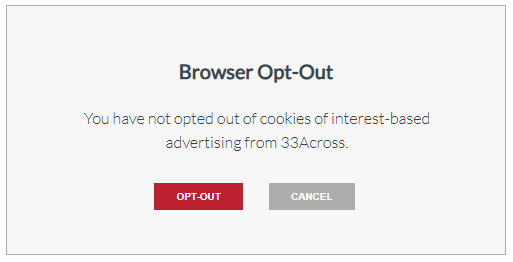
Choose the request option (browser opt-out/email opt-out)
The page may offer two paths: a cookie preference for your browser and a form submission for broader coverage. Choose the form option to help remove identifiers across contexts. You may need to use your email and basic details.

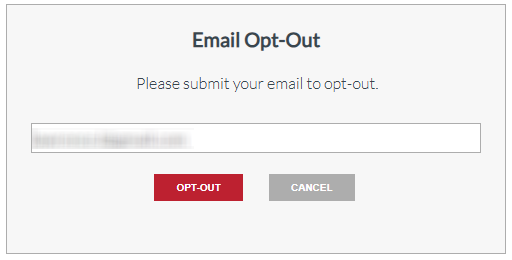
Verify via code or link (email/SMS)
Check your inbox for a message. Confirm by clicking the link or entering the code. If the message does not appear, wait a few minutes and retry.
Confirm deletion / Do-Not-Sell request
After verification, the company may show a confirmation screen. Save or screenshot it. This step completes the procedure.
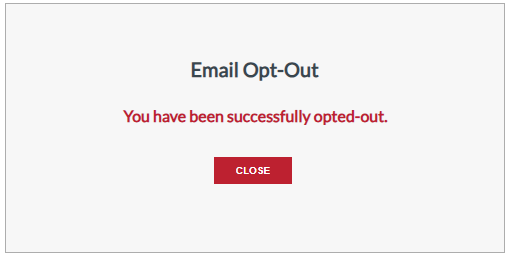
Track confirmation & timeline
Processing typically completes in several days. If nothing appears, resubmit once. Keep confirmations organized to control future checks.
Timelines, Verification & What to Expect
Most submissions finish in 3–7 days. You’ll first see an on-page confirmation, followed by a final email. Keep all messages because they may help later if you remove or reset settings. If you use multiple gadgets, repeat checks to ensure coverage. If no final confirmation arrives after a week, send one follow-up through the same form. No fees apply. Store confirmations in one folder to simplify future reviews.
Edge Cases & Troubleshooting
- No email access: submit with a current email and verify that one.
- “Record not found”: continue; suppression still applies to future matching.
- Verification code missing: check spam, retry once.
- Region limitation: follow region-specific links on the company page.
- Confusion with account vs. data: follow the opt-out steps for identifiers.
- Need to cancel the process: simply do not confirm the verification link.
Will my data reappear?
Because sources refresh, some identifiers may return. To reduce recurrence, keep confirmations and repeat the process every few months. Set a reminder and resubmit if needed. This helps ensure removal steps stay active over time.
Related removals
- LiveRamp
- Quantcast
- Neustar
- Lotame
- Criteo
- Taboola
- Outbrain.
Manual vs Assisted Removal
Manual:
- Pros: Direct control, no cost, flexible.
- Cons: Time required, repeat monitoring.
Assisted:
- Pros: Streamlined steps, tracking, a centralized follow-up.
- Cons: Service fees.
“Excellent”
We remove your data for you - faster, verified, trackable.
Discover Which Sites Share Your Private Details—Instantly and Free.
2,865,794 have already used our service
FAQ
Receive expert privacy advice by email - 1-2 times per month, no fluff.
Share Article

Posted by Ava J. Mercer
Ava J. Mercer is a privacy writer at ClearNym focused on data privacy, data broker exposure, and practical privacy tips. Her opt-out guides are built on manual verification: Ava re-tests broker opt-out processes on live sites, confirms requirements and confirmation outcomes, and updates guidance when something changes. She writes with a simple goal - help readers take the next right step to reduce unwanted exposure and feel more in control of their personal data.
76 Articles

